Need help?
Do you have a question about the Sony PXW-X180 and is the answer not in the manual?
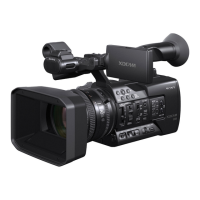
Details the physical components and their functions on the camcorder body.
Explains the indications displayed on the camcorder screen.
Lists compatible battery packs, chargers, and AC adaptors for powering the camcorder.
Details the initial setting display and how to set the date/time and time zone.
Instructions for attaching the lens hood with its cover.
Instructions for using the wireless remote commander and replacing its battery.
Details the camcorder's use of SxS memory cards for recording.
Details on using "Memory Stick" and SD cards via adaptors.
How to use an SD card to store camera settings.
Step-by-step guide for basic recording operations.
How to change basic settings based on usage and conditions.
How to assign various functions to the camcorder's assignable buttons.
Details on setting recording and playback frame rates for S&Q motion.
How to record proxy data on an SD card simultaneously with SxS recording.
How to connect the camcorder to other devices via wireless LAN using the IFU-WLM3.
How to connect the camcorder to a device in access point mode.
How to connect by manually entering SSID and password.
How to connect the camcorder to an existing wireless LAN access point.
How to connect the camcorder to the Internet via wireless LAN.
How to upload proxy or original files to a server via the Internet.
How to use a smartphone, tablet, or computer as a remote commander.
How to access and use the camcorder's web menu via a browser.
Settings for proxy file format and stream format.
Detailed steps for registering a server for uploading files.
How to check upload progress, cancel, or delete files from the job list.
How to operate clips and access subsidiary data using the thumbnail menu.
How to play back recorded clips from the thumbnail screen.
How to operate clips and access subsidiary data using the thumbnail menu.
How to view detailed properties and information for a selected clip.
How to delete individual or multiple clips from the memory card.
Lists menu items for displaying clip properties, setting index pictures, and changing thumbnail views.
Explains how to access and navigate the camcorder's setup menus.
Explains how to use menu controls like MENU, SEL/SET dial, and CANCEL/BACK.
How to input text strings, such as filenames, using the camcorder interface.
Lists settings available in the Camera menu, including Gain and ND Filter options.
Settings related to focus adjustment, including AF Assist and Focus Macro.
Options for Shutter modes, Shutter Speed, Angle, ECS, SLS, Color Bars, Flicker Reduce, SteadyShot, and Zoom.
Settings for white balance adjustment, including Preset, Shockless, and ATW modes.
Settings for black correction, gamma compensation, and black gamma.
Settings for knee compensation, including Auto Knee, Point, Slope, and Saturation.
Settings for detail adjustment in HD mode, covering manual setting, level, H/V ratio, and crispening.
Settings for detail adjustment in SD mode and skin detail compensation.
Settings for aperture correction, matrix correction, and multi-matrix correction.
Settings for audio inputs, including reference levels, wind filters, and AGC.
Settings for video output, including SDI, HDMI, and down converter options.
Settings for the LCD screen and viewfinder, including color, brightness, peaking, and markers.
Settings for Zebra patterns and controlling the display of on-screen items.
Settings for Auto Iris, AE Mode, White Balance, SDI/HDMI control, Gamma, Timecode Lock, Audio Format, Wi-Fi, and Video Signal Monitor.
Settings for timecode modes, run modes, reset, and TC format.
Settings for Slow & Quick Motion, Simul Rec, Clip Continuous Rec, Proxy Recording Mode, and SDI/HDMI Rec Control.
Options for updating and formatting media, including SxS cards and SD cards.
Settings for clip naming, including auto naming and title prefix configuration.
Options for loading/saving all files, scene files, and managing planning metadata.
Settings for Codec, Recording Format, and related options based on region and codec.
Settings for AVCHD audio format, aspect ratio, file transfer, assignable buttons, rec lamp, and language.
Settings for Clock Set, Country, Hours Meter, Basic Authentication, and Wi-Fi connection.
Settings for GPS, IR Remote, Battery Alarm, All Reset, Network Reset, and Version information.
How to connect external monitors and recording devices via various connectors.
How to synchronize the camcorder's timecode with other units.
How to use a computer to manage clips from the camcorder.
General operational guidance and important information.
Explains camcorder indications of errors or warnings via screen, lamp, or buzzer.
Information regarding MPEG-2 Video and MPEG-4 AVC licenses.
Table showing recording media compatibility with different formats.
Compatibility of special recording modes like S&Q and Clip Continuous Rec.
Advice on using the camcorder in different countries, including TV system settings.
Steps to prevent moisture condensation when moving between different temperature environments.
Explanation of the GPS system for geographical location tracking.
Table detailing output formats for the SDI OUT connector based on region and recording format.
Table detailing output formats for the HDMI OUT connector based on region and recording format.
Specifies video output signals available from the GENLOCK/VIDEO connector.
Physical specifications including mass, dimensions, power requirements, and consumption.
Lists video recording formats and their specifications.
Lists AVCHD and DVCAM audio formats.
Details about the camcorder's lens, including type, mount, zoom, aperture, and focal length.
Specifications for the pickup device, effective picture elements, optical system, and built-in filters.
Details on audio input, audio output, video output, SDI output, timecode, GENLOCK, USB, headphone, speaker, DC, HDMI, and REMOTE connectors.
Rated input, rated output, power requirements, and consumption of the AC adaptor.
Information on where to download device drivers and software from Sony's website.
 General
| Sensor type | CMOS |
|---|---|
| Total megapixels | - MP |
| Optical sensor size | 1/3 \ |
| Filter size | 82 mm |
| Digital zoom | - x |
| Optical zoom | 25 x |
| Image stabilizer | Yes |
| Focal length range | 3.7 - 92.5 mm |
| Interchangeable lens | - |
| Maximum aperture number | 11 |
| Minimum aperture number | 1.6 |
| Maximum focal length (35mm film equiv) | 650 mm |
| Minimum focal length (35mm film equiv) | 26 mm |
| Camcorder media type | Memory card |
| Disc types supported | No |
| Compatible memory cards | SD, SDHC |
| Internal storage capacity | - GB |
| Camera shutter speed | 1/32 - 1/2000 s |
| Display diagonal | 3.5 \ |
| Display aspect ratio | 16:9 |
| Viewfinder type | Electronic |
| Viewfinder resolution | 2360000 pixels |
| Viewfinder screen size | 0.5 \ |
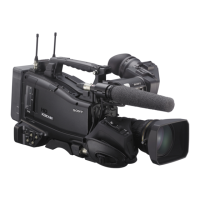
| Camcorder type | Shoulder camcorder |
| Product color | Black |
| Video resolutions | 720 x 576, 1280 x 720, 1920 x 1080 pixels |
| Video formats supported | AVCHD, DV, MPEG, MPEG2 |
| Maximum video resolution | 1920 x 1080 pixels |
| Audio formats supported | LPCM |
| Headphone outputs | 1 |
| Headphone connectivity | 3.5 mm |
| USB 2.0 ports quantity | USB 2.0 ports have a data transmission speed of 480 Mbps, and are backwards compatible with USB 1.1 ports. You can connect all kinds of peripheral devices to them. |
| Battery type | BP-U30c |
| Battery capacity | - mAh |
| Battery life (max) | - h |
| Battery recharge time | 2.23 h |
| Storage temperature (T-T) | -20 - 60 °C |
| Operating temperature (T-T) | 0 - 40 °C |
| Cables included | AC, USB |
 Weight and Dimensions
| Depth | 412 mm |
|---|---|
| Width | 191.5 mm |
| Height | 201.5 mm |
| Weight | 2700 g |

 To Next Page