EasyManua.ls Logo

Sony RM-450 - Page 8

Sony RM-450
53 pages
Print Icon
To Next Page IconTo Next Page
To Previous Page IconTo Previous Page
Loading...
RM-450/RM-450CE
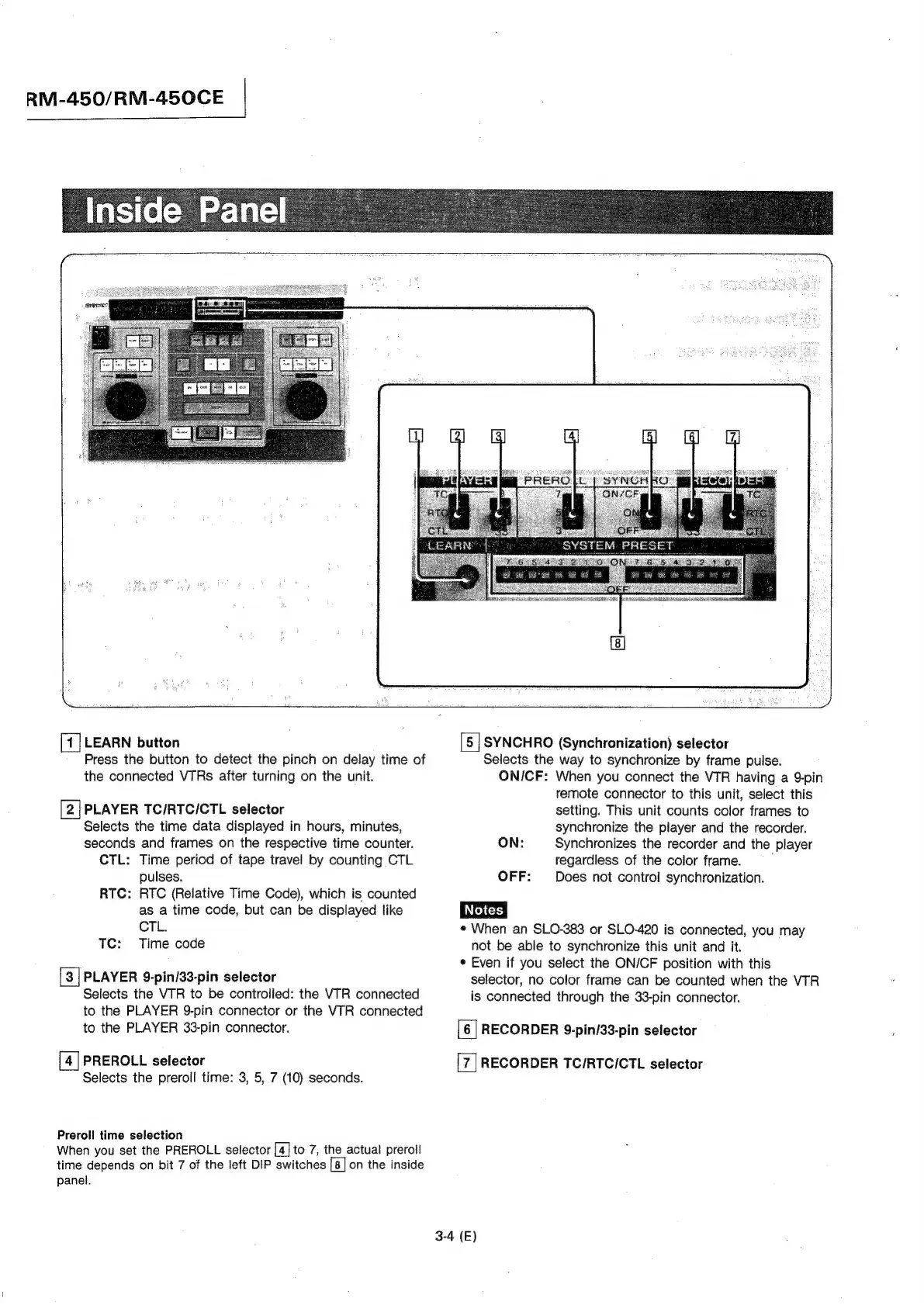
LEARN
button
[5
|
SYNCHRO
(Synchronization)
selector
Press
the
button
to
detect
the
pinch
on
delay
time
of
Selects
the
way
to
synchronize
by
frame
pulse.
the
connected
VTRs
after
turning
on
the
unit.
ON/CF:
When
you
connect
the
VTR
having
a
9-pin
remote
connector
to
this
unit,
select
this
PLAYER
TC/RTC/CTL
selector
setting.
This
unit
counts
color
frames
to
Selects
the
time
data
displayed
in
hours,
minutes,
synchronize
the
player
and
the
recorder.
seconds
and
frames
on
the
respective
time
counter.
ON:
Synchronizes
the
recorder
and
the
player
CTL:
Time
period
of
tape
travel
by
counting
CTL
regardless
of
the
color
frame.
,
pulses.
OFF:
Does
not
control
synchronization.
RTC:
RTC
(Relative
Time
Code),
which
is
counted
as
a
time
code,
but
can
be
displayed
like
Dace
CTL.
¢
When
an
SLO-383
or
SLO-420
is
connected,
you
may
TC:
Time
code
not
be
able
to
synchronize
this
unit
and
it.
¢
Even
if
you
select
the
ON/CF
position
with
this
[3
|
PLAYER
9-pin/33-pin
selector
selector,
no
color
frame
can
be
counted
when
the
VTR
Selects
the
VTR
to
be
controlled:
the
VTR
connected
is
connected
through
the
33-pin
connector.
to
the
PLAYER
9-pin
connector
or
the
VTR
connected
to
the
PLAYER
33-pin
connector.
[6
]
RECORDER
9-pin/33-pin
selector
[4]
PREROLL
selector
RECORDER
TC/RTCICTL
selector
Selects
the
preroll
time:
3,
5,
7
(10)
seconds.
Preroll
time
selection
When
you
set
the
PREROLL
selector
[4]
to
7,
the
actual
preroil
time
depends
on
bit
7
of
the
left
DIP
switches
[8]
on
the
inside
panel.
3-4
(E)

Other manuals for Sony RM-450

Related product manuals