EasyManua.ls Logo

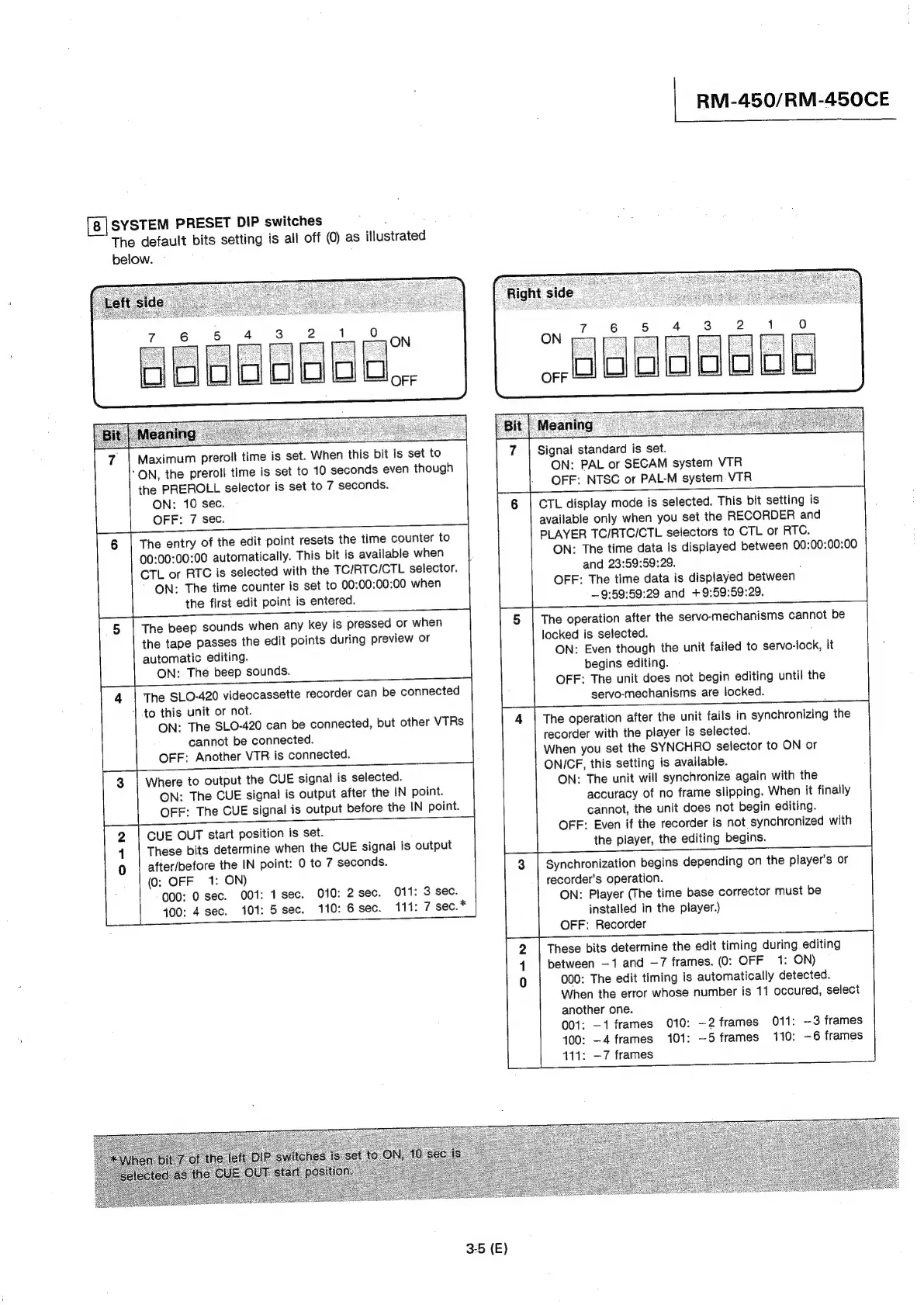
Sony RM-450 - System Configuration and Presets; System Preset DIP Switch Functions

Sony RM-450
53 pages
Print Icon
To Next Page IconTo Next Page
To Previous Page IconTo Previous Page
Loading...
RM-450/RM-450CE
SYSTEM
PRESET
DIP
switches
The
default
bits
setting
is
all
off
(0)
as
illustrated
below.
~
6
5
old
7
|
Maximum
preroll
time
is
set.
When
this
bit
is
set
to
ON,
the
preroll
time
is
set
to
410
seconds
even
though
the
PREROLL
selector
is
set
to
7
seconds.
ON:
10
sec.
OFF:
7
sec.
6
|
The
entry
of
the
edit
point
resets
the
time
counter
to
00:00:00:00
automatically.
This
bit
is
available
when
CTL
or
RTC
is
selected
with
the
TC/RTC/CTL
selector.
"ON:
The
time
counter
is
set
to
00:00:00:00
when
the
first
edit
point
is
entered.
Signal
standard
is
set.
ON:
PAL
or
SECAM
system
VTR
OFF:
NTSC
or
PAL-M
system
VTR
CTL
display
mode
is
selected.
This
bit
setting
is
available
only
when
you
set
the
RECORDER
and
PLAYER
TC/RTCI/CTL
selectors
to
CTL
or
RTC.
ON:
The
time
data
is
displayed
between
00:00:00:00
and
23:59:59:29.
:
OFF:
The
time data
is
displayed
between
—9:59:59:29
and
+9:59:59:29,
5
|
The
beep
sounds
when
any
key
is
pressed
or
when
the
tape
passes
the
edit
points
during
preview
or
automatic
editing.
ON:
The
beep
sounds.
The
operation
after
the
servo-mechanisms
cannot
be
locked
is
selected.
;
ON:
Even
though
the
unit
failed
to
servo-lock,
it
begins
editing.
OFF:
The
unit
does
not
begin
editing
until
the
4
|
The
SLO-420
videocassette
recorder
can
be
connected
servo-mechanisms
are
locked.
1
to
this
unit
or
not.
ON:
The
SLO-420
can
be
connected,
but
other
VTRs
cannot
be
connected.
OFF:
Another
VTR
is
connected.
The
operation
after
the
unit
fails
in
synchronizing
the
recorder
with
the
player
is
selected.
When
you
set
the
SYNCHRO
selector
to
ON
or
ONICF,
this
setting
is
available.
ON:
The
unit
will
synchronize
again
with
the
accuracy
of
no
frame
slipping.
When
it
finally
cannot,
the
unit
does
not
begin
editing.
OFF:
Even
if
the
recorder
is
not
synchronized
with
the
player,
the
editing
begins.
Synchronization
begins
depending
on
the
player's
or
recorder’s
operation.
ON:
Player
(The
time
base
corrector
must
be
installed
in
the
player.)
OFF:
Recorder
3
|
Where
to
output
the
CUE
signal
is
selected.
ON:
The
CUE
signal
is
output
after
the
IN
point.
OFF:
The
CUE
signal
is
output
before
the
IN
point.
2
|
CUE
OUT
start
position
is
set.
4
|
These
bits
determine
when
the
CUE
signal
is
output
0
|
after/before
the
IN
point:
0
to
7
seconds.
(0:
OFF
1:
ON)
000:
0
sec.
001:
1
sec.
010:
2
sec.
011:
3
sec.
400:
4
sec.
101:
5sec.
110:
6sec,
111:
7
sec.
*
These
bits
determine
the
edit
timing
during
editing
between
—1
and
—7
frames.
(0:
OFF
1:
ON)
000:
The
edit
timing
is
automatically
detected.
When
the
error
whose
number
is
11
occured,
select
another
one.
001:
—1
frames
010:
—2
frames
011:
-3
frames
100:
—4
frames
101:
—5
frames
110:
-6
frames
411:
—7
frames
3-5
(E)

Other manuals for Sony RM-450

Related product manuals