14
HT-CT770 4-488-971-51(1)
Basic Operations / Opérations de base / 基本操作
When using one-touch connection (NFC) / Utilisation d’une connexion par simple contact (NFC) /
使用觸控連接功能時(NFC)
1 Download, install, and start the “NFC Easy Connect” app on your
smartphone.
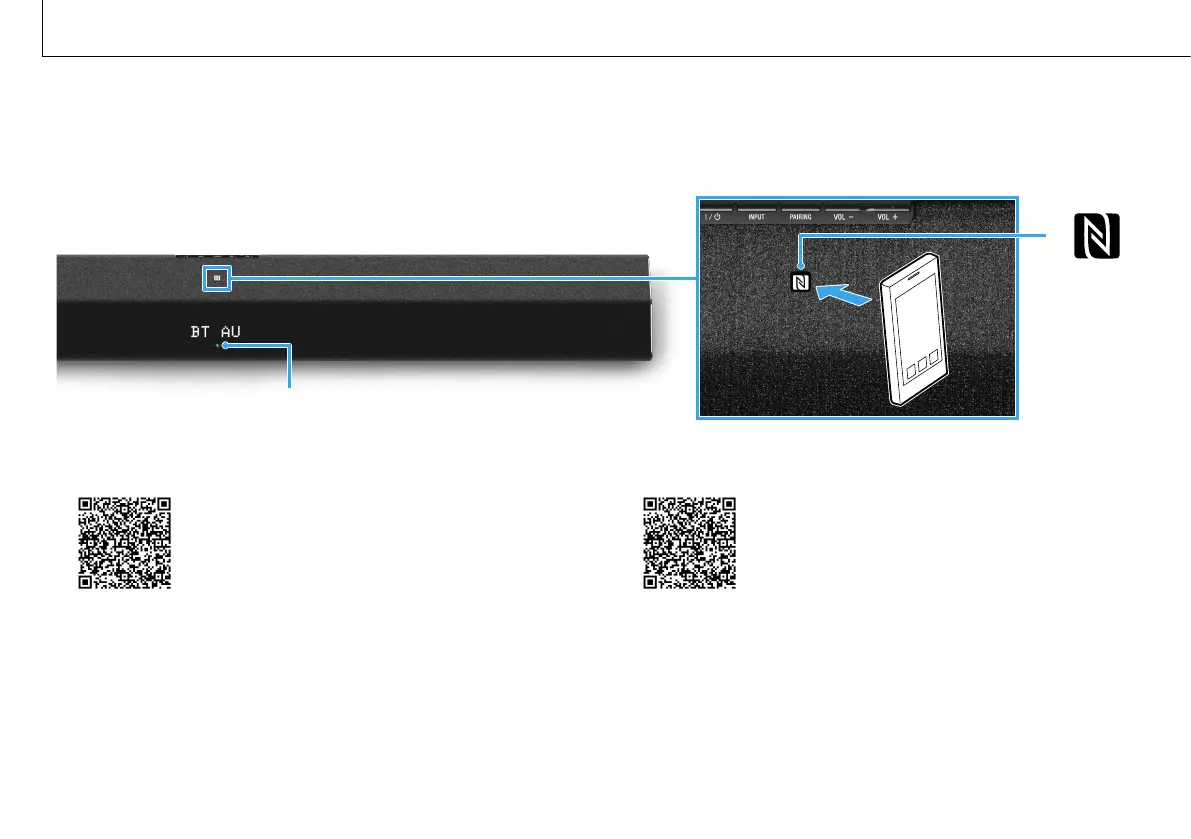
2 Touch the N mark of the Bar Speaker with the smartphone.
3 Make sure that the lamp (blue) lights up. (Connection has been
established.)
•Compatibledevices
Smartphones, tablets, and music players with the NFC function built-in
(OS: Android™ 2.3.3 or later, excluding Android 3.x)
1 Téléchargez, installez et lancez l’application «Connexion NFC facile»
sur votre smartphone.
2 Touchez la marque N de l’enceinte-barre avec le smartphone.
3 Assurez-vous que le témoin (bleu) s’éclaire. (Le connexion a été
établie.)
•Périphériquescompatibles
Smartphones, tablettes et lecteurs de musique disposant de la fonction NFC
intégrée (SE: Android™2.3.3 ou supérieur, à l’exception d’Android3.x)
Lamp (blue) / Témoin (bleu) / 指示燈(藍色)



 To Next Page