EasyManua.ls Logo

Sony RM-E100V - Page 4

Sony RM-E100V
23 pages
Print Icon
To Next Page IconTo Next Page
To Previous Page IconTo Previous Page
Loading...
Location
and
Function
of
Controls
For
details,
refer
to
the
pages
indicated
in
parentheses.
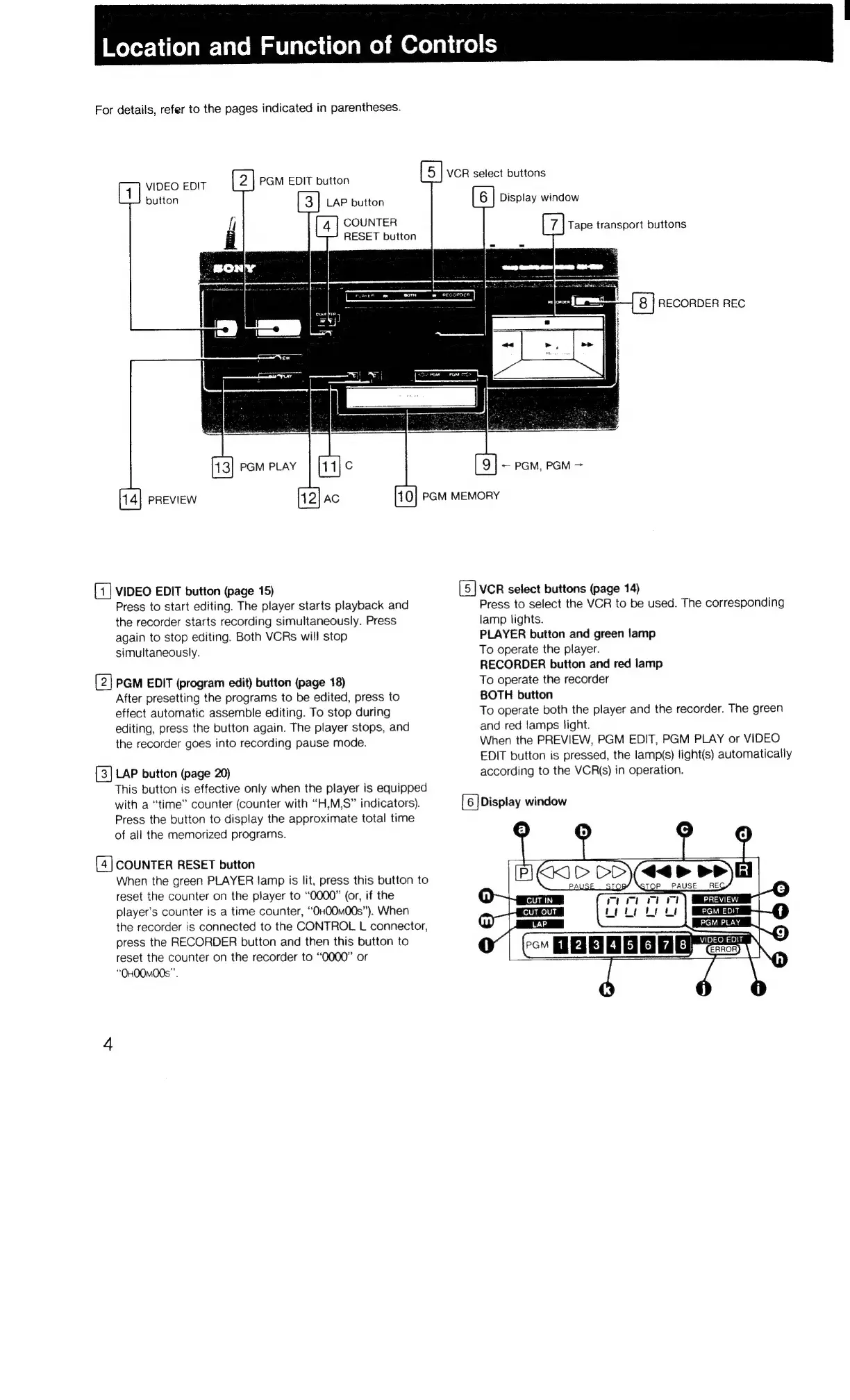
ViEOEOR
PGM
EDIT
button
VCR
select
buttons
1)
sutton
LAP
button
6
|
Display
window
if
4
|
COUNTER
7
|
Tape
transport
buttons
i
RESET
button
7
P
|
8
|
RECORDER
REC
[11]
¢
19]
Pam,
PGM
>
PGM
PLAY
PREVIEW
AC
PGM
MEMORY
VIDEO
EDIT
button
(page
15)
VCR
select
buttons
(page
14)
Press
to
start
editing.
The
player
starts
playback
and
Press
to
select
the
VCR
to
be
used.
The
corresponding
the
recorder
starts
recording
simultaneously.
Press
lamp
lights.
again
to
stop
editing.
Both
VCRs
will
stop
PLAYER
button
and
green
lamp
simultaneously.
To
operate
the
player.
RECORDER
button
and
red
lamp
PGM
EDIT
(program
edit)
button
(page
18)
To
operate
the
recorder
After
presetting
the
programs
to
be
edited,
press
to
BOTH
button
effect
automatic
assemble
editing.
To
stop
during
To
operate
both
the
player
and
the
recorder.
The
green
editing,
press
the
button
again.
The
player
stops,
and
and
red
lamps
light.
the
recorder
goes
into
recording
pause
mode.
When
the
PREVIEW,
PGM
EDIT,
PGM
PLAY
or
VIDEO
EDIT
button
is
pressed,
the
lamp(s)
light(s)
automatically
LAP
button
(page
20)
according
to
the
VCR(s)
in
operation.
This
button
is
effective
only
when
the
player
is
equipped
with
a
“time”
counter
(counter
with
“H,M,S”
indicators).
[6
]Display
window
Press
the
button
to
display
the
approximate
total
time
of
all
the
memorized
programs.
COUNTER
RESET
button
When
the
green
PLAYER
lamp
is
lit,
press
this
button
to
reset
the
counter
on
the
player
to
“0000”
(or,
if
the
player's
counter
is
a
time
counter,
“OHO0m00s”).
When
the
recorder
is
connected
to
the
CONTROL
L
connector,
press
the
RECORDER
button
and
then
this
button
to
reset
the
counter
on
the
recorder
to
“0000”
or
“OHOOMOOS”’.

Related product manuals