EasyManua.ls Logo

Sony RM-E700 - Page 10

Sony RM-E700
58 pages
Print Icon
To Next Page IconTo Next Page
To Previous Page IconTo Previous Page
Loading...
+S)
(=)
0
Me
Ore)
alatzrec(e)a)
Before
You
Connect
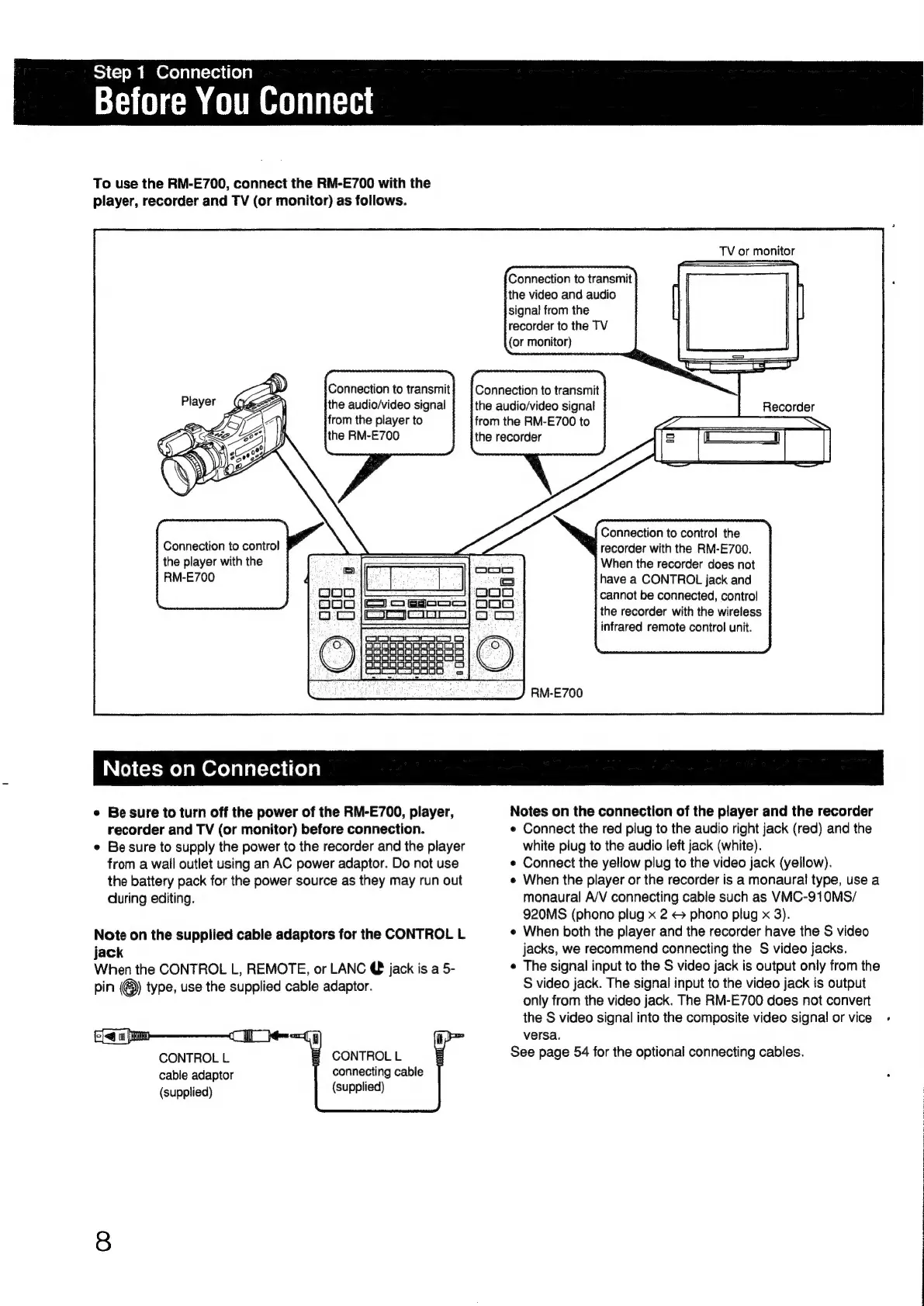
To
use
the
RM-E700,
connect
the
RM-E700
with
the
player,
recorder
and
TV
(or
monitor)
as
follows.
Connection
to
transmit
the
audio/video
signal
Connection
to
conirol
the
player
with
the
RM-E700
TV
or
monitor
Connection
to
transmit
the
video
and
audio
Connection
to
transmit
the
audio/video
signal
from
the
RM-E700
to
the
recorder
Connection
to
control
the
recorder
with
the
RM-E700.
When
the
recorder
does
not
have
a
CONTROL
jack
and
cannot
be
connected,
control
the
recorder
with
the
wireless
infrared
remote
control
unit.
RM-E700
IN
(oy
(=X-molamerelalatcieviiela
e
Be
sure
to
turn
off
the
power
of
the
RM-E700,
player,
recorder
and
TV
(or
monitor)
before
connection.
e
Be
sure
to
supply
the
power
to
the
recorder
and
the
player
from
a
wail
outlet
using
an
AC
power
adaptor.
Do
not
use
the
battery
pack
for
the
power
source
as
they
may
run
out
during
editing.
Note
on
the
supplied
cable
adaptors
for
the
CONTROL
L
jack
When
the
CONTROL
L,
REMOTE,
or
LANC
@
jack
is
a
5-
pin
(®)
type,
use
the
supplied
cable
adaptor.
CONTROL
L
CONTROL
L
cable
adaptor
connecting
cable
(supplied)
(supplied)
Notes
on
the
connection
of
the
player
and
the
recorder
e
Connect
the
red
plug
to
the
audio
right
jack
(red)
and
the
white
plug
to
the
audio
left
jack
(white).
e
Connect
the
yellow
plug
to
the
video
jack
(yellow).
e
When
the
player
or
the
recorder
is
a
monaural
type,
use
a
monaural
A/V
connecting
cable
such
as
VMC-910MS/
920MS
(phono
plug
x
2
©
phono
plug
x
3).
e
When
both
the
player
and
the
recorder
have
the
S
video
jacks,
we
recommend
connecting
the
S
video
jacks.
e
The
signal
input
to
the
S
video
jack
is
output
only
from
the
S
video
jack.
The
signal
input
to
the
video
jack
is
output
only
from
the
video
jack.
The
RM-E700
does
not
convert
the
S
video
signal
into
the
composite
video
signal
or
vice.
versa.
See
page
54
for
the
optional
connecting
cables.

Other manuals for Sony RM-E700

Related product manuals