3
TABLE OF CONTENTS
Location of Parts and Basic Remote
Operations 4
Parts Description 4
Advanced Remote Operations 11
Changing the Factory Setting of a Function
Button 12
Operating Non-Sony Components 13
Additional Information 16
Troubleshooting 16
Specifications 17
Before You Use Your
Remote
Check that you received the following item with the
remote:
R6 (size-AA) batteries (2)
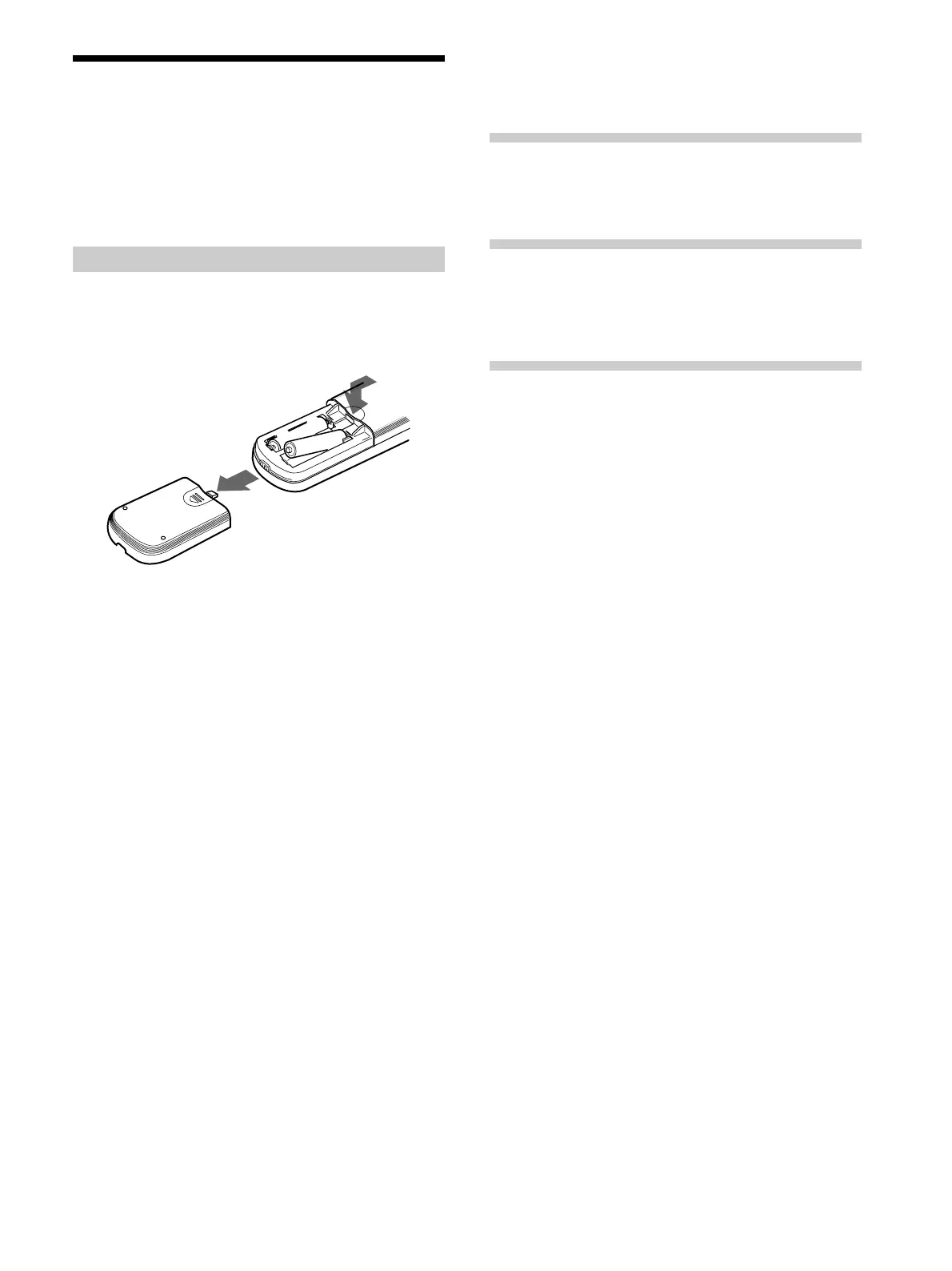
Inserting batteries into the remote
Insert two R6 (size-AA) batteries with the + and –
properly oriented in the battery compartment. When
using the remote, point it at the remote sensor g on the
receiver.
}
]
}
]
z
When to replace batteries
Under normal conditions, the batteries should last for about 6
months. When the remote no longer operates the receiver,
replace both batteries with new ones.
Notes
• Do not leave the remote in an extremely hot or humid place.
• Do not use a new battery with an old one.
• Do not expose the remote sensor of the receiver to direct
sunlight or lighting apparatuses. Doing so may cause a
malfunction.
• If you don’t use the remote for an extended period of time,
remove the batteries to avoid possible damage from battery
leakage and corrosion.







 To Next Page