masterpage:Left
filename[\\B-02w2000e\SONY RM-
PP412\4247244111\424724411RMPP412CEL\GB03BSC_RM-PP412-CEL.fm]
8
GB
model name1[RM-PP412]
[4-247-244-11(1)]
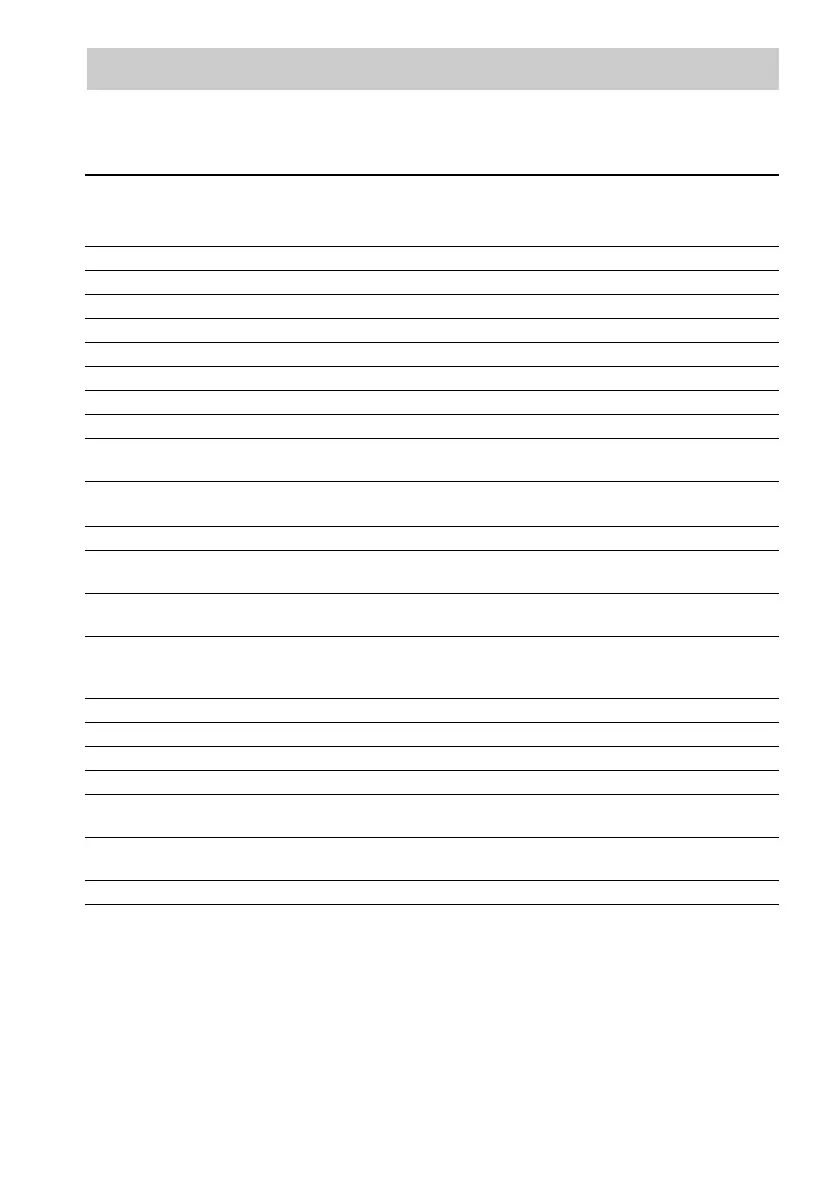
When you program the remote to control the following Sony or non-Sony components, you can use the
buttons on the remote that are marked with circles. Note, however, that some buttons may not operate
your component.
* B deck only.
**With a multi-disc changer only.
Table of buttons used to control each component
Component
Button(s)
CD
player
DAT
deck
MD
deck
Tape
deck
(A and B)
LD
player
VCR TV
Satellite
tuner/
Cable
box
Video
CD
player
DVD
player
AV ?/1 zzz zzzzzz
Numeric buttons zzzzzzzzzz
H zzzzzz zz
X zzzzzz zz
x zzzzzz zz
./> zzz z
*
zz zz
m/M zzzzzz zz
ANT z
D.SKIP**
PRESET/CH +/–
zz
zzz
zz
SUBTITLE
>10/11
zzzz zz
z
AUDIO zz z
SWAP
ANGLE
z
z
JUMP
TIME zz
zz
zz
DISC**
-/--
SEARCH MODE
z
zz
z
z
ENTER zzzzzzzz z
AV MENU zzz
TOP MENU/GUIDE zz
DISPLAY z z zzzzzz
RETURN O
EXIT
z
z
zz
V/v/B/b/
ENTER/
EXECUTE
zzz
CLEAR z z







 To Next Page