135
“Memory Stick” Operations
You can record still images on a “Memory Stick.”
Before operation
Insert a “Memory Stick” into your camcorder.
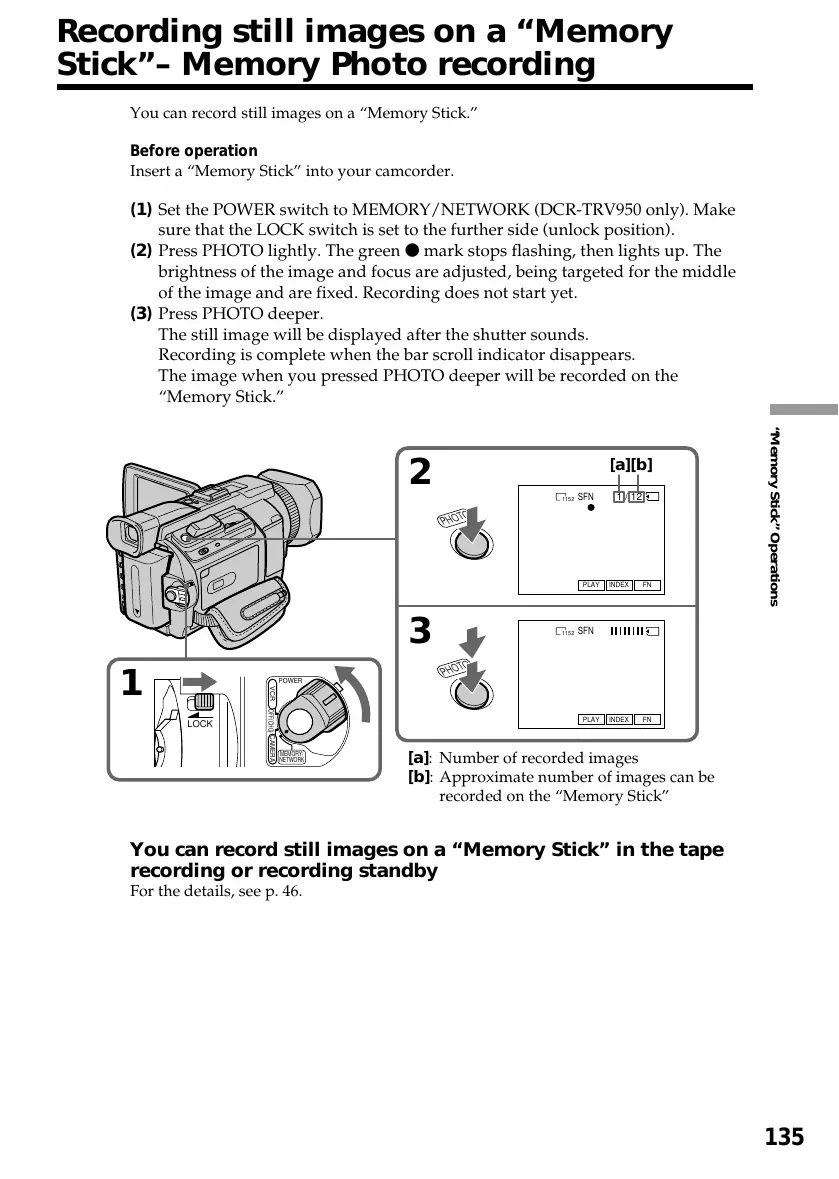
(1) Set the POWER switch to MEMORY/NETWORK (DCR-TRV950 only). Make
sure that the LOCK switch is set to the further side (unlock position).
(2) Press PHOTO lightly. The green z mark stops flashing, then lights up. The
brightness of the image and focus are adjusted, being targeted for the middle
of the image and are fixed. Recording does not start yet.
(3) Press PHOTO deeper.
The still image will be displayed after the shutter sounds.
Recording is complete when the bar scroll indicator disappears.
The image when you pressed PHOTO deeper will be recorded on the
“Memory Stick.”
You can record still images on a “Memory Stick” in the tape
recording or recording standby
For the details, see p. 46.
3
2
1 / 12
SFN
1152
SFN
1152
FN
INDEXPLAY
FN
INDEXPLAY
P
H
O
T
O
P
H
O
T
O
1
LOCK
POWER
OFF(CHG)
CAMERA
MEMORY/
NETWORK
VCR
[a][b]
[a]: Number of recorded images
[b]: Approximate number of images can be
recorded on the “Memory Stick”
Recording still images on a “Memory
Stick”– Memory Photo recording








 To Next Page