EasyManua.ls Logo

Sony RMT-B120P - User Manual

Sony RMT-B120P
105 pages
Print Icon
To Next Page IconTo Next Page
Loading...
Sony Corporation
Home Entertainment Business Group
SERVICE MANUAL
9-890-789-12
2013A6900-1
© 2013.01
Published by Document Design Dept.
BLU-RAY
DISC / DVD PLAYER
BDP-BX18/S185/S186
RMT-B120P/B119A/B109C
SPECIFICATIONS
General
Power requirements:
120V AC, 60Hz (BDP-S185:US, CND/BX18)
220 – 240V AC, 50/60Hz (AEP,UK, AUS, RUS, CH)
Power consumption:
10 W
Operating humidity:
25 % to 80 %
Specifications and design are subject to change
without notice.
Supplied accessories
Audio/video cable (phono plug ×3) (1)(AUS,RUS,US,CND)
Remote commander (remote) (1)
Size AA (R6) batteries (2)
HDMI cable (1) (
BDP-S185:CN/BX18
)
(BDP-S185:US/BX18:US)
ENERGY STAR and the ENERGY STAR mark
are registered U.S. marks. ENERGY STAR is a
registered mark owned by the U.S. government.
Operating temperature:
5 ºC to 35 ºC(41 F to 95 F) ºº
TM
Ver. 2.1 2013.01
Dimensions (approx.):
290mm × 196mm × 43mm
(width/depth/height) incl. projecting parts
(11
1/2
in. × 7
3/4
in. × 1
3/4
in.)
Mass (approx.):
1.1kg
(2 lb 6
3
/
4
oz)
System
Laser: Semiconductor laser
Inputs and outputs
(Jack name:
Jack type/Output level/Load impedance)
HDMI OUT:
HDMI 19-pin standard connector
LINE OUT VIDEO:
Phono jack/1.0 Vp-p/75 ohms
LAN (100):
100BASE-TX Terminal
USB:
USB jack Type A maximum current 500mA
LINE OUT R-AUDIO-L:
Phone jack/2 Vrms/10 kilohms
DIGITAL OUT (COAXIAL):
Phono jack/0.5 Vp-p/75 ohms
(For connecting USB device)
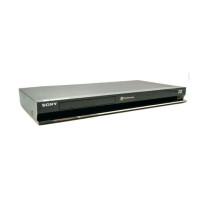
Photo: BDP-S185
Remote : RMT-B119A
Tiss : Refer HV12BDK535
US
***BDP-S185 (S/N)
CND
US
***BDP-BX18 (S/N)
CND
*BDP-S185 (S/N)
1,200,001 ~ 1,499,999
**BDP-S185 (S/N)
**BDP-S186 (S/N)
AEP (Black)
AEP (Silver)
IMPORTANT INFORMATION
Note : Use only for serial number (S/N) listed
4000001 ~ 4499999
3300001 ~ 3499999
4500001 ~ 4999999
3600001 ~ 3999999
7400001 ~ 8499999
5200001 ~ 5999999
2000001 ~ 4999999
8700001 ~ 9999999
2000001 ~ 4999999
8700001 ~ 9999999
UK/AUS
RUS
CH
5,300,001 ~ 5 ,499,999
4,200,001 ~ 4,399,999
***US Model
***Canadian Model
*Australian/NZ Model
*Chinese Model
*Russian Model
**AEP Model
*UK Model
BDP-S185
BDP-S185/BX18
BDP-S185/S186
Question and Answer IconNeed help?

Do you have a question about the Sony RMT-B120P and is the answer not in the manual?

Summary

SPECIFICATIONS

General

Covers power, dimensions, operating conditions, and supplied accessories.

System

Details laser type, inputs, outputs, and connectors.

IMPORTANT INFORMATION

SAFETY CHECK-OUT

LEAKAGE TEST

Procedure for testing AC leakage current for safety.

SAFETY-RELATED COMPONENT WARNING!

Identifies critical safety components for replacement.

SECTION 1 SERVICE NOTE

1-1. Disc Removal Procedure (Forced Ejection)

Steps for manual disc tray ejection.

1-4. Drive Repairing

Section on drive maintenance and troubleshooting.

SECTION 2 DISASSEMBLY

2-1. DISASSEMBLY FLOW

Step-by-step disassembly overview.

2-6. MB-144 BOARD

Details for disassembling the MB-144 board.

SECTION 3 BLOCK DIAGRAMS

3-1. OVERALL BLOCK DIAGRAM

High-level overview of system components.

3-5. POWER BLOCK DIAGRAM

Detailed block diagram of the power supply.

SECTION 4 SCHEMATIC DIAGRAMS

4-1. THIS NOTE IS COMMON FOR SCHEMATIC DIAGRAMS

General notes for schematic interpretation.

4-5. MB-144 BOARD (DDR 3 A ) SCHEMATIC DIAGRAM (1;12 )

Schematic for a key board, part 1 of 12.

SECTION 5 PRINTED WIRING BOARDS

5-1. THIS NOTE IS COMMON FOR PRINTED WIRING BOARDS

General notes for printed wiring board diagrams.

5-3. MB-144 BOARD (MAIN) PRINTED WIRING BOARD (SIDE A)

Printed wiring board layout for the MB-144 board.

SECTION 6 IC PIN FUNCTION DESCRIPTION

SECTION 7 SERVICE MODE

Enter Service Mode

Instructions on how to access the service mode.

Diag Menu (Device Test)

(Window 1) Select test category

Selecting test categories for diagnostics.

Log Menu

(Window 2):Display Error Log

How to view and interpret recorded error logs.

Factory Initialize

(Window 1) select initialize.

Steps to perform a factory reset.

System Information

(Window 1)Basic Information Menu

Displaying basic system and hardware information.

SECTION 9 TROUBLESHOOTING

Main Flow

General troubleshooting flowchart for common issues.

Power (System) Flow

Flowchart for diagnosing power supply issues.

Audio section flowchart

Flowchart for diagnosing audio output problems.

Video section flowchart

Flowchart for diagnosing video output problems.

Drive flowchart

Specific flowchart for diagnosing and resolving drive issues.

Remote control does not operate

Flowchart for troubleshooting remote control functionality.

SECTION 10 REPAIR PARTS LIST

10-1. EXPLODED VIEWS

Visual breakdown of parts with reference numbers.

8-2. ELECTRICAL PARTS LIST

NOTE:

Important notes regarding the electrical parts list.

REVISION HISTORY

Summary

SPECIFICATIONS

General

Covers power, dimensions, operating conditions, and supplied accessories.

System

Details laser type, inputs, outputs, and connectors.

IMPORTANT INFORMATION

SAFETY CHECK-OUT

LEAKAGE TEST

Procedure for testing AC leakage current for safety.

SAFETY-RELATED COMPONENT WARNING!

Identifies critical safety components for replacement.

SECTION 1 SERVICE NOTE

1-1. Disc Removal Procedure (Forced Ejection)

Steps for manual disc tray ejection.

1-4. Drive Repairing

Section on drive maintenance and troubleshooting.

SECTION 2 DISASSEMBLY

2-1. DISASSEMBLY FLOW

Step-by-step disassembly overview.

2-6. MB-144 BOARD

Details for disassembling the MB-144 board.

SECTION 3 BLOCK DIAGRAMS

3-1. OVERALL BLOCK DIAGRAM

High-level overview of system components.

3-5. POWER BLOCK DIAGRAM

Detailed block diagram of the power supply.

SECTION 4 SCHEMATIC DIAGRAMS

4-1. THIS NOTE IS COMMON FOR SCHEMATIC DIAGRAMS

General notes for schematic interpretation.

4-5. MB-144 BOARD (DDR 3 A ) SCHEMATIC DIAGRAM (1;12 )

Schematic for a key board, part 1 of 12.

SECTION 5 PRINTED WIRING BOARDS

5-1. THIS NOTE IS COMMON FOR PRINTED WIRING BOARDS

General notes for printed wiring board diagrams.

5-3. MB-144 BOARD (MAIN) PRINTED WIRING BOARD (SIDE A)

Printed wiring board layout for the MB-144 board.

SECTION 6 IC PIN FUNCTION DESCRIPTION

SECTION 7 SERVICE MODE

Enter Service Mode

Instructions on how to access the service mode.

Diag Menu (Device Test)

(Window 1) Select test category

Selecting test categories for diagnostics.

Log Menu

(Window 2):Display Error Log

How to view and interpret recorded error logs.

Factory Initialize

(Window 1) select initialize.

Steps to perform a factory reset.

System Information

(Window 1)Basic Information Menu

Displaying basic system and hardware information.

SECTION 9 TROUBLESHOOTING

Main Flow

General troubleshooting flowchart for common issues.

Power (System) Flow

Flowchart for diagnosing power supply issues.

Audio section flowchart

Flowchart for diagnosing audio output problems.

Video section flowchart

Flowchart for diagnosing video output problems.

Drive flowchart

Specific flowchart for diagnosing and resolving drive issues.

Remote control does not operate

Flowchart for troubleshooting remote control functionality.

SECTION 10 REPAIR PARTS LIST

10-1. EXPLODED VIEWS

Visual breakdown of parts with reference numbers.

8-2. ELECTRICAL PARTS LIST

NOTE:

Important notes regarding the electrical parts list.

REVISION HISTORY

Sony RMT-B120P Specifications

General IconGeneral
BrandSony
ModelRMT-B120P
CategoryBlu-ray Player
LanguageEnglish

Related product manuals