Home
Sony
Speakers
SA-NS500
Page 41
Sony SA-NS500 - Page 41
60 pages
Manual
Save Page as PDF
To Next Page
To Next Page
To Previous Page
To Previous Page
Loading...
41
GB
Oth
ers
4
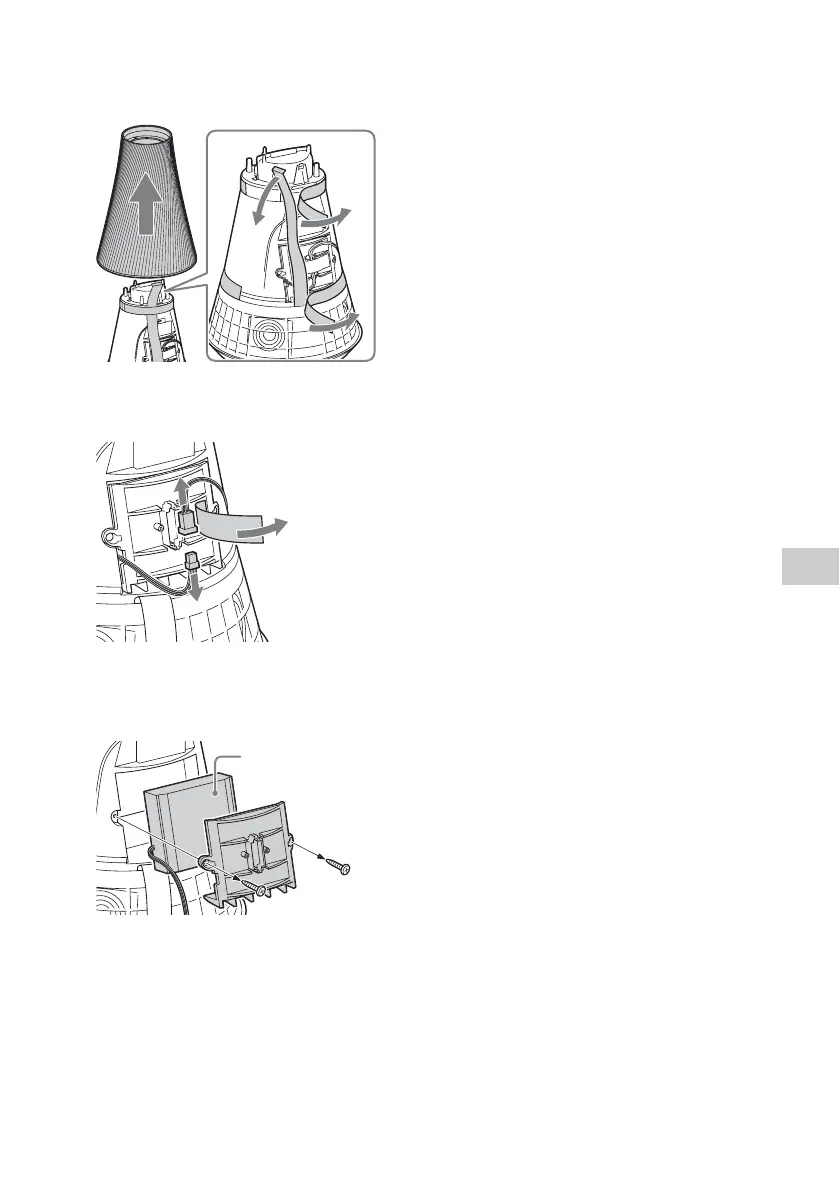
Lift up
the side
cover, then
remove the flexible
cable in the
direction of an arrow.
5
Remove the
tape, then r
emove
the connector.
6
Remove th
e 2 screws,
then
remove
the battery
cover an
d
the ba
ttery pack.
Battery
pack
40
42
Table of Contents
Main Page
Default Chapter
2
Important Safety Instructions
2
Table of Contents
5
Features of this Unit
6
Setting up Your Home Network
7
Getting Started
8
Guide to Parts and Controls
8
Main Unit
8
Remote Control
13
Checking the Supplied Accessories
14
Preparing the Remote Control
14
Preparing the Unit
15
Connecting to an AC Power Source
15
Using the Unit with the Built-In Battery
15
Setting the Standby Mode
16
Turning the Unit on
16
Network Connections
17
How to Connect Your Network
17
Setting up for a Wireless Network
17
Option 1: Method for Using a Supplied CD-ROM and Windows PC
17
Option 2: Method for Using an Application for Smartphones or Tablets (Android Device/Iphone/Ipod Touch/Ipad)
18
Option 3: Manual Setting Method Using an Access Point Scan (for Pc/Mac)
19
Option 4: Method for Using a WPS Push Button at the Access Point Supporting WPS
20
Setting up Wired Networks
21
Option 5: DHCP Method
21
Listening to Audio Content over Your Home Network
22
Using DLNA (Digital Living Network Alliance)
22
Listening to Audio Content on a Computer with Windows 7
22
Listening to Audio Content on a Computer with Windows Vista/Windows XP
24
Playing Back Audio Content on a Server at Random
26
Using the Bookmark Function
26
Registering a Bookmark List
26
Playing Back Audio Content in the Bookmark List
27
Using Internet Music Streaming
28
Streaming (Music Service)
28
Preparing Your Mobile Device Instead of the Remote Control
28
Enjoying Internet Music Streaming
29
Using Airplay
31
Using Music Throw
33
Using Music Throw on a Sony Tablet
33
Others
34
Using the PARTY STREAMING
34
Starting a PARTY
34
Joining a PARTY
34
Updating Software
35
Setting Screen on the Browser
36
Using the Setting Screen on the Browser
36
Starting the Browser with Windows XP
37
Specifications
38
Precautions
39
Notes on Unit Disposal
40
Troubleshooting
42
Indicator Information
47
Other manuals for Sony SA-NS500
Quick Setup Guide
2 pages
Quick Start Guide
2 pages
Specifications
4 pages
Connecting Guide
2 pages
Related product manuals
Sony SA-NS510
60 pages
Sony SA-NS300
40 pages
Sony SA-NS400
45 pages
Sony SA-NS310
44 pages
Sony SA-NS410
2 pages
Sony SA-Z9R
34 pages
Sony SA-RS5
10 pages
Sony SA-D10
2 pages
Sony SA-WGT1
72 pages
Sony SA-RS3S
4 pages
Sony SA-40SE1
2 pages
Sony SA-WMS315
12 pages


 To Next Page