model name [SHAKE-6D]
[4-462-817-11(2)] GB
18
GB
filename[D:\NORM'S JOB\SONY HA\SO130043\SHAKE-6D (PMRF
01)\4462817112_GB\060CDP.fm]
masterpage:Left
Basic playback
1 For DVD/CD function:
Press DVD/CD.
For USB function:
Press USB repeatedly until “USB A”
or “USB B” lights up in the display
panel.
2 For DVD/CD function:
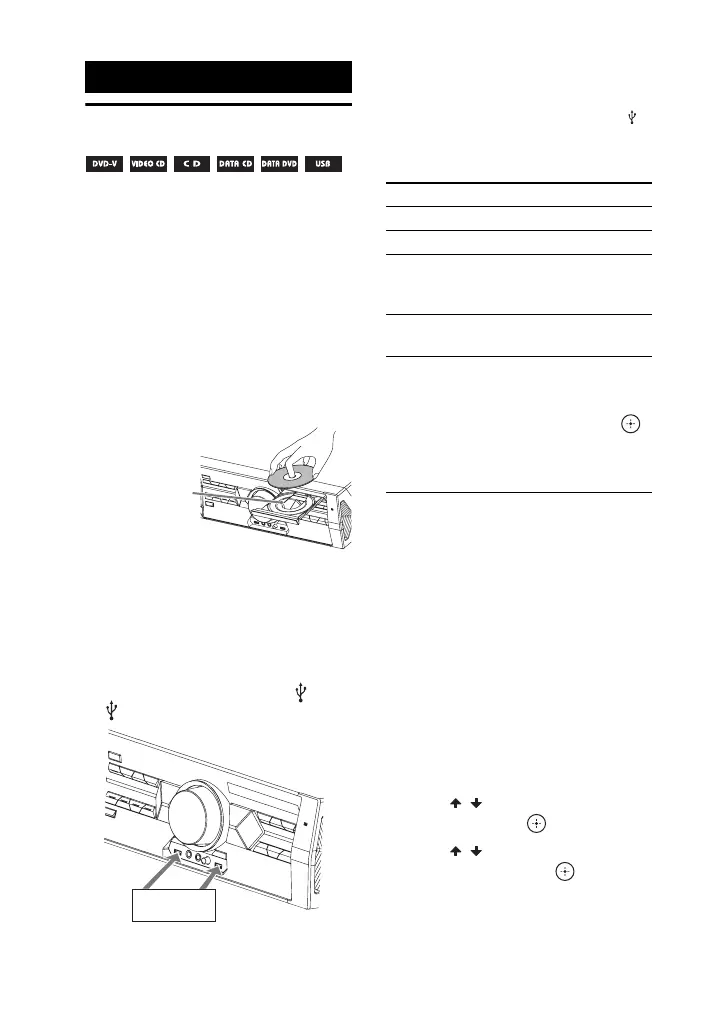
Press Z OPEN/CLOSE on the unit to
open the disc tray and load a disc with
the label facing up on the disc tray.
Press Z OPEN/CLOSE on the unit
again to close the disc tray.
Do not forcibly push the disc tray to
close it as this may cause a
malfunction.
For USB function:
Connect a USB device to the A or
B port.
Note
You can use a USB adaptor (not supplied) to
connect the USB device to the unit if the
USB device cannot be plugged into the
port.
3 Press N to start playback.
To select the playback source or
transferring destination (USB
memory select)
If the USB device has more than one
memory (for example, internal memory
and a memory card), you can select which
memory to use as a playback source or
transferring destination.
Note
You cannot select a memory during playback or
transfer. Make sure to select a memory before
starting playback.
1 Hold down SHIFT, then press
OPTIONS.
2 Press / to select “USB MEM
SEL”, then press .
3 Press / to select the memory
you want, then press .
Disc/USB Playback
When you play
back an 8 cm
disc such as a
CD single,
place it on the
inner circle of
the tray
USB device
To Press
Stop playback x
Pause playback X
Resume playback
or return to normal
playback
N
Cancel the resume
point
x twice
Select a track, file,
chapter or scene
. or > during
playback.
Or, press the numeric
buttons, then press .
(Operation might be
prohibited by disc or
USB device)



 To Next Page