Administrating the Camera
Setting the Camera Image — Camera Menu
45
SNC-CH220/CH260/DH220/DH220T/DH260
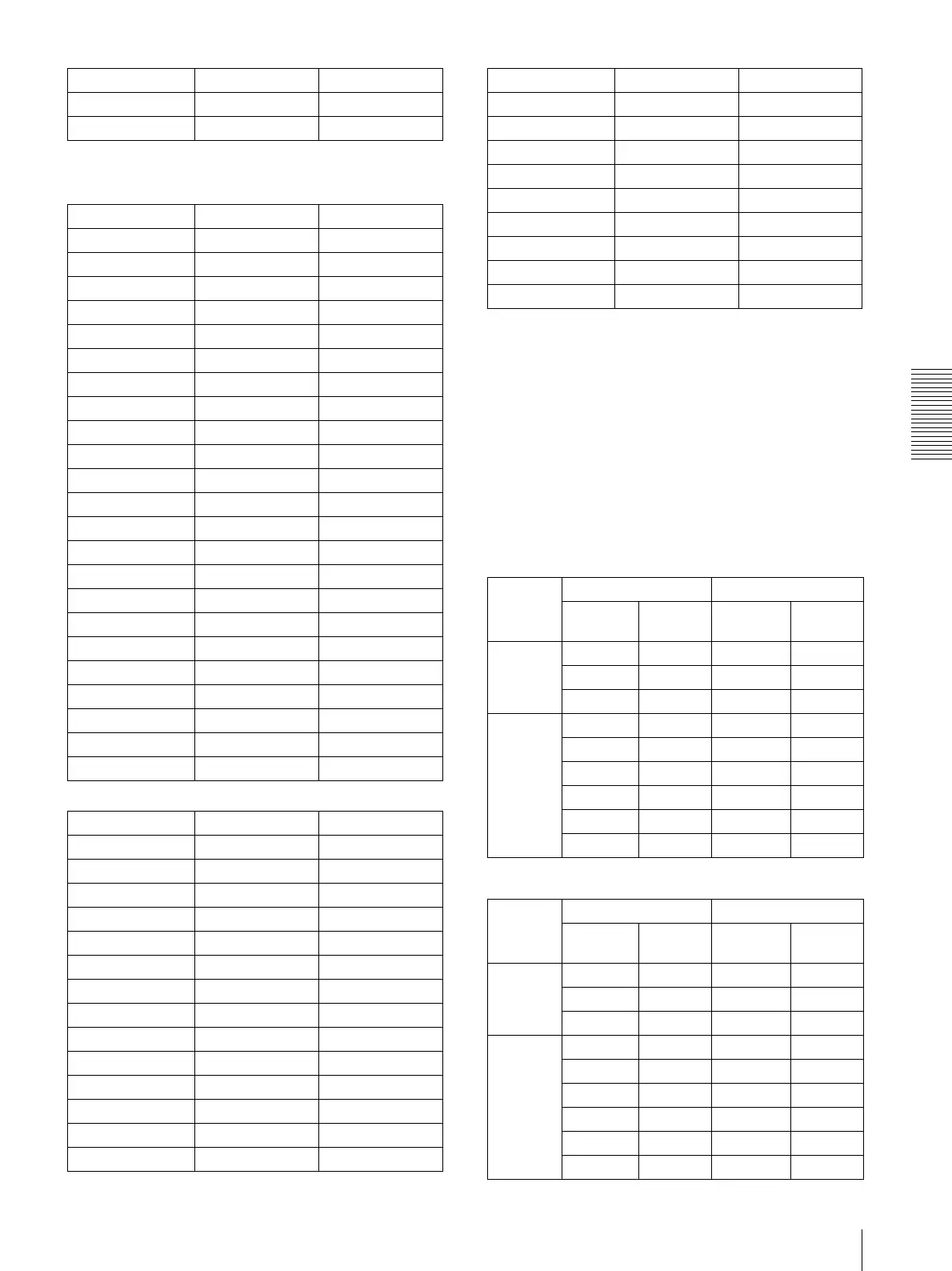
Maximum image size [1920 × 1080]
Maximum image size [1920 × 1440]
Frame rate
Set the frame rate of the image.
Selectable frame rates are as follows:
1, 2, 3, 4, 5, 6, 8, 10, 12, 15, 16, 20, 25, 30 (fps)
“fps” is a unit indicating the number of frames
transmitted per second.
Configurable frame rates are as follows:
The frame rate of JPEG image can be changed by the
setting of Image quality.
SNC-CH120/CH160/DH120/DH120T/DH160
Image size [1280 × 720]
Image size [1280 × 1024]
Image 1 Image 2
320
×
240 aa
320
×
192 aa
Image 1 Image 2
1920
×
1440 × ×
1600
×
1200 × ×
1680
×
1056 a ×
1920
×
1080 a ×
1440
×
912 a ×
1376
×
768 a ×
1280
×
1024 × ×
1280
×
960 × ×
1280
×
800 a ×
1280
×
720 af
1024
×
768 × ×
1024
×
576 af
800
×
600 × ×
800
×
480 af
768
×
576 × ×
720
×
576 × ×
704
×
576 × ×
720
×
480 × ×
640
×
480 × a
640
×
368 aa
384
×
288 × a
320
×
240 × a
320
×
192 aa
Image 1 Image 2
1920
×
1440 a ×
1600
×
1200 a ×
1680
×
1056 × ×
1920
×
1080 × ×
1440
×
912 × ×
1376
×
768 × ×
1280
×
1024 a ×
1280
×
960 a ×
1280
×
800 × ×
1280
×
720 × ×
1024
×
768 af
1024
×
576 × ×
800
×
600 a ×
800
×
480 × ×
Image 1 Image 2
768
×
576 af
720
×
576 af
704
×
576 af
720
×
480 af
640
×
480 aa
640
×
368 × a
384
×
288 aa
320
×
240 aa
320
×
192 × a
Image 1 Image 2
Codec Frame rate
(fps)
Codec Frame rate
(fps)
Single
codec
H.264 30 -
MPEG4 30 -
JPEG 30 -
Dual codec
H.264 25 H.264 5
H.264 25 JPEG 10
H.264 25 MPEG4 6
MPEG4 30 MPEG4 10
MPEG4 30 JPEG 16
JPEG 30 JPEG 30
Image 1 Image 2
Codec Frame rate
(fps)
Codec Frame rate
(fps)
Single
codec
H.264 20 -
MPEG4 25 -
JPEG 30 -
Dual codec
H.264 15 H.264 6
H.264 15 JPEG 12
H.264 15 MPEG4 8
MPEG4 20 MPEG4 8
MPEG4 25 JPEG 6
JPEG 30 JPEG 12


 To Next Page