EasyManua.ls Logo

Sony SRF-HM22 - Installing Batteries; Battery Replacement Indicators; Battery Replacement Procedure; Battery Leakage Prevention

Sony SRF-HM22
10 pages
Print Icon
To Next Page IconTo Next Page
To Previous Page IconTo Previous Page
Loading...
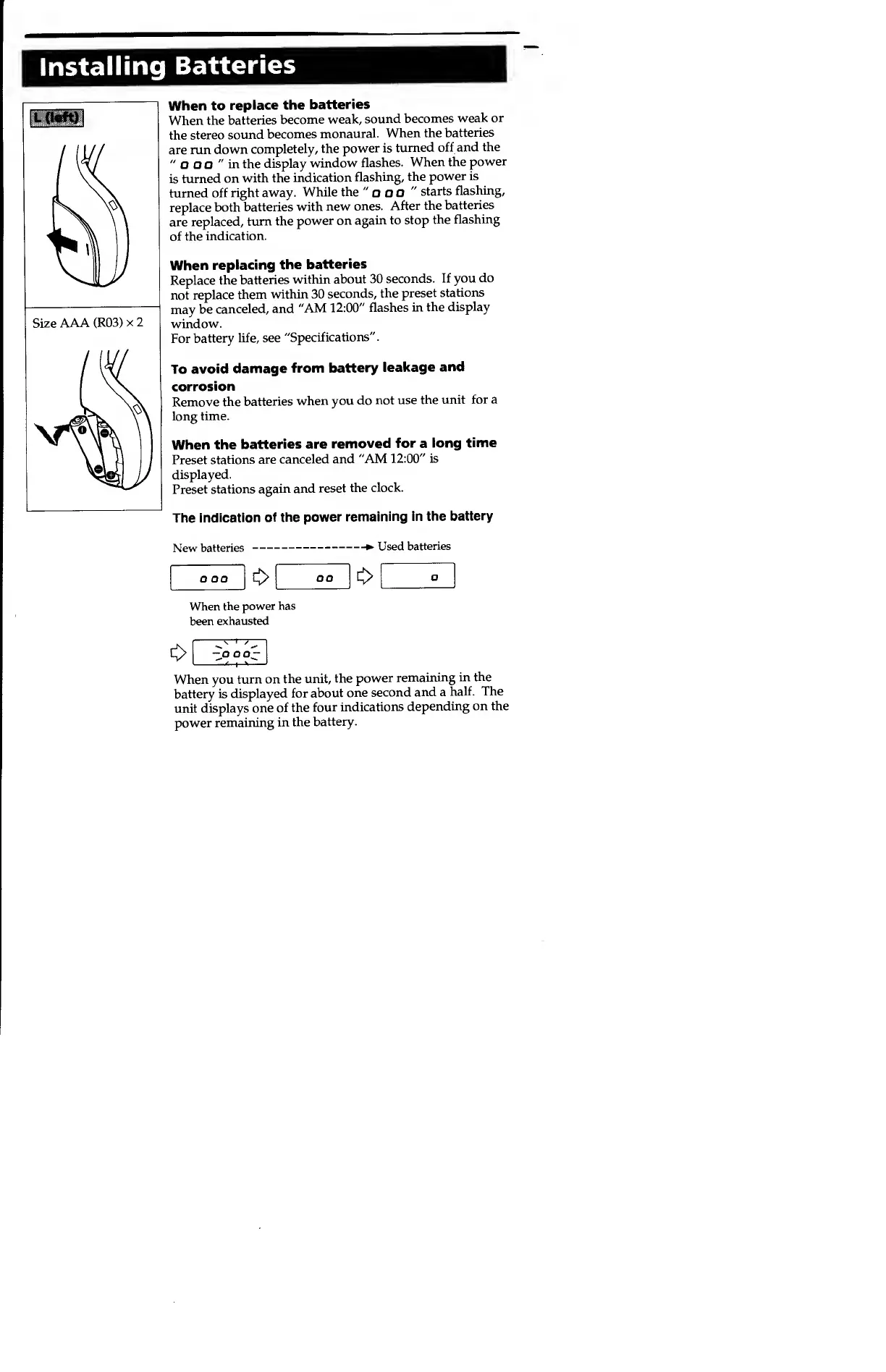
Installing
Batteries
When to
replace the
batteries
When the
batteries
become
weak,
sound
becomes
weak
or
the
stereo
sound
becomes
monaural.
When the
batteries
are run
down
completely,
the
power
is
turned
off and
the
"
O O O
"
in the
display
window
flashes.
When the
power
is
turned on
with the
indication
flashing, the
power is
turned
off right
away.
While
the
"
o
OO
"
starts
flashing,
replace
both
batteries
with
new
ones.
After the
batteries
are
replaced,
turn the
power on
again to stop
the
flashing
of the
indication.
When
replacing
the
batteries
Replace
the
batteries
within
about
30
seconds.
If you
do
not
replace
them
within 30
seconds,
the
preset
stations
may
be
canceled,
and
"AM
12:00"
flashes
in
the
display
window.
For
battery
life, see
"Specifications".
To
avoid
damage
from
battery
leakage
and
corrosion
Remove
the
batteries
when you
do
not use
the unit
for a
long
time.
When the
batteries are
removed
for
a
long
time
Preset
stations
are
canceled and
"AM
12:00"
is
displayed.
Preset stations
again and
reset
the
clock.
The
indication
of the
power
remaining in the
battery
New
batteries
>
Used
batteries
oo
o
When
the power
has
been
exhausted
a OO;
When you
turn on
the unit,
the
power
remaining
in
the
battery
is
displayed for
about
one
second
and a
half. The
unit
displays
one
of the
four
indications
depending
on the
power
remaining
in
the
battery.

Other manuals for Sony SRF-HM22

Related product manuals