Setting the Clock
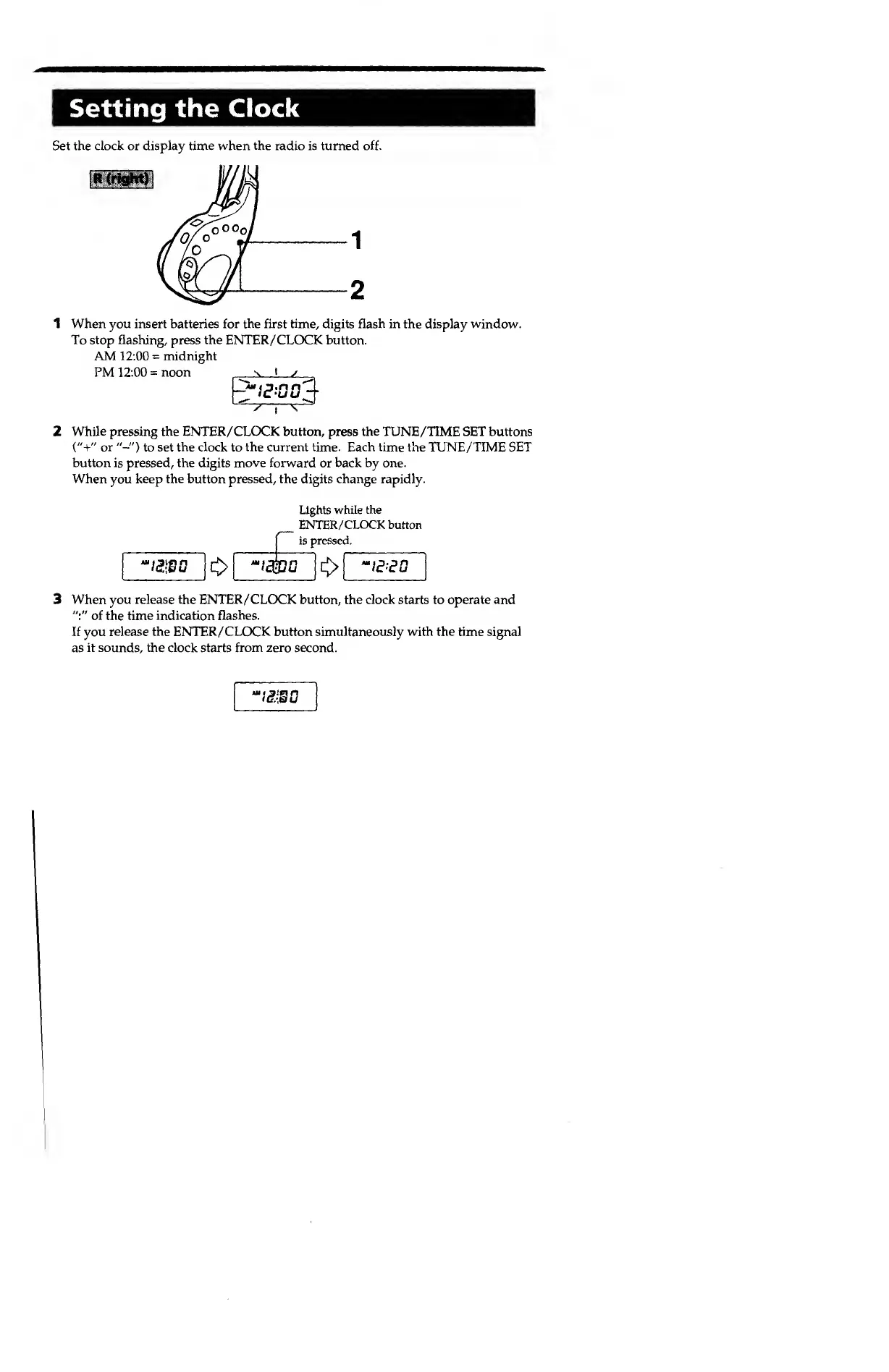
Set the clock or display time when
the
radio is turned
off.
R
(right)
1 When you insert batteries for the first time, digits flash in
the
display window.
To stop flashing,
press
the
ENTER/CLOCK button.
AM 12:00
=
midnight
PM 12:00
=
noon
-v
I
s
'
i
^
2
While pressing the ENTER/CLOCK button, press the TUNE/TIME SET buttons
("+"
or
"-")
to set
the clock
to
the current time. Each time
the TUNE/TIME SET
button
is
pressed, the digits move forward
or
back by one.
When you keep
the
button
pressed,
the digits
change
rapidly.
Lights
while the
ENTER/CLOCK button
is pressed.
"IE
-ED
3
When you release the ENTER/CLOCK button,
the
clock
starts to
operate and
":"
of
the time
indication flashes.
If you release the ENTER/CLOCK button simultaneously with the
time
signal
as
it sounds, the clock
starts
from
zero second.
I&JB0


 To Next Page