EasyManua.ls Logo

Sony SRF-HM22 - Tuning in and Presetting Stations

Sony SRF-HM22
10 pages
Print Icon
To Next Page IconTo Next Page
To Previous Page IconTo Previous Page
Loading...
Tuning
in
and
Presetting Stations
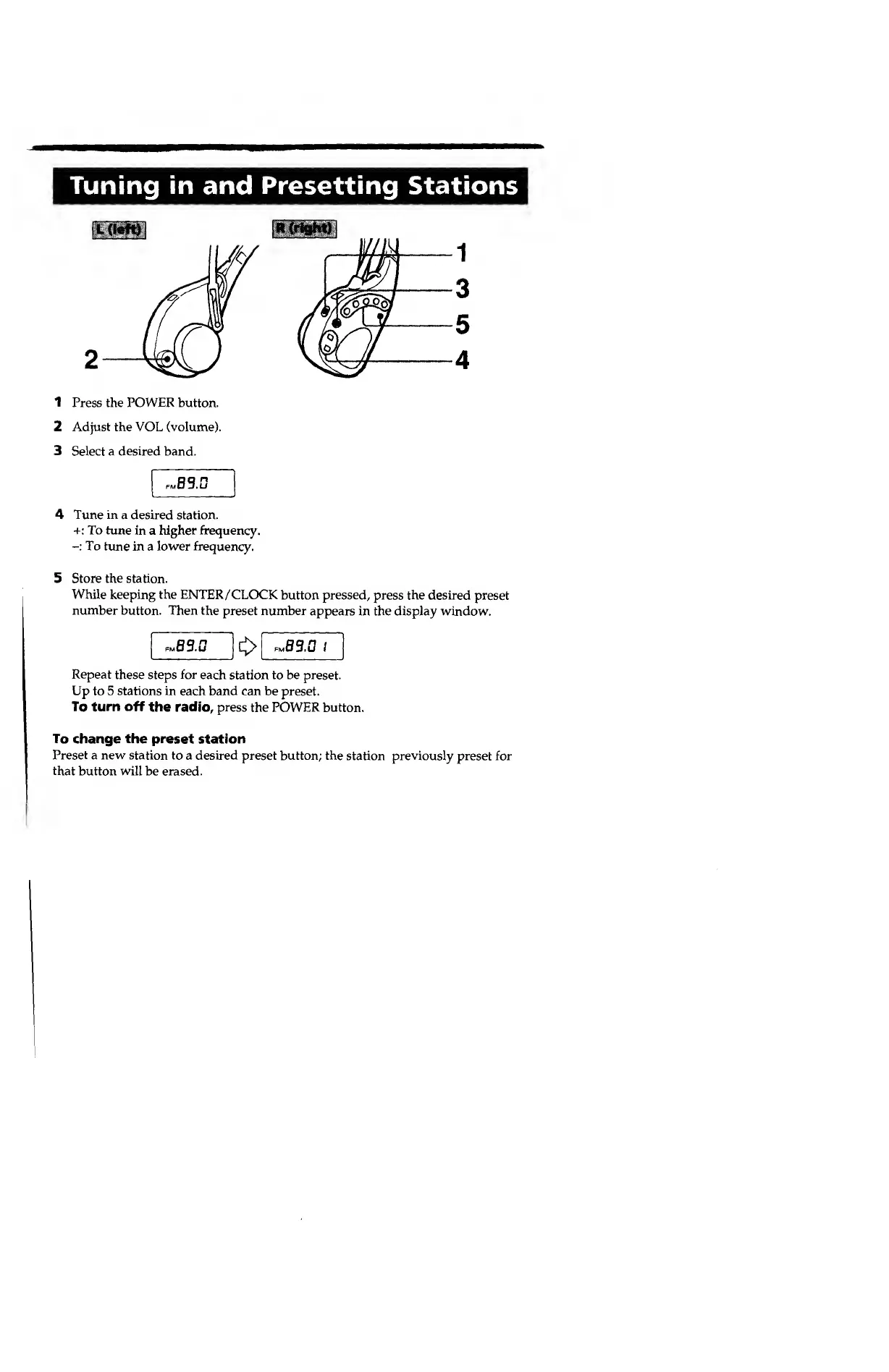
1 Press the POWER button.
2
Adjust
the VOL (volume).
3 Select a
desired
band.
iaBS.U
4
Tune in
a desired station.
+: To tune
in a higher frequency.
-:
To
tune in a
lower
frequency.
5 Store the station.
While
keeping
the
ENTER/CLOCK
button pressed, press the desired
preset
number button. Then the
preset number
appears in the display window.
.89.0
.83.0 t
Repeat
these steps
for
each
station
to be
preset.
Up
to
5 stations in
each
band can be
preset.
To turn off
the
radio, press
the
POWER button.
To
change
the
preset station
Preset a new station to
a
desired
preset button; the
station previously preset for
that
button will be erased.

Other manuals for Sony SRF-HM22

Related product manuals