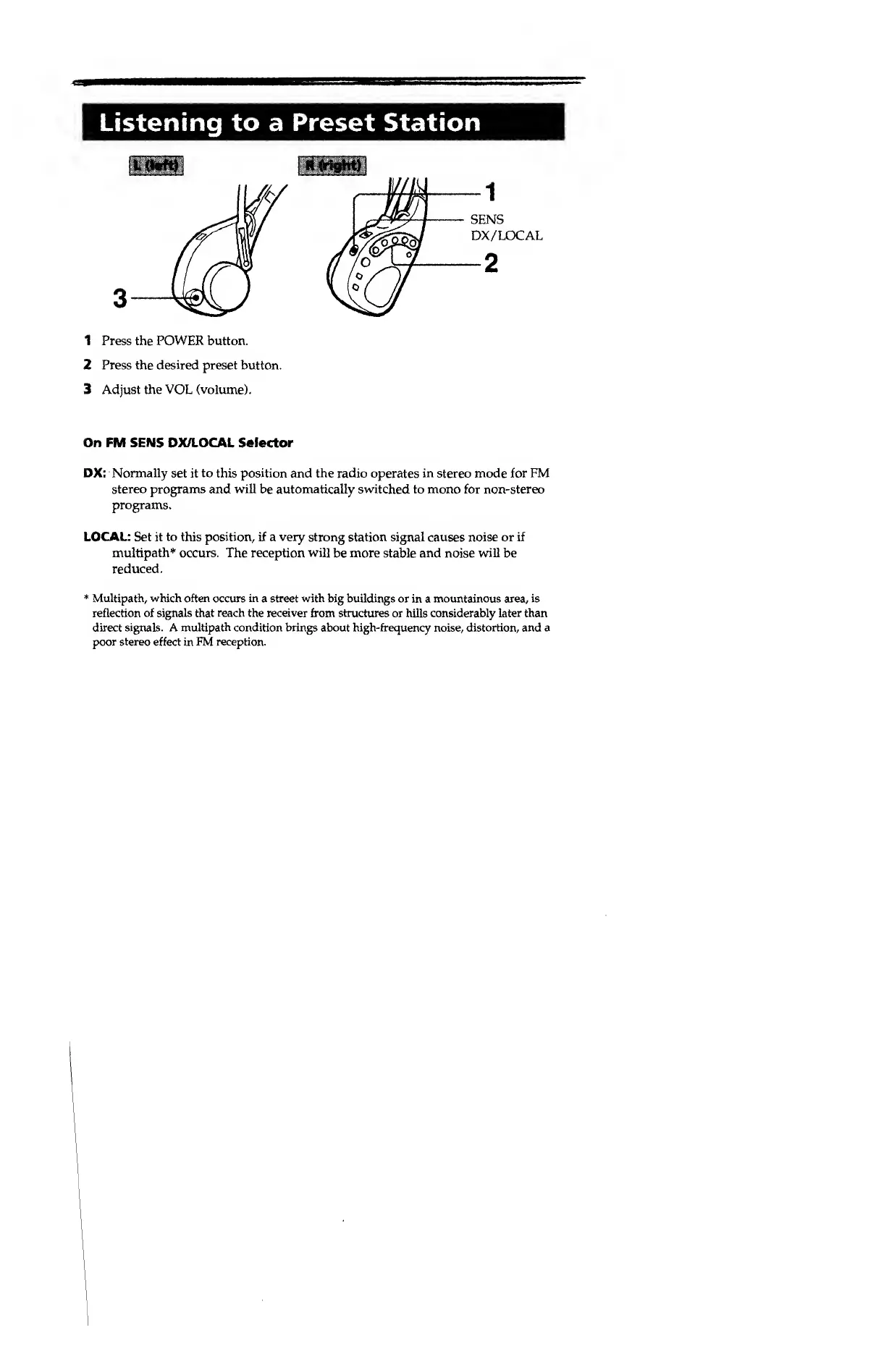
L(l«ft)
R
(right)
3
SENS
DX/LOCAL
2
1
1 Press the
POWER
button.
2 Press the
desired
preset button.
3 Adjust the VOL (volume).
On FM SENS OX/LOCAL Selector
DX:
Normally
set it
to
this
position
and the radio operates
in
stereo mode for
FM
stereo
programs and
will
be automatically switched to mono for non-stereo
programs.
LOCAL: Set it
to
this
position,
if a
very
strong station signal causes noise or if
multipath* occurs. The reception will
be more stable and noise
will
be
*
Multipath, which often
occurs
in
a street with big buildings or
in a
mountainous area, is
reflection
of signals
that
reach the receiver
from structures or hills considerably
later
than
direct
signals. A multipath condition brings about high-frequency
noise,
distortion, and a
poor
stereo
effect in
FM reception.
reduced.


 To Next Page