3 Press
TUNE/TIME
SET
+
or
- to set the desired countdown
duration for the pitch timer.
The
countdown duration
can
be
set from I second to
59
minutes
59
seconds,
in I-second increments.
4 Press
ENTER.
The
beep
sounds and the number
of
times flashes in the
display.
Using
the
Pitch
Timer
The
pitch timer allows setting the timer with an identical length
of
time
repeatedly.
The
functions
of
the radio, the stopwatch, and the countdown timer
are available even while the pitch timer is being used.
1 Press
DISPLAY
to select the pitch timer.
"PITCH"
flashes in the display.
2 Hold down
ENTER
for more than 2 seconds.
The
beep
sounds and the countdown duration flashes in
the display.
To
preset another station, repeat these steps.
To
change the preset station, preset a new station. The previous station will
be canceled.
To
cancel the presetting mode, press
MODE.
Note
If
you
do
not press TUNEITIME
SET
+
or
-,
or
ENTER
within 65 seconds, the
preset tuning mode will be canceled.
3 Press
TUNE/TIME
SET
+ nr - to select the number you wish to
preset, then press
ENTER.
When you select the preset number using TUNEITIME
SET
+
or
-,
"P"
appears
if
that number has a preset station. If it has
no
preset station. only the
number flashes and
"P"
does not appear.
When
you press
ENTER,
the selected preset number lights up in the display.
Example:
Display window when you preset
FM
90.0
MHz
in preset
number
2.
Clock Stopwatch
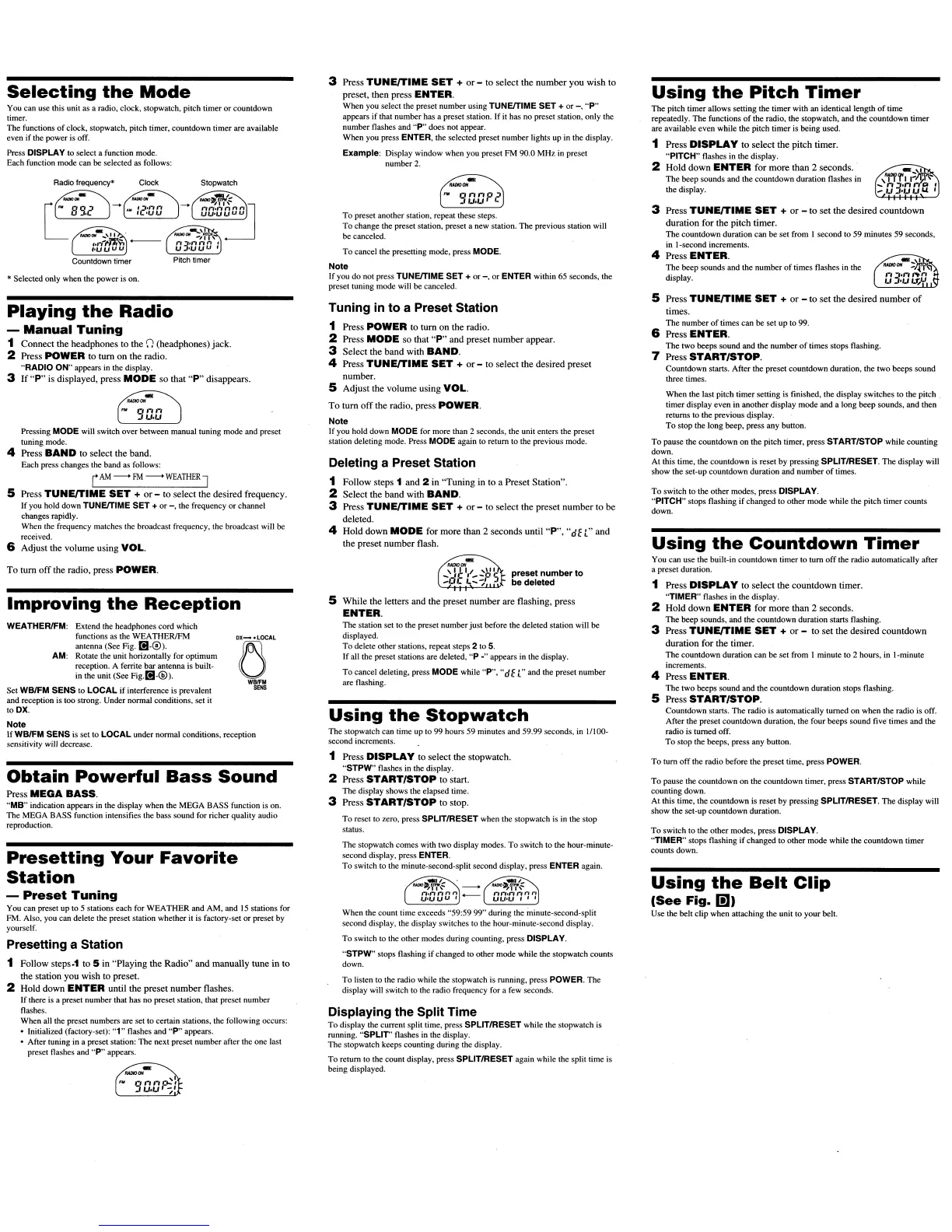
Selecting
the
Mode
You can use this unit as a radio. clock, stopwatch, pitch timer
or
countdown
timer.
The functions
of
clock, stopwatch, pitch timer, countdown timer are available
even if the
power
is off.
Press
DISPLAY to select a function mode.
Each function mode can be selected as follows:
*Selected only when the power is on.
Playing
the
Radio
-
Manual
Tuning
1 Connect the headphones to the
()
(headphones) jack.
2 Press POWER to
tum
on the radio.
"RADIO ON" appears in the display.
3 If
"p"
is
displayed, press
MODE
so that
"P"
disappears.
-
"""'''''
Pressing
MODE
will switch over between manual tuning mode and preset
tuning mode.
4 Press
BAND
to select the band.
Each press changes the band as follows:
r
AM
~
FM
~
WEATHER
J
5 Press
TUNE/TIME
SET
+
or
- to select the desired frequency.
If
you hold down
TUNElTIME
SET
+
or
-,
the frequency
or
channel
changes rapidly.
When the frequency matches the broadcast frequency, the broadcast will be
received.
6 Adjust the volume using
YOLo
Tuning in
to
a Preset Station
1 Press
POWER
to tum on the radin.
2 Press
MODE
sn that
"P"
and preset number appear.
3 Select the band with
BAND.
4 Press
TUNE/TIME
SET
+
or
- to select the desired preset
number.
5 Adjust the volume using
YOLo
To tum
off
the radio, press POWER.
Note
If you hold down
MODE
for more than 2 seconds, the unit enters the preset
station deleting mode. Press
MODE
again to return to the previous mode.
Deleting a Preset Station
1
Follow steps 1 and 2 in "Tuning
in
to a Preset Station".
2 Select the band with
BAND.
3 Press
TUNE/TIME
SET
+
or
- to select the preset number to be
deleted.
4 Hnld down
MODE
for more than 2 seconds until
"P",
"dE
["
and
the preset number flash.
5 Press
TUNE/TIME
SET
+
or
- to set the desired number
of
times.
The
number
of
times
can
be set up to 99.
6 Press
ENTER.
The
two
beeps sound and the
number
of
times stops flashing.
7 Press
START/STOP.
Countdown starts. After the preset countdown duration, the
two
beeps sound
three times.
When
the last pitch timer setting is finished, the display switches to the pitch
timer display
even
in another display mode and a long beep sounds, and then
returns
to
the previous Qisplay.
To
stop the long beep, press any button.
To
pause the countdown on the pitCh timer, press
STARTISTOP
while counting
down.
At this time, the countdown is reset
by
pressing
SPLITIRESET.
The
display will
show the set-up countdown duration and
number
of
times.
To
switch to the other modes, press
DISPLAY.
"PITCH"
stops flashing
if
changed to other mode while the pitch timer counts
down.
Using
the
Countdown
Timer
You can use the built-in countdown timer to turn
off
the radio automatically after
a preset duration.
1 Press
DISPLAY
tn select the countdnwn timer.
"TIMER"
flashes in the display.
2 Hold down
ENTER
for more than 2 seconds.
The
beep sounds, and the countdown duration starts flashing.
3 Press
TUNE/TIME
SET
+
or
- tn set the desired countdown
duration for the timer.
The
countdown duration
can
be
set from I minute
to
2 hours, in I·minute
increments.
4 Press
ENTER.
The
two beeps sound and the countdown duration stops flashing.
5 Press
START/STOP.
Countdown starts.
The
radio is automatically turned on when the radio is off.
After the preset countdown duration, the four beeps sound five' times and the
radio is turned off.
To
stop the beeps, press any button.
To
tum
off
the radio before the preset time, press
POWER.
To
pause the countdown
on
the countdown timer, press
START/STOP
while
counting down.
At this time, the countdown is reset by pressing
SPLITIRESET.
The
display will
show the set-up countdown duration.
To
switch
to
the other modes, press
DISPLAY.
"TIMER"
stops flashing
if
changed to other mode while the countdown timer
counts down.
Using
the
Belt
Clip
(See
Fig.
I!lJ
Use the belt clip when attaching the unit to
your
belt.
To
reset
to
zero, press
SPLITIRESET
when the stopwatch is in the stop
status.
To
listen to the radio while the stopwatch is running, press
POWER.
The
display will switch to the radio frequency for a few seconds.
When the count time exceeds "59:59
99"
during the minute-second-split
second display, the display switches to the hour-minute-second display.
To
switch to the other modes during counting, press
DISPLAY.
"STPW"
stops flashing
if
changed to other mode while the stopwatch counts
down.
The
stopwatch comes with two display modes.
To
switch
to
the hour-minute-
second display, press
ENTER.
To
switch to the minute-second-split second display, press
ENTER
again.
Using
the
Stopwatch
1 Press
DISPLAY
to select the stopwatch.
"STPW"
flashes in the display.
2 Press
START/STOP
to start.
The
display shows the elapsed time.
3 Press
START/STOP
to stop.
preset number
to
be
deleted
5 While the letters and the preset number are flashing, press
ENTER.
The
station set to the preset number
just
before the deleted station will be
displayed.
To
delete other stations, repeat steps 2 to
5.
If all the preset stations are deleted,
"P
.,. appears in the display.
To
cancel deleting, press
MODE
while
"P",
"dE
L"
and the preset number
are flashing.
The stopwatch can time up
to
99 hours 59 minutes and 59.99 seconds, in 1/100-
second increments.
Displaying the Split Time
To
display the current split time, press
SPLITIRESET
while the stopwatch is
running.
"spur'
flashes in the display.
The
stopwatch keeps counting during the display.
To
return to the count display, press
SPLITIRESET
again while the split time is
being displayed.
Obtain
Powerful
Bass
Sound
Press
MEGA
BASS.
"MB"
indication appears in the display when the
MEGA
BASS function is on.
The
MEGA BASS function intensifies the bass sound for richer quality audio
reproduction.
Presetting a Station
1
Follow
steps~1
to 5
in
"Playing the Radio" and manually tune in to
the station you wish to preset.
2 Hold down
ENTER
until the preset number flashes.
If
there is a preset number that has no preset station. that preset number
flashes.
When all the preset numbers are set to certain stations, the following occurs:
• Initialized (factory-set):
"1"
flashes and
"P"
appears.
• After tuning in a preset station: The next preset number after the one last
preset flashes and
"P"
appears.
To tum nff the radio, press POWER.
WEATHERlFM:
Extend the headphones cord which
functions as the
WEATHERlFM
antenna (See Fig.
[1-0).
AM: Rotate the unit horizontally for optimum
reception. A ferrite bar antenna is built-
in the unit (See
Fig.D1-@).
Set
WB/FM
SENS
to
LOCAL
if
interference is prevalent
and reception is too strong. Under nonnal conditions, set
it
to
OX.
Note
If
WBIFM
SENS
is set to
LOCAL
under
nonnal
conditions, reception
sensitivity will decrease.
Improving
the
Reception
Presetting
Your
Favorite
Station
-
Preset
Tuning
You can preset up to 5 stations each for
WEATHER
and AM, and
15
stations for
FM. Also. you can delete the preset station whether it is factory-set
or
preset by
yourself.


 To Next Page
 Loading...