Setting the Camera Via a Network
32
Setting the Security — Security Menu
Setting the Security
—Security Menu
When you click in the Administrator menu, the
Security menu appears.
The Security menu consists of the User, Access limit,
SSL, 802.1X and Referer check tabs.
Administrator and User
This camera identifies those who log in as the
Administrator or User.
The Administrator can use all the functions of this
camera, including camera settings. The User can use the
functions for monitoring the image and audio from the
camera, and control the camera. The Viewer mode
setting is used to restrict the user’s access rights. There
are five types of users.
Each type of user can use the corresponding functions
below.
z Usable function
– Not usable function
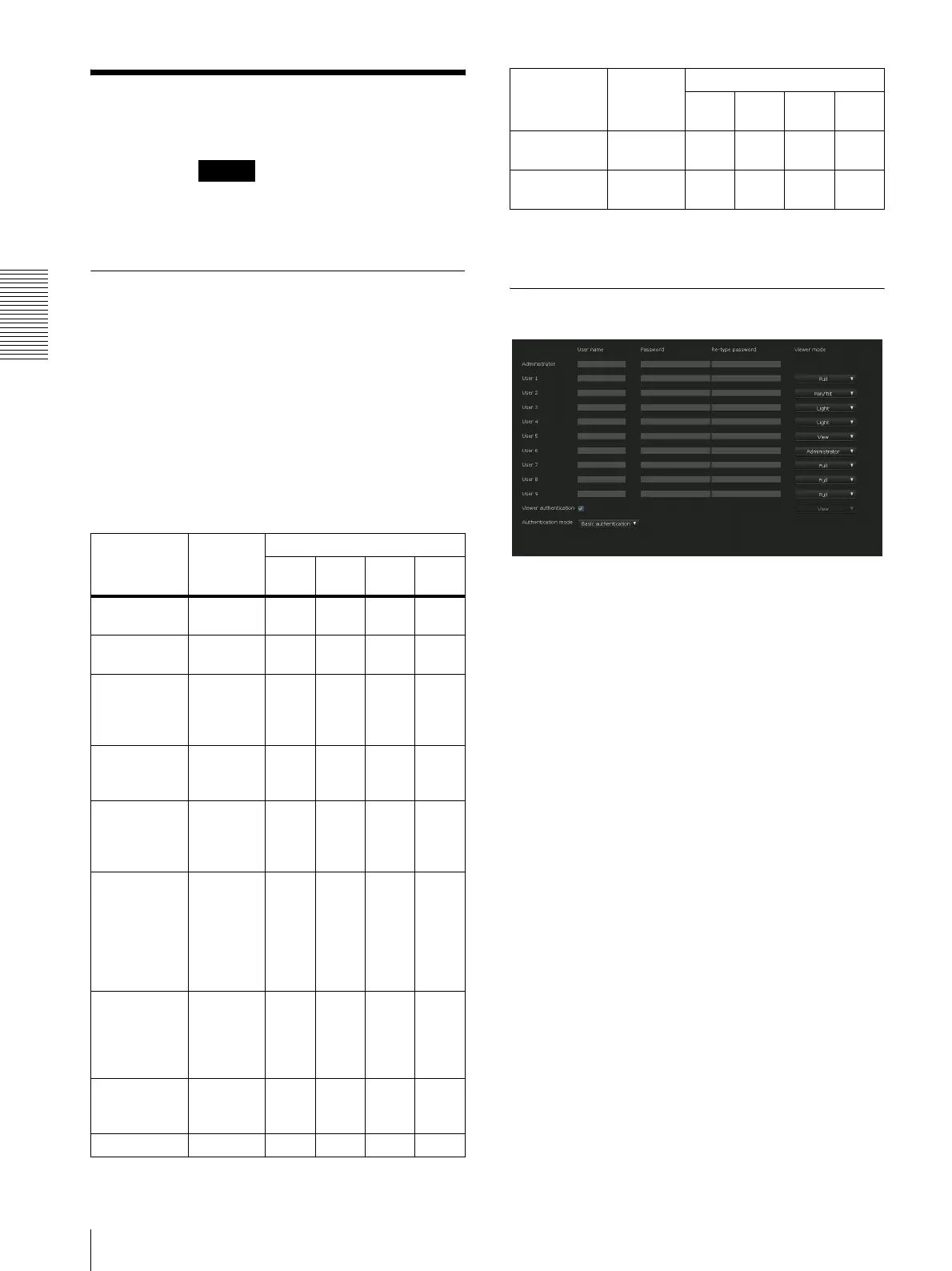
User Tab
Set the user names and passwords of Administrator and
up to 9 types of user (User 1 to User 9), and the viewer
mode of each user.
Administrator, User 1 to 9
Specify User name, Password, Re-type password and
Viewer mode for each user ID.
User name
Type a user name between 5 and 16 characters.
Password
Type a password between 5 and 16 characters.
Re-type password
To confirm the password, retype the password that you
typed in the Password box.
Viewer mode
When the user is authenticated for logging in the viewer,
select the viewer mode to be displayed after
authentication.
Administrator: The user can operate all functions
including the setting menu in this mode.
Full: The user can operate all functions other than the
setting menu.
Pan/Tilt: In addition to the Light mode, the user can
operate pan/tilt/zoom.
Function
Administrator
User
Full
Pan/
Tilt
Light View
Monitor a live
image
z zzzz
View the date
and time
z zzzz
Control the
frame rate
(JPEG mode
only)
zz–––
Control the
image view
size
z zzz –
Save a still
image and
movie in the
computer
z zzz –
Switch the
TCP/UDP
transmission
mode
(Available in
H.264 mode
only)
zz–––
Switch
Deactivation/
Activation of
hardware
acceleration
z zzzz
Perform the
pan/tilt/zoom
operation
zzz––
Receive audio z zzzz
Security
Select the
codec mode
z zzz –
Control the
setting menu
z ––––
Function
Administrator
User
Full
Pan/
Tilt
Light View


 To Next Page