Need help?
Do you have a question about the Sony SRS-GU10iP and is the answer not in the manual?
Follow instructions, avoid water, clean with dry cloth, ensure ventilation.
Install away from heat, do not defeat plug safety features.
Protect power cord, use manufacturer-specified accessories.
Refer servicing to qualified personnel for any damage or malfunction.
Choose dock adapter, insert it, and place iPod into the unit.
Power on, select input, play music, charge iPod, and adjust volume.
Identifies buttons like INPUT, MENU, ENTER, SHUFFLE, REPEAT, VOLUME, MUTING.
Indicator flashing indicates protect mode; disconnect/reconnect AC.
Check iPod software, connections, volume, and cases.
Check for obstacles, sensor alignment, battery, and lighting.
Move system from noise sources, try a different mains outlet.
Reduce volume and adjust iPod EQ settings.
 General
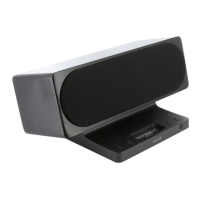
| Driver unit | 57 mm |
|---|---|
| Magnet type | Neodymium |
| Product color | Black |
| Volume control | Digital |
| Bass adjustment | Yes |
| Dimensions (WxDxH) | 320 x 154 x 194 mm |
 Weight and Dimensions
| Weight | 2100 g |
|---|

 To Next Page