Help Guide
Multi Channel AV Receiver
STR-AZ7000ES/STR-AZ5000ES/STR-AZ3000ES
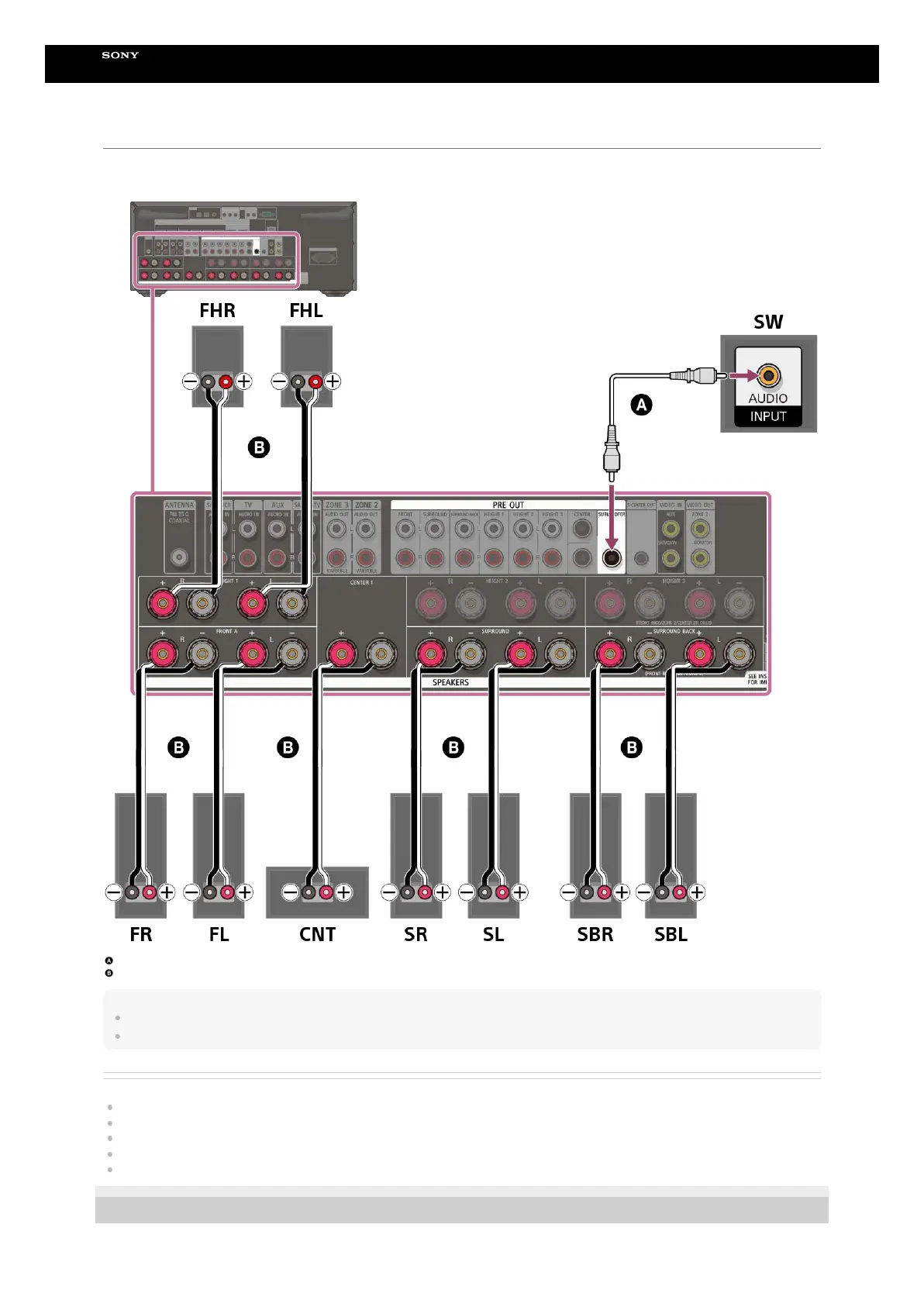
Connecting 7.1.2-channel speaker system
Connect each speaker to the SPEAKERS terminals on the rear of the receiver.
Before connecting cables, be sure to disconnect the AC power cord (mains lead).
For details on how to connect speaker cables to the receiver, see “How to connect speaker cables.”
Monaural audio cable (not supplied)
Speaker cable (not supplied)
Note
After you have installed and connected your speakers, set the [Manual Speaker Settings] - [Speaker Pattern] to [7.1.2(FH)] in the [Speaker Settings] menu.
Connect speaker cables properly with the polarities (+/–) matched between the speaker cables and the SPEAKERS terminals.
Related Topic
Speaker installation example
Installing 7.1.2-channel speaker system
Selecting the speaker pattern (Speaker Pattern)
Notes on connecting cables
How to connect speaker cables
5-037-021-11(1) Copyright 2022 Sony Corporation











 To Next Page