11
EN
STR-AZ7000ES/STR-AZ5000ES/STR-AZ3000ES
5-037-019-11(1)
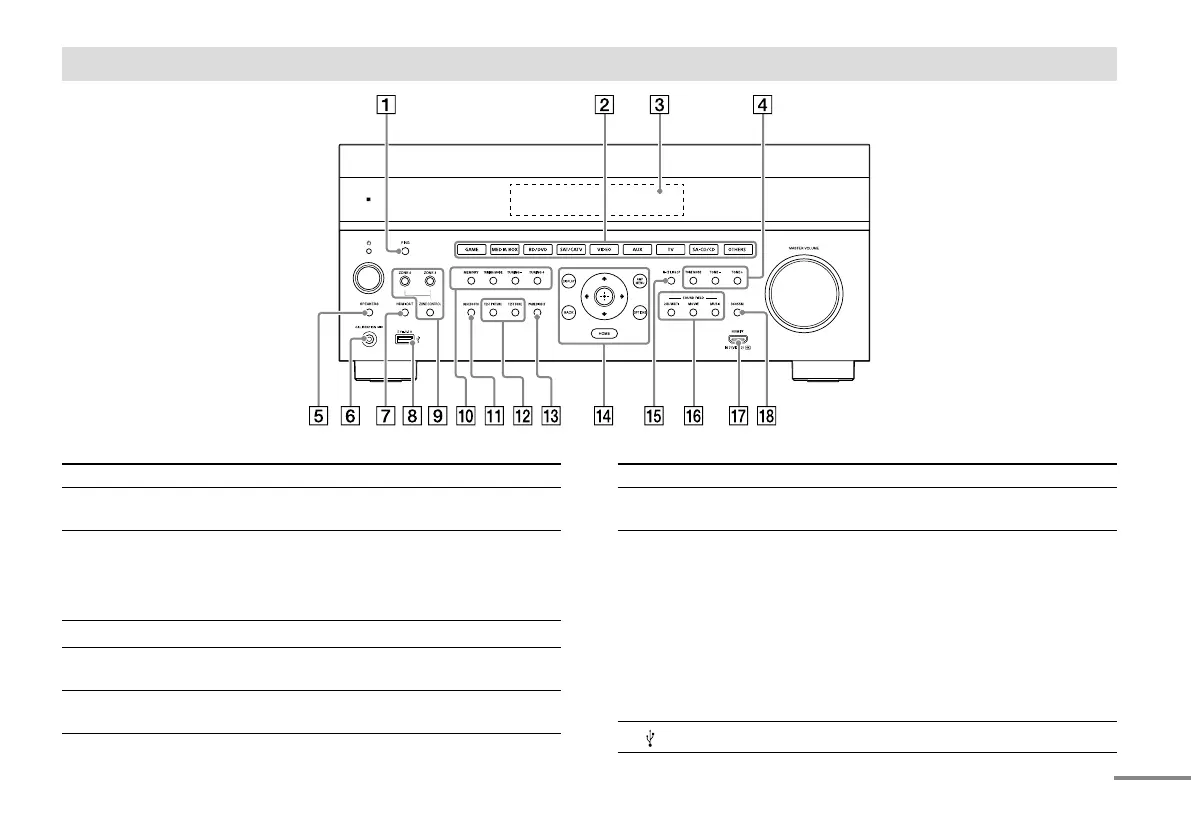
Front panel
Parts Functions
PING Displays the IP address and MAC address on
the display panel.
Input buttons Select the device you want to play.
When you press any of the input buttons, the
receiver turns on.
Press OTHERS button repeatedly to select
other playback source.
Display panel Switches information on the display panel.
TONE MODE, TONE+/– Press to adjust the bass/treble level of the
speaker.
SPEAKERS Switches the front speakers to “OFF”, “A”, “B”
or “A+B.”
Parts Functions
CALIBRATION MIC jack Connect the supplied calibration microphone
for “Auto Calibration” to this jack (page 21).
HDMI OUT Switches the output for two monitors
connected to the HDMI OUT A and
HDMI OUT B (ZONE 2) jacks. When
[HDMI OUT B Mode] is set to [Main] in
[HDMI Settings], output is toggled between
“HDMI A”, “HDMI B”, “HDMI A+B” and
“HDMI OFF” each time the button is pressed.
Select “HDMI OFF” to turn off the output for
HDMI OUT A and HDMI OUT B (ZONE 2) jacks.
When [HDMI OUT B Mode] is set to [Zone2],
output is toggled between “HDMI A” and
“HDMI OFF” each time the button is pressed.
(USB) port
Connect a USB device here.
continued











 To Next Page