19
EN
STR-AZ7000ES/STR-AZ5000ES/STR-AZ3000ES
5-037-019-11(1)
Remote Control
Parts Functions
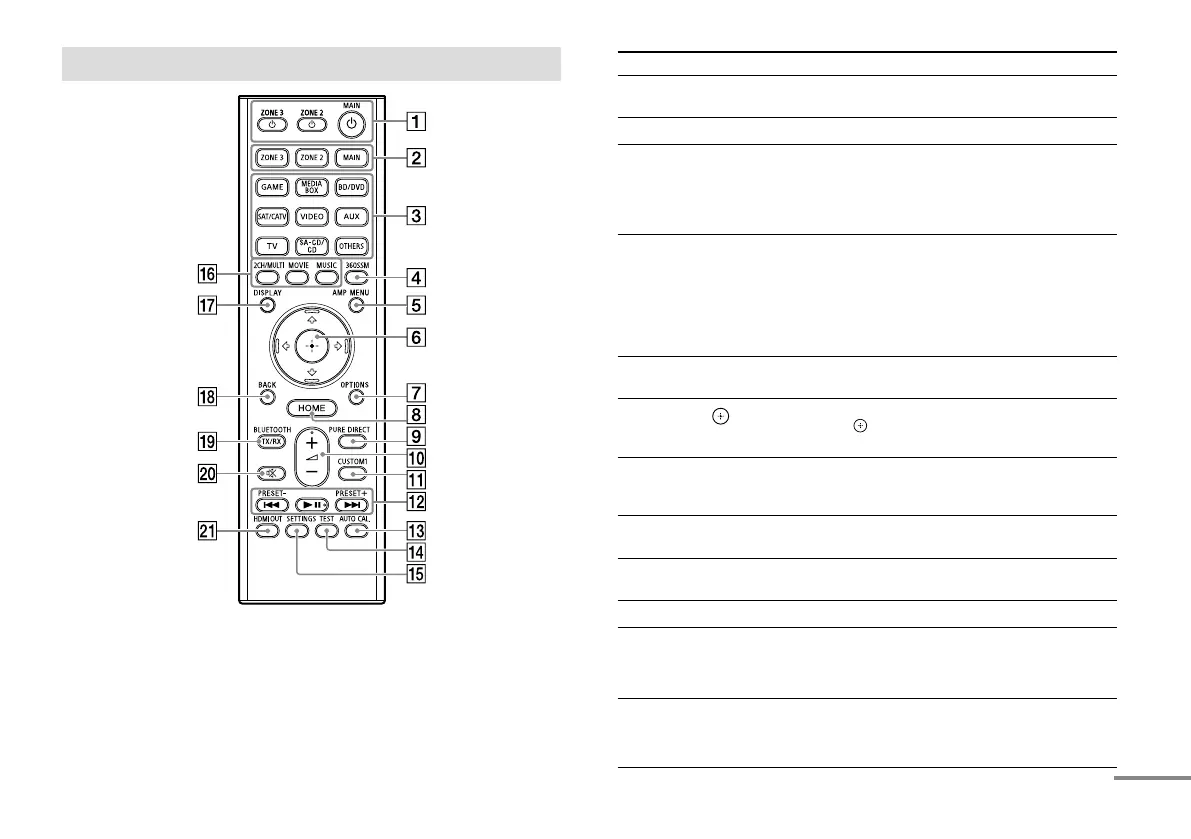
(power)
ZONE 2, ZONE 3, MAIN
Turns the receiver in the main zone, Zone 2 or
Zone 3 on or sets it to standby mode.
ZONE 2, ZONE 3, MAIN Selects the location to be controlled.
Input buttons Select the device you want to play.
When you press any of the input buttons, the
receiver turns on.
Press OTHERS button repeatedly to select
other playback source.
360SSM Activates or deactivates the
360 Spatial Sound Mapping function.
The 360 Spatial Sound Mapping function
allows you to enjoy an amazing 360 Spatial
Sound experience that makes the sound
feel more spacious and as if there are more
speakers in the room.
AMP MENU Displays the menu on the display panel to
operate the receiver.
///,
Press /// to select the menu items. Then
press
to enter the selection (page 23,
24, 25, 27, 29).
OPTIONS Displays items from the options menus
(page26).
The menu is not displayed for the TV input.
HOME Displays the home menu on the TV screen
(page 23, 24, 25, 27, 29).
PURE DIRECT Activates or deactivates the Pure Direct
function.
+*/–
Adjusts the volume level (page 24).
CUSTOM1 Saves and recalls various settings for the
receiver. Press to select the custom preset
setting. Press and hold to save the current
settings to a preset.
/, *
Skip, play, pause operation.
PRESET+/– Select preset stations or channels. Press and
hold to scan stations automatically.
continued











 To Next Page