EasyManua.ls Logo

Sony STR-D311 - Remote Commander Operation; Battery Installation and Life

Sony STR-D311
21 pages
Print Icon
To Next Page IconTo Next Page
To Previous Page IconTo Previous Page
Loading...
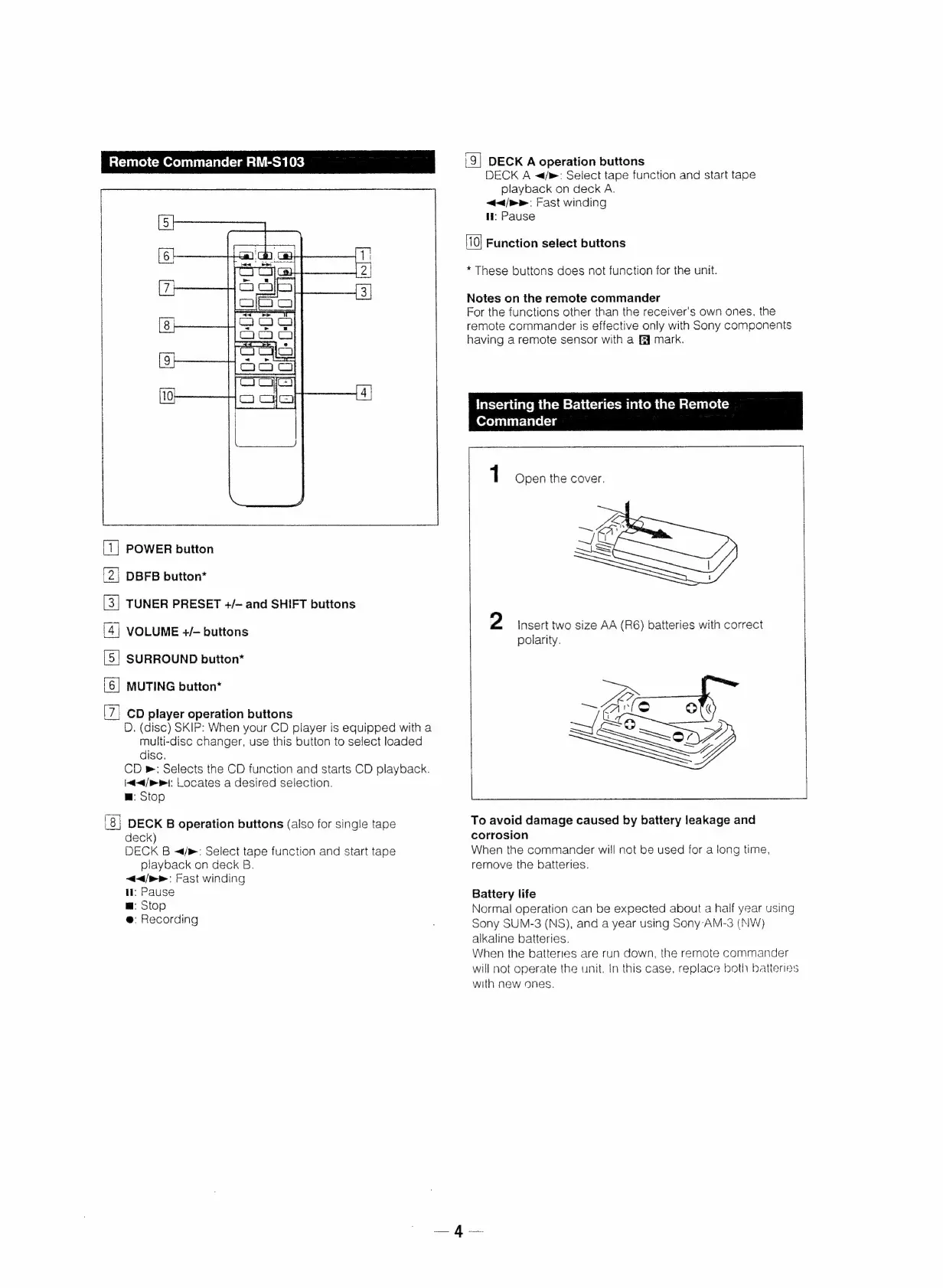
Remote
Commander
RM-S103
(9]
DECK
A
operation
buttons
DECK
A
~</m:
Select
tape
function
and
start
tape
playback
on
deck
A.
</p>
Fast
winding
li:
Pause
[10]
Function
select
buttons
*
These
buttons
does
not
function
for
the
unit.
Notes
on
the
remote
commander
For
the
functions
other
than
the
receiver's
own
ones,
the
remote
commander
is
effective
only
with
Sony
components
having
a
remote
sensor
with
a
EF
mark.
inserting
the
Batteries
into
the
Remote
Commander
1
Open
the
cover.
POWER
button
DBFB
button*
TUNER
PRESET
+/—
and
SHIFT
buttons
2
Insert
two
size
AA
(R6)
batteries
with
correct
polarity.
VOLUME
+/—
buttons
SURROUND
button*
MUTING
button*
ay
A] f)
fel
&
el
be
7,
CD
player
operation
buttons
D.
(disc)
SKIP:
When
your
CD
player
is
equipped
with
a
multi-disc
changer,
use
this
button
to
select
loaded
disc.
CD
®:
Selects
the
CD
function
and
starts
CD
playback.
|~<4/mr|:
Locates
a
desired
selection.
~~
art
@
fp)
<Gaeessst
SEY
m:
Stop
'8|
DECK
B
operation
buttons
(also
for
single
tape
To
avoid
damage
caused
by
battery
leakage
and
deck)
corrosion
DECK
B
~</®:
Select
tape
function
and
start
tape
When
the
commander
will
not
be
used
for
a
long
time,
playback
on
deck
B.
remove
the
batteries.
</>:
Fast
winding
ll:
Pause
Battery
life
m@:
Stop
Normal
operation
can
be
expected
about
a
half
year
using
Sony
SUM-3
(NS),
and
a
year
using
Sony-AM-3
(NW)
alkaline
batteries.
When
the
batteries
are
run
down,
the
remote
commander
will
not
operate
the
unit.
In
this
case,
replace
both
batteries
with
new
ones.
@:
Recording

Other manuals for Sony STR-D311

Related product manuals