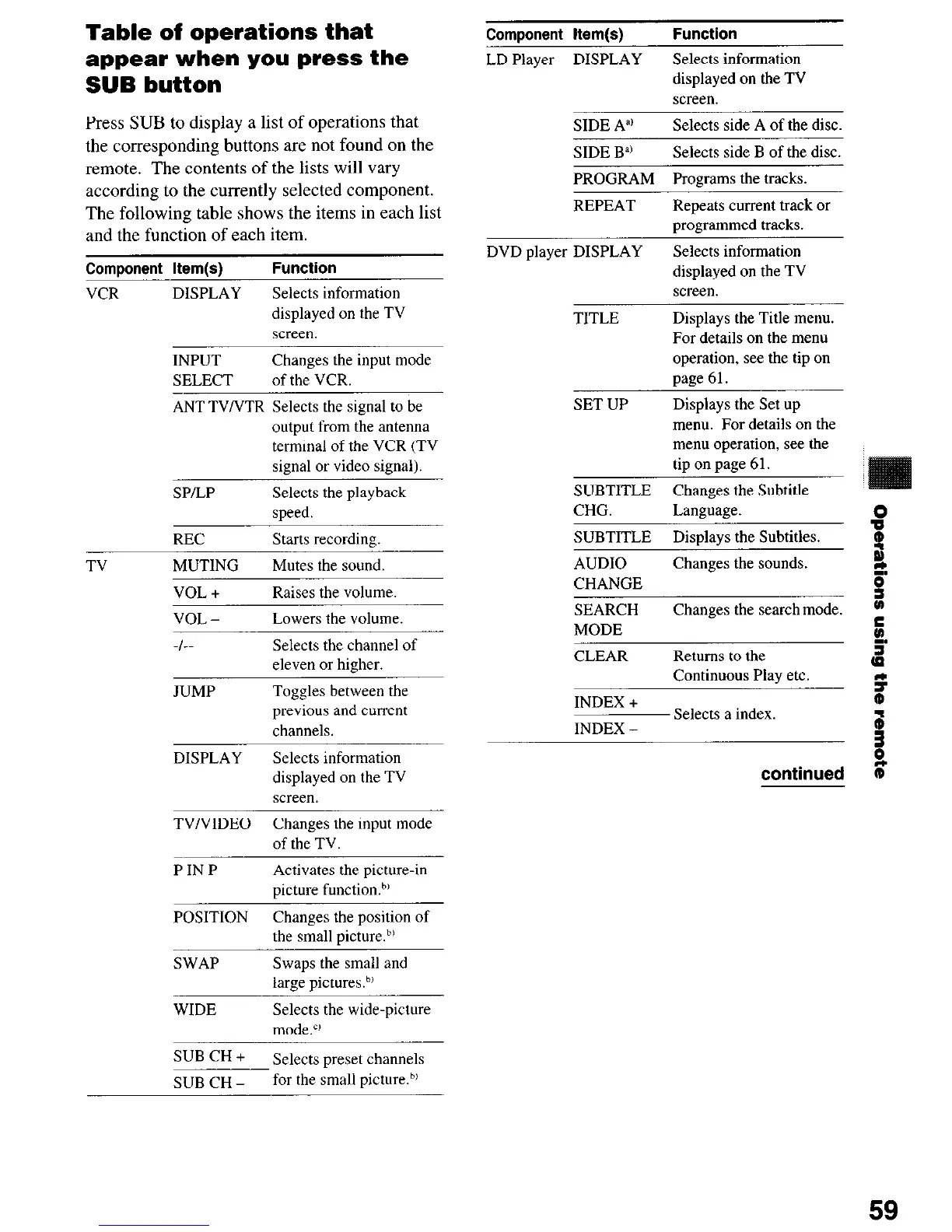
Table of operations that
appear when you press the
SUB button
Press SUB to display a list of operations that
the corresponding buttons are not found on the
remote. The contents of the lists will vary
according to the currently selected component.
The following table shows the items in each list
and the function of each item.
Component Item(s)
Function
VCR
DISPLAY
Selects information
displayed on the TV
screen.
TV
INPUT
Changes the input mode
SELECT
of the VCR.
-
ANT TVNTR Selects the signal to be
output from the antenna
terminal of the VCR (TV
signal or video signal).
SP/LP
Selects the playback
speed.
REC
Starts recording.
MUTING
Mutes the sound.
VOL +
Raises the volume.
VOL -
Lowers the volume.
-/--
Selects the channel of
eleven or higher.
JUMP
Toggles between the
previous and current
channels.
DISPLAY Selects information
displayed on the TV
screen.
TV/VIDEO Changes the input mode
of the TV.
P IN P
Activates the picture-in
picture function.h’
POSITION
Changes the position of
the small picture.bl
SWAP
Swaps the small and
large picturesh’
WIDE
Selects the wide-picture
mode.”
SUB CH +
Selects preset channels
SUB CH -
for the small picture.b’
ComDonent Item(s)
Function
LD Player DISPLAY
SIDE A”’
Selects information
displayed on the TV
screen.
Selects side A of the disc.
SIDE B”’
Selects side B of the disc.
PROGRAM Proerams the tracks.
REPEAT
DVD player DISPLAY
Repeats current track or
programmed tracks.
Selects information
displayed on the TV
screen.
TITLE
SET UP
Displays the Title menu.
For details on the menu
operation, see the tip on
page 61.
Displays the Set up
menu. For details on the
menu operation, see the
tip on pige 61.
SUBTITLE Changes the Subtitle
CHG. Language.
8
SUBTITLE Displays the Subtitles.
s
AUDIO
Changes the sounds.
%
_,
CHANGE
SEARCH
Changes the search mode.
D
MODE
c.
CLEAR Returns to the
z
Continuous Play etc.
9
INDEX +
INDEX -
Selects a index
;r
continued (P
59













 To Next Page