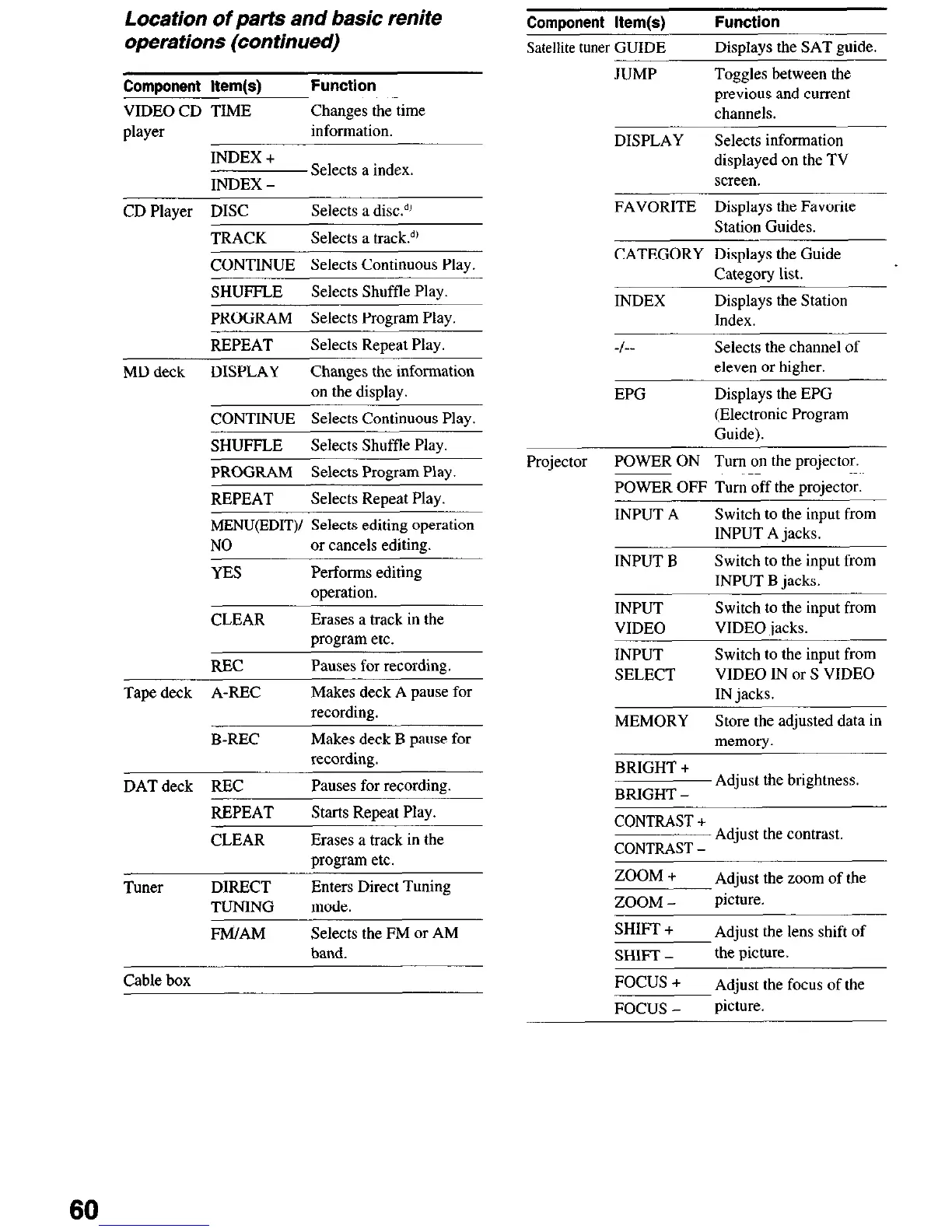
Location of parts and basic renite
operations (continued)
Component Item(s)
Function
VIDEO CD TIME
Changes the time
player
information.
Component Item(s)
Satellite tuner GUIDE
JUMP
Function
Displays the SAT guide.
Toggles between the
previous and current
channels.
DISPLAY Selects information
displayed on the TV
screen.
INDEX +
INDEX -
Selects a index
FAVORITE Displays the Favorite
Station Guides.
CD Player DISC
TRACK
Selects a disc!’
Selects a track!’
CATEGORY Displays the Guide
Category list.
CONTINUE Selects Continuous Play.
SHUFFLE
Selects Shuffle Play.
INDEX
Displays the Station
Index.
PROGRAM Selects Program Play
REPEAT
Selects Repeat Play.
MD deck
DISPLAY Changes the information
on the display.
CONTINUE Selects Continuous Play.
-,-
EPG
Selects the channel of
eleven or higher.
Displays the EPG
(Electronic Program
Guide).
SHUFFLE
Selects Shuffle Play
Projector
POWER ON Turn on the projector.
POWER OFF Turn off the proiector.
PROGRAM Selects Program Play.
REPEAT
Selects Repeat Play.
MENU(EDIT)/ Selects editing operation
NO
or cancels editing.
YES
Performs editing
operation.
CLEAR
Erases a track in the
program etc.
REC
Pauses for recording
INPUT A
Switch to the input from
INPUT A jacks.
INPUT B
Switch to the input from
INPUT B jacks.
INPUT
VIDEO
Switch to the input from
VIDEO jacks.
INPUT
SELECT
Switch to the input from
VIDEO IN or S VIDEO
IN jacks. Tape deck A-REC
Makes deck A pause for
recording.
MEMORY
Store the adjusted data in
memory. B-REC
Makes deck B pause for
recording.
BRIGHT +
BRIGHT -
Adjust the brightness.
DATdeck REC
Pauses for recording
REPEAT Starts Retreat Play.
CONTRAST +
CONTRAST -
Adjust the contrast.
ZOOM +
Adjust the zoom of the
ZOOM -
picture.
CLEAR
Erases a track in the
moeram etc.
Tuner DIRECT
TUNING
Enters Direct Tuning
mode.
FM/AM
Selects the FM or AM
band.
SHIFT +
SHIFT -
FOCUS +
FOCUS -
Adjust the lens shift of
the picture.
Adjust the focus of the
picture.
Cable box
60













 To Next Page