masterpage:Left
lename[C:\Documents and Settings\pc13\Desktop\Data_HT-
800DP\J9041614_4252273111HT6800DP\4252273111\GB08REM_HT-6800DP-U.fm]
38
US
model name1[HT-6800DP]
[4-252-273-11(1)]
You can use the remote RM-PP860 to operate
the components in your system.
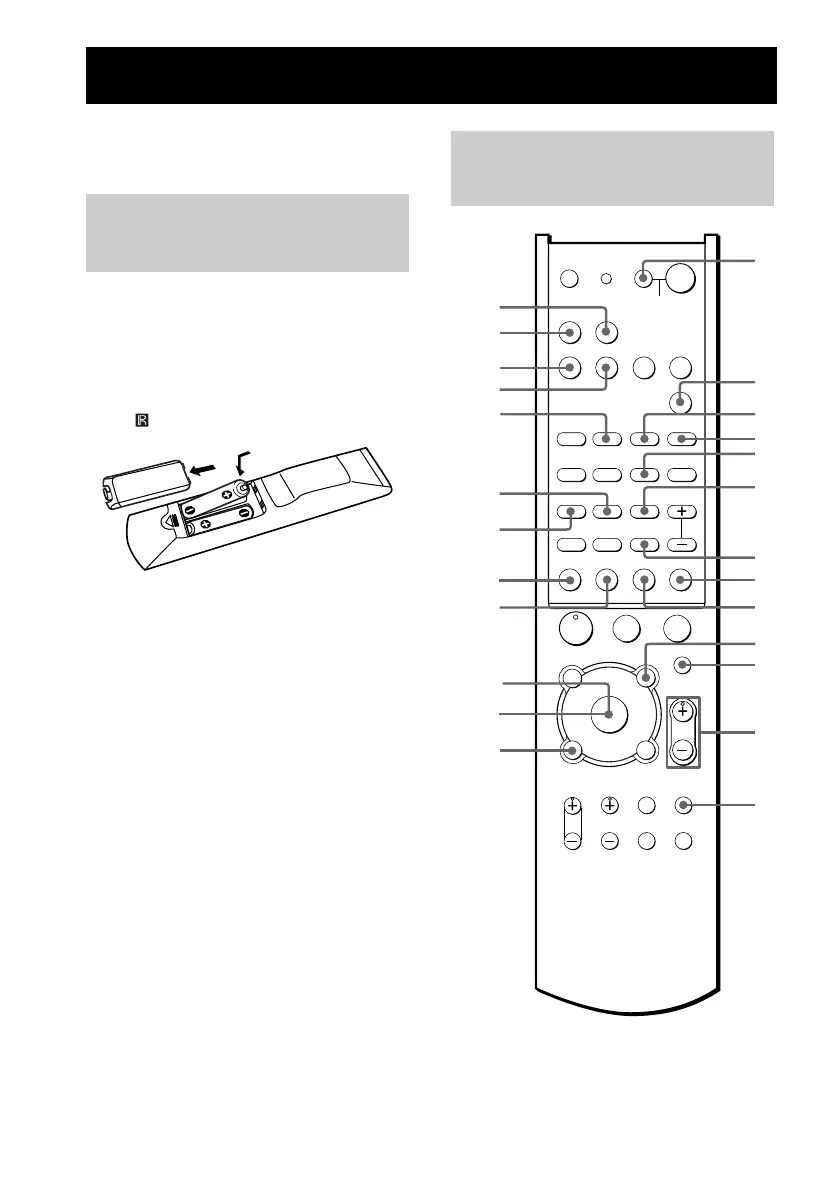
Inserting batteries into the
remote
Insert R6 (size-AA) batteries with the + and –
properly oriented in the battery compartment.
When using the remote, point it at the remote
sensor on the receiver.
Tip
Under normal conditions, the batteries should last for
about 6 months. When the remote no longer operates
the receiver, replace all batteries with new ones.
Notes
• Do not leave the remote in an extremely hot or humid
place.
• Do not use a new battery with an old one.
• Do not expose the remote sensor to direct sunlight or
lighting apparatuses. Doing so may cause a
malfunction.
• If you don’t use the remote for an extended period of
time, remove the batteries to avoid possible damage
from battery leakage and corrosion.
Operations Using the Remote RM-PP860
Before you use your
remote
Remote button
description
H
X
Mm
.
>
-
VIDEO1 VIDEO2
RM SET UP
SYSTEM STANDBY
SLEEP
AV1 AV2
TV ?/1 AV ?/1
DVD
MD/TAPE SA-CD/CD
TUNER
MULTI CH
SHIFT
TOP MENU/
GUIDE
AV MENU
MUTING
MASTER
VOL
DISPLAY
TV VOL TV CH
TV/
VIDEO
MAIN
MENU
TEST
TONEWIDE
RETURN/EXIT
D.TUNING DISC ALT
ANT
CLEAR
SEARCH MODE
2CH
A.F.D.
123
456
789
0/10 >10/11 12
MOVIE
SUBTITLE ENTER
MUSIC
AUDIO
ANGLE
JUMP/
TIME
PRESET/
CH/D.SKIP
SB
DECODING
DUAL
MONO
x
?/1
P
O
v
V
bB
1
8
qa
4
2
3
5
6
9
7
qs
qd
qf
qg
qh
qk
ql
wa
ws
qj
ENTER
q;
w;
wd
wf
GB01COV_HT-6800DP-U.book Page 38 Tuesday, March 23, 2004 6:02 PM




 To Next Page