EasyManua.ls Logo

Sony STR-KM7 - User Manual

Sony STR-KM7
85 pages
Print Icon
To Next Page IconTo Next Page
Loading...
SERVICE MANUAL
Sony Corporation
Audio & Video Business Group
Published by Sony EMCS (Malaysia) PG Tec
STR-KM5/KM7
MULTI CHANNEL AV RECEIVER
9-890-588-07
2014C80-1
©
2014.03
US Model
E Model
STR-KM5
Argentina Model
Saudi Arabia Model
South African Model
STR-KM5/KM7
Australian Model
Singapore Model
STR-KM7
Ver. 1.6 2014.03
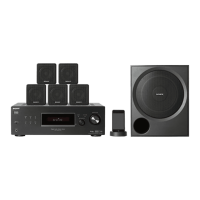
STR-KM5 is the receiver section in HT-M5.
STR-KM7 is the receiver section in HT-M7.
– Continued on next page –
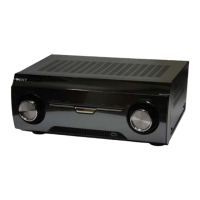
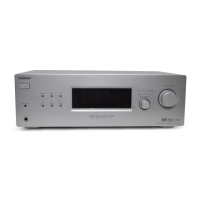
Photo: STR-KM7
This receiver incorporates Dolby* Digital and Pro Logic Surround and the DTS** Digital Surround System.
* Manufactured under license from Dolby Laboratories. Dolby, Pro Logic, and the double-D symbol are trademarks of Dolby Laboratories.
** Manufactured under license under U.S. Patent Nos: 5,956,674; 5,974,380; 6,226,616; 6,487,535 & other U.S. and worldwide patents issued & pending.
DTS, the Symbol, & DTS and the Symbol together are registered trademarks & DTS Digital Surround | 96/24 is a trademark of DTS, Inc. Product
includes software. © DTS, Inc. All Rights Reserved.
This receiver incorporates High-De nition Multimedia Interface (HDMI
TM
) technology.
HDMI, the HDMI logo, and HDMI High-De nition Multimedia Interface are trademarks or registered trademarks of HDMI Licensing LLC in the United
States and other countries.
“x.v.Color (x.v.Colour)” and “x.v.Color (x.v.Colour)” logo are trademarks of Sony Corporation.
“BRAVIA” is a trademark of Sony Corporation.
“PlayStation” is a registered trademark of Sony Computer Entertainment Inc.
MPEG Layer-3 audio coding technology and patents licensed from Fraunhofer IIS and Thomson.
“WALKMAN” is a registered trademark of Sony Corporation.
MICROVAULT is a trademark of Sony Corporation.
Windows media is either a registered trademark or trademark of Microsoft Corporation in the United States and/or other countries.
This product contains technology subject to certain intellectual property rights of Microsoft. Use or distribution of this technology outside of this product is
prohibited without the appropriate license(s) from Microsoft.
SPECIFICATIONS
Ampli er section
Power Output
• STR-KM7
Argentina model
Stereo mode output (rated) (6 ohms, 1 kHz, THD 1%)
120 W + 120 W
1)
Surround mode output
2)
(reference) (6 ohms, 1 kHz,
THD 30%)
RMS output
FRONT: 255 W per channel
1)
CENTER: 255 W
1)
SURROUND: 255 W per channel
1)
SURROUND BACK: 255 W per channel
1)
Surround mode
2)
(reference) (4 ohms, 100 Hz,
THD 30%)
SUBWOOFER: 280 W per channel
1)
Other models
Stereo mode output (rated) (6 ohms, 1 kHz, THD 1%)
120 W + 120 W
1)
Surround mode output
2)
(reference) (6 ohms, 1 kHz,
THD 10%)
RMS output
FRONT: 216 W per channel
1)
CENTER: 216 W
1)
SURROUND: 216 W per channel
1)
SURROUND BACK: 216 W per channel
1)
Surround mode
2)
(reference) (4 ohms, 100 Hz,
THD 10%)
SUBWOOFER: 250 W per channel
1)
1)
Measured under the following conditions:
Area Power requirements
SAF, SP 240 V AC, 50 Hz
EA 127 V AC, 60 Hz
AUS, AR 230 V AC, 50 Hz
2)
Reference power output for front, center, surround,
surround back speakers and subwoofers.
Depending on the sound eld settings and the source,
there may be no sound output.
• STR-KM5
AUDIO POWER SPECIFICATIONS
POWER OUTPUT AND TOTAL
HARMONIC DISTORTION:
(US model only)
Front L + Front R:
With 6 ohm loads, both channels driven, from
50 Hz – 20,000 Hz; rated 100 watts per channel
minimum RMS power, with no more than 0.2%
total harmonic distortion from 250 milliwatts to
rated output.
US, Latin America and Argentina models
Stereo mode output (rated) (6 ohms, 1 kHz, THD 1%)
120 W + 120 W
3)
Surround mode output
4)
(reference) (6 ohms, 1 kHz,
THD 30%)
RMS output
FRONT: 255 W per channel
3)
CENTER: 255 W
3)
SURROUND: 255 W per channel
3)
Surround mode
4)
(reference) (4 ohms, 100 Hz,
THD 30%)
SUBWOOFER: 280 W per channel
3)
Other models
Stereo mode output (rated) (6 ohms, 1 kHz, THD 1%)
120 W + 120 W
3)
Surround mode output
4)
(reference) (6 ohms, 1 kHz,
THD 10%)
RMS output
FRONT: 216 W per channel
3)
CENTER: 216 W
3)
SURROUND: 216 W per channel
3)
Surround mode
4)
(reference) (4 ohms, 100 Hz,
THD 10%)
SUBWOOFER: 250 W per channel
3)


Table of Contents

Questions and Answers

  • S
    Scott SheltonAug 21, 2025
    What to do if the remote control for my Sony STR-KM7 Home Theater System does not function?
    • F
      Francisco LaneAug 21, 2025
      If the remote control for your Sony Home Theater System isn’t working, try these steps: * Point the remote control at the remote control sensor on the receiver. * Remove any obstacles between the remote control and the receiver. * Replace the batteries in the remote control with new ones if they are weak.
  • R
    Ricky HamiltonAug 23, 2025
    What to do if there is no sound from a specific equipment connected to my Sony STR-KM7 Home Theater System?
    • A
      Amber NguyenAug 25, 2025
      If there is no sound from a specific equipment connected to your Sony Home Theater System, check the following: * Ensure the equipment is correctly connected to the audio input jacks for that equipment. * Verify the connecting cord(s) are fully inserted into the jacks on both the receiver and the equipment. * Check the INPUT MODE. * Check the setting of “AUDIO.OUT” in the HDMI menu. * Confirm the equipment is correctly connected to the HDMI jack for that equipment. * Note that you cannot listen to Super Audio CD by connecting HDMI.
  • D
    Donald FitzgeraldAug 26, 2025
    Why are the left and right sounds unbalanced or reversed on my Sony STR-KM7 Home Theater System?
    • G
      Glenn BlevinsAug 26, 2025
      If the left and right sounds are unbalanced or reversed on your Sony Home Theater System, check that the speakers and equipment are connected correctly and securely. You can also adjust the level parameters using the LEVEL menu.
  • D
    David ChapmanAug 27, 2025
    What to do if no image appears on my Sony STR-KM7 Home Theater System TV?
    • C
      christopherpatelAug 28, 2025
      If no image appears on the TV when using your Sony Home Theater System, try the following: * Select the appropriate input using the input buttons. * Set your TV to the appropriate input mode. * Move your audio equipment away from the TV. * Ensure cables are correctly and securely connected to equipment. * Set up the playback equipment, depending on the equipment. * Use a High Speed HDMI cable, especially for 1080p, Deep Color, or 3D transmission.
  • M
    Mariah RobinsonAug 30, 2025
    Why does my Sony STR-KM7 turn off automatically?
    • K
      Katie MorenoAug 30, 2025
      Your Sony Home Theater System receiver might be turning off automatically because “AUTO.STBY” is set to “STBY ON”, or the Sleep Timer function is active.
  • A
    Ana ZamoraSep 1, 2025
    What does USB FAIL mean on my Sony STR-KM7 and what to do?
    • L
      linda72Sep 1, 2025
      If your Sony Home Theater System displays “USB FAIL”, it indicates: * An over current from the USB port was detected. Check the USB device, then unplug it and turn on the power again. * Irregular current is output to the speakers, or the receiver is covered and ventilation holes are blocked. Remove the object covering the upper panel of the receiver, check the speaker connection, and turn on the power again.
  • K
    Kelly AvilaSep 3, 2025
    What to do if recording cannot be carried out on my Sony STR-KM7?
    • C
      Christina RoseSep 3, 2025
      If you cannot record with your Sony Home Theater System, please check the following: * Verify that the equipment is connected correctly. * Select the source equipment using the input buttons. * Note that audio input signals via HDMI IN and DIGITAL IN jacks cannot be recorded. * The source may contain copyright protection to prevent recording.
  • C
    Charles MurraySep 5, 2025
    Why is the FM reception poor on my Sony Home Theater System?
    • L
      Lisa ShepherdSep 5, 2025
      To improve poor FM reception on your Sony Home Theater System, use a 75-ohm coaxial cable to connect the receiver to an outdoor FM antenna.
  • M
    Melissa RoachSep 7, 2025
    What to do if the Control for HDMI function does not work on my Sony STR-KM7?
    • J
      Jose BaileySep 7, 2025
      If the Control for HDMI function is not working on your Sony Home Theater System, verify the following: * Check the HDMI connection. * Make sure “CTRL.HDMI” is set to “CTRL ON” in the HDMI menu. * Ensure the connected equipment is compatible with the Control for HDMI function.
  • P
    paul66Sep 9, 2025
    Why is there no 3D image appears on the TV connected to my Sony STR-KM7?
    • W
      wnelsonSep 10, 2025
      3D images may not be displayed on your Sony Home Theater System, depending on the TV or the video equipment you are using.

Sony STR-KM7 Specifications

General IconGeneral
BrandSony
ModelSTR-KM7
CategoryHome Theater System
LanguageEnglish

Related product manuals