STR-KM5/KM7
10
SECTION 3
TEST MODE
FL CHECK MODE
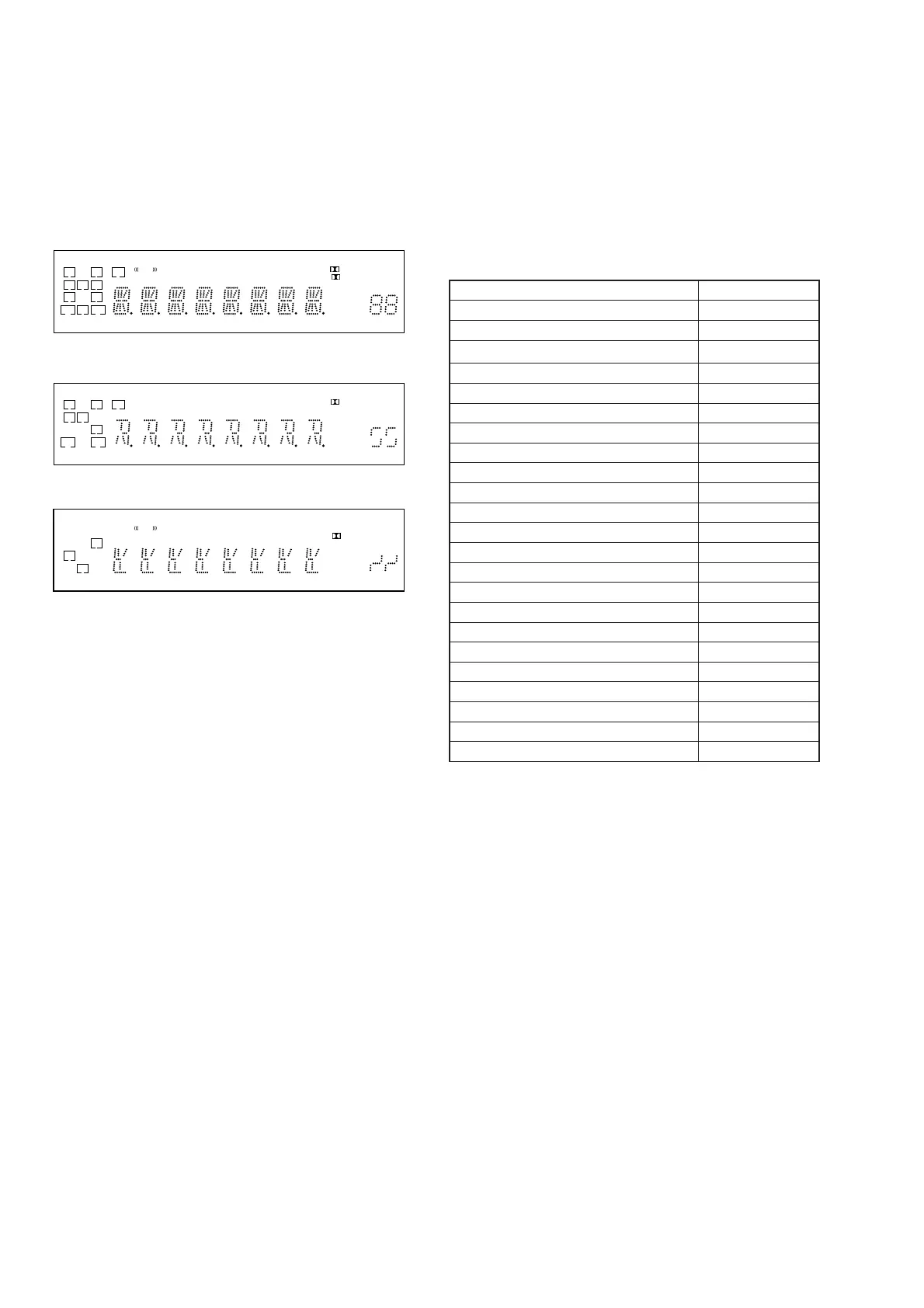
All fl uorescent segments are tested. When this test is activated, all
segments turn on at the same time, then each segment turns on one
after another.
Procedure:
1.
When pressing the [SURROUND SPEAKER] and [M-TURBO]
buttons, press the [
?/1
] button to turn on the main power.
2. All segments turn on.
L C R
SL S SR
SBL SB SBR
LH RH SW
COAX OPT
HDMILFE DTS -ES NEO:6 USB
96/24
DTS-HD MSTR HI RES LBR LPCM
RDS
AAC
TrueHD
SLEEP
D.RANGE
ST
D
PL II
+ EX
MHz
ft.
k Hz
m
x z
dB
3. Turn the [INPUT SELECTOR] dial.
4. Test pattern 1 turn on.
L C R
SL S
SR
SBL SB SBR
LH RH SW
COAX OPT
HDMILFE DTS -ES NEO:6 S-AIR
96/24
DTS-HD MSTR HI RES LBR LPCM
AAC
TrueHD
SLEEP
D.RANGE
PL
+
ft.
k m
z
dB
5. Turn the [INPUT SELECTOR] dial once again.
6. Test pattern 2 turn on.
L R
S
SBL SBR
LH RH SW
COAX OPT
HDMILFE DTS -ES NEO:6 USB
96/24
DTS-HD MSTR HI RES LBR LPCM
RDS
TrueHD
SLEEP
D.RANGE
ST
D
PL II
EX
MHz
Hz
x
7. Turn the [INPUT SELECTOR] dial once again. All segments
and LED turn off.
8. Every turning of the [INPUT SELECTOR] dial turns on each
segment one after another on the same order.
S.F. CLEAR MODE
The preset sound fi led is cleared when this mode is activated. Use
this mode before returning the product to clients upon completion
of repair.
Procedure:
1. While pressing the [MUSIC] button, press the [
?/1
] button to
turn on the main power.
2. The message “S.F. CLEAR” appears and initialization is per-
formed.
PROTECTOR AUTO OFF
Procedure:
1. While depressing the [MOVIE] and the [GAMING]
buttons simultaneously, press the power [
?/1
] button to
turn on the main power.
2. “PROTEVER” appears.
HISTORY MODE
The state that the set is used is memorized.
Procedure:
1. While depressing the [SURROUND SPEAKER] and the
[GAMING] buttons simultaneously, press the [
?/1
] button to
turn on the main power.
2. “HISTORY” appears.
3. Each time the [↑] / [↓] buttons on the remote commander is
pressed, the item is switched in order as follows.
Items Display
Protector Count COUNT xx
Total Single Power On Time xxxxxHxx 01
Surround Speaker Position SURPOS X
Sound Field SND FLD
Input Function FUNCTION
Input Mode INP MODE
Digital Select DIG IN
Stream Information STREAM
Signal Confi guration CO xxxxx
Headphone HP xxx
Volume VOL xx
Bass BASS xxx
Treble TREB xxx
Level FL/FR F xxxxxx
Level SL/SR S xxxxxx
Level CT/SW CWxxxxxx
Level BL/BR B xxxxxx
Total Power ON Time xxxxxHxx 02
Muting MUTE xxx
Power ON Counter (Rebox Test Mode) REBXxxxx
Protector Type PROTxxxx
Temperature Record TEM xxxx
VACS Step VACS xx
USER INITIALIZE MODE
All preset contents are cleared when this mode is activated. Use
this mode before returning the product to clients upon completion
of repair.
Procedure:
1. Hold the [
?/1
] for 5 seconds.
2. The message “CLEARING” appears on the display.
3. After a few seconds, “CLEARED” appears.
Ver. 1.1







 To Next Page