Getting Started
7
GB
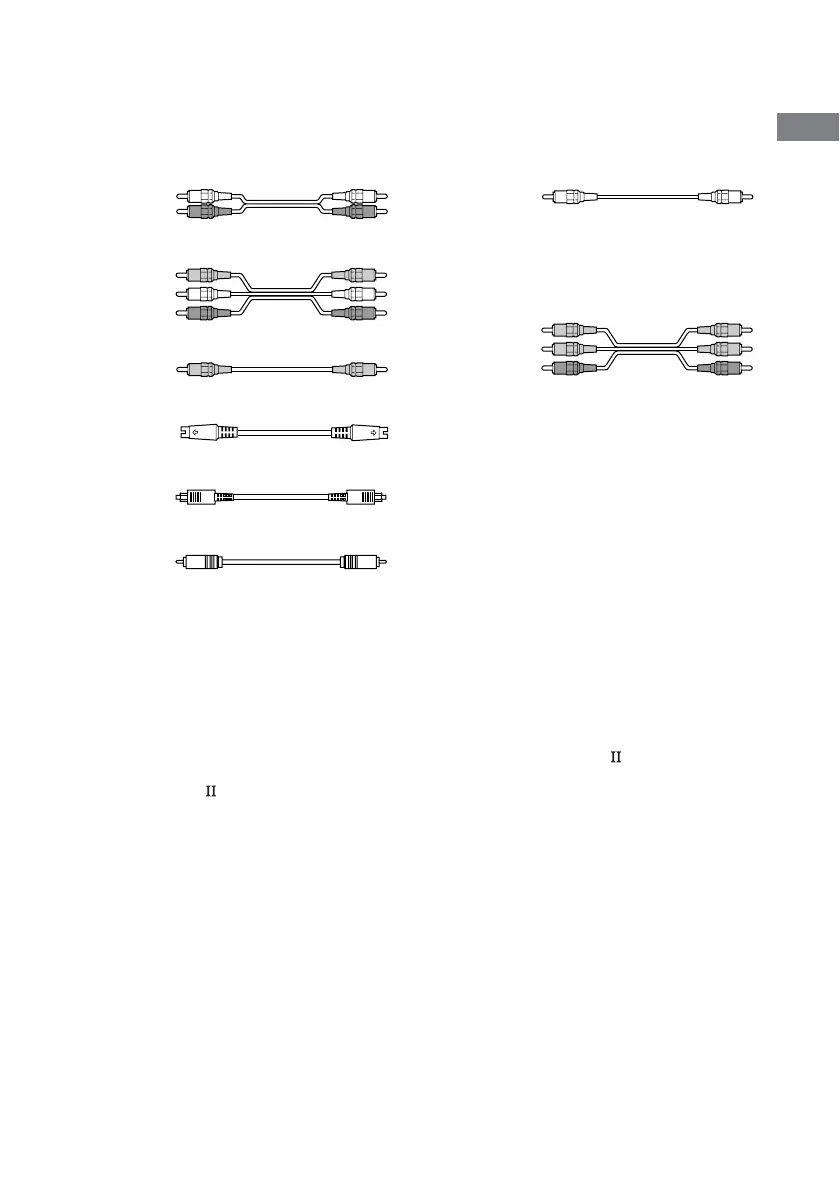
A Audio cord
White (L)
Red (R)
B Audio/video cord
Yellow (video)
White (L/audio)
Red (R/audio)
C Video cord
Yellow
D S-video cord
E Optical digital cord
F Coaxial digital cord
Notes
• Turn off the power to all components before making any connections.
• Be sure to make connections firmly to avoid hum and noise.
• When connecting an audio/video cord, be sure to match the color-coded pins to the appropriate jacks on the
components: yellow (video) to yellow; white (left, audio) to white; and red (right, audio) to red.
• When connecting optical digital cords, insert the cord plugs straight in until they click into place.
• Do not bend or tie optical digital cords.
If you have a Sony components with CONTROL A1 jack
See “CONTROL A1 control system” on page 60.
Required cords
The hookup diagrams on the subsequent pages assume the use of the following optional connection
cords (A to H) (not supplied).
G Monaural audio cord
Black
Tip
Audio cord A can be torn into two monaural audio
cords G.
H Component video cord
Green
Blue
Red



 To Next Page