EasyManua.ls Logo

Sony TA-E1000ESD - Page 18

Sony TA-E1000ESD
48 pages
Print Icon
To Next Page IconTo Next Page
To Previous Page IconTo Previous Page
Loading...
Getting
Ready
to
Enjoy
Surround
Sound
PNoF
lei
tlaremcar-m
inl
elei@
Men'-)M-Tale
Mia)
eel
m@
st-1f-lare-mecelm
Ble)le)
moll
lacelelare
mii
(ole[-))
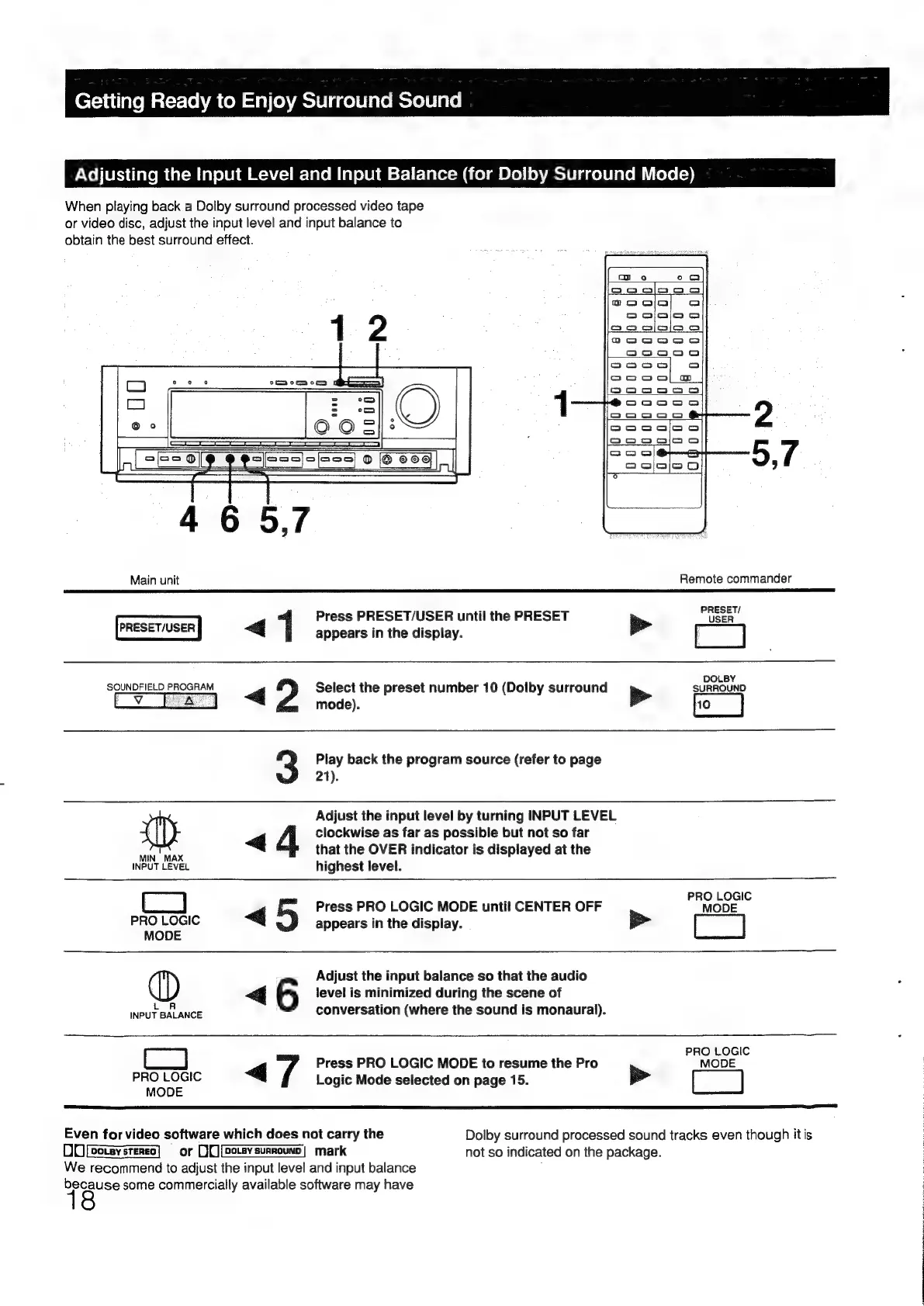
When
playing
back
a
Dolby
surround
processed
video
tape
or
video
disc,
adjust
the
input
level
and
input
balance
to
obtain
the
best
surround
effect.
12
me
eos
4
6
5,7
Main
unit
Remote
commander
Press
PRESET/USER
until
the
PRESET
POSER
<q
1
appears
in
the
display.
>>
[]
DOLBY
SOUNDFIELD
PROGRAM
Gj
Select
the
preset
number
10
(Dolby
surround
Bete
SURROUND
mode).
Play
back
the
program
source
(refer
to
page
21).
Adjust
the
input
level
by
turning
INPUT
LEVEL
4
clockwise
as
far
as
possible
but
not
so
far
T
that
the
OVER
indicator
is
displayed
at
the
MIN
MAX
.
INPUT
LEVEL
highest
level.
:
PRO
LOGIC
<4
Press
PRO
LOGIC
MODE
until
CENTER
OFF
MODE
PRO
LOGIC
appears
in
the
display.
>
MODE
Adjust
the
input
balance
so
that
the
audio
«
6
level
is
minimized
during
the
scene
of
NPUTBALANCE
conversation
(where
the
sound
is
monaural).
PRO
LOGIC
<q
7
Press
PRO
LOGIC
MODE
to
resume
the
Pro
MODE
PRO
LOGIC
Logic
Mode
selected
on
page
15.
pe
MODE
Even
for
video
software
which
does
not
carry
the
Dolby
surround
processed
sound
tracks
even
though
it
is
DU
[eoteysreneo]
§
or
D[][potevsurrounn)
mark
not
so
indicated
on
the
package.
We
recommend
to
adjust
the
input
level
and
input
balance
because
some
commercially
available
software
may
have

Other manuals for Sony TA-E1000ESD

Related product manuals