EasyManua.ls Logo

Sony TA-E1000ESD - Page 22

Sony TA-E1000ESD
48 pages
Print Icon
To Next Page IconTo Next Page
To Previous Page IconTo Previous Page
Loading...
Listening
to
/
Watching
Program
Sources
Combining
the
Video
Image
with
the
Sound
from
Another
Program
Source
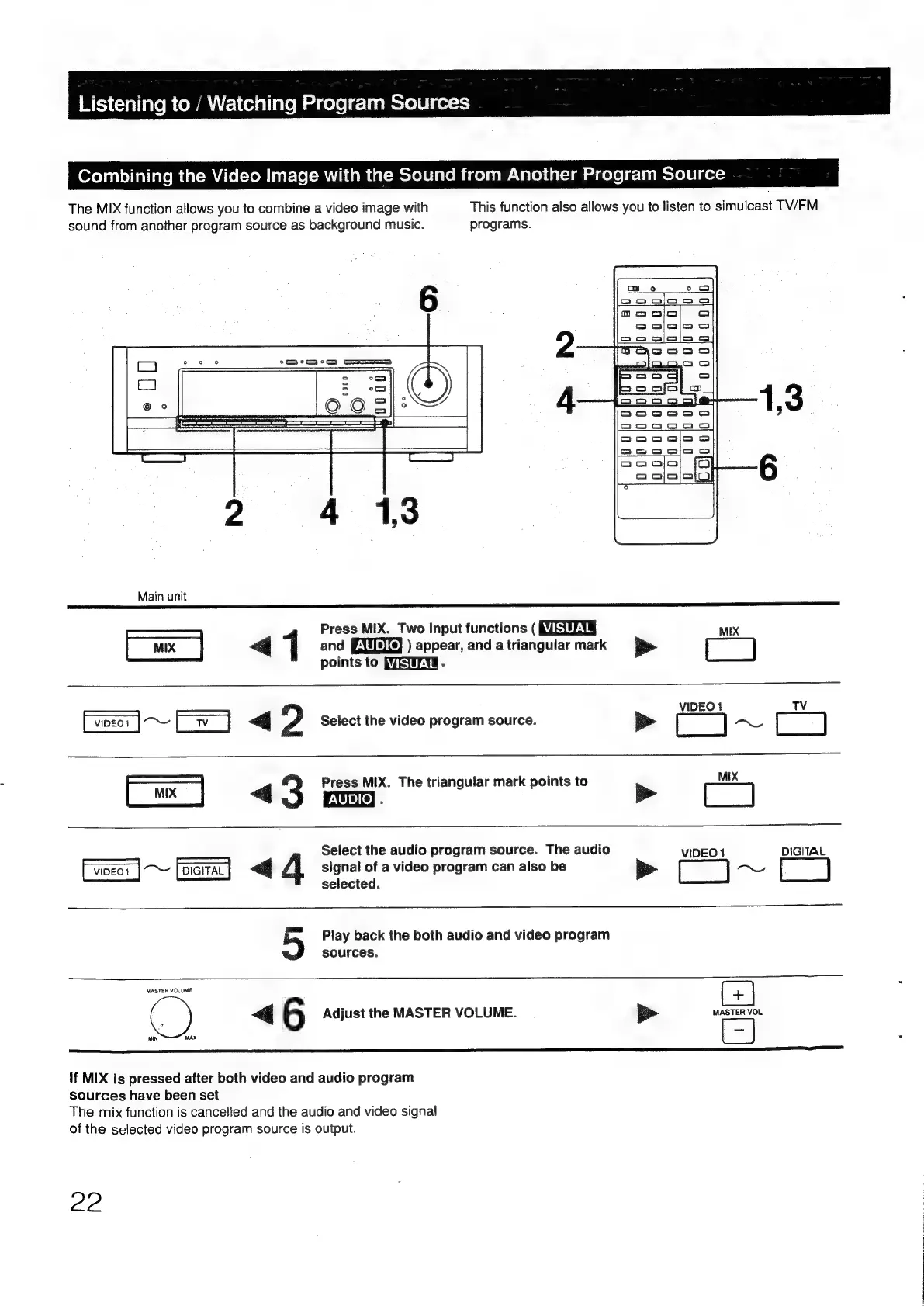
The
MIX
function
allows
you
to
combine
a
video
image
with
This
function
also
allows
you
to
listen
to
simulcast
TV/FM
sound
from
another
program
source
as
background
music.
programs.
Main
unit
Press
MIX.
Two
input
functions
(
MZEUN§
MIX
[x]
<q
1
and
[XURe)
)
appear,
and
atriangular
mark
==
>
points
to
PEE
-
VIDEO
1
TV
Eo1
jo
~
2
Select
the
video
program
source.
be
[
~_
i
3]
Press
MIX.
The
triangular
mark
points
to
MIX
Ce]
<3
oo’
Se
a
Select
the
audio
program
source.
The
audio
VIDEO
1
DIGITAL
~
[oarrac]
«<<
A
signal
of
a
video
program
can
also
be
b>
[_]
x,
selected.
Play
back
the
both
audio
and
video
program
sources.
MASTER
VOLUME
i
|
6
Adjust
the
MASTER
VOLUME.
i>
MASTER
VOL
MIN
MAX
If
MIX
is
pressed
after
both
video
and
audio
program
sources
have been
set
The
mix
function
is
cancelled
and
the
audio
and
video
signal
of
the
selected
video
program
source
is
output.
22

Other manuals for Sony TA-E1000ESD

Related product manuals