EasyManua.ls Logo

Sony TA-E1000ESD - Page 28

Sony TA-E1000ESD
48 pages
Print Icon
To Next Page IconTo Next Page
To Previous Page IconTo Previous Page
Loading...
Using
the
Remote
Commander
e
When
you
manipulate
a
switch
or
button
on
the
commander,
be
sure
to
point
the
head
of
the
commander
toward
the
remote
control
sensor
on
the
front
of
the
receiver.
e
If
there
is
an
obstacle
between
the
amplifier
and
the
head
of
the
commander,
the
amplifier
may
not
be
controlled
remotely.
Programming
Signals
of
Other
Audio/Video
Equipment
with
RM-P1000
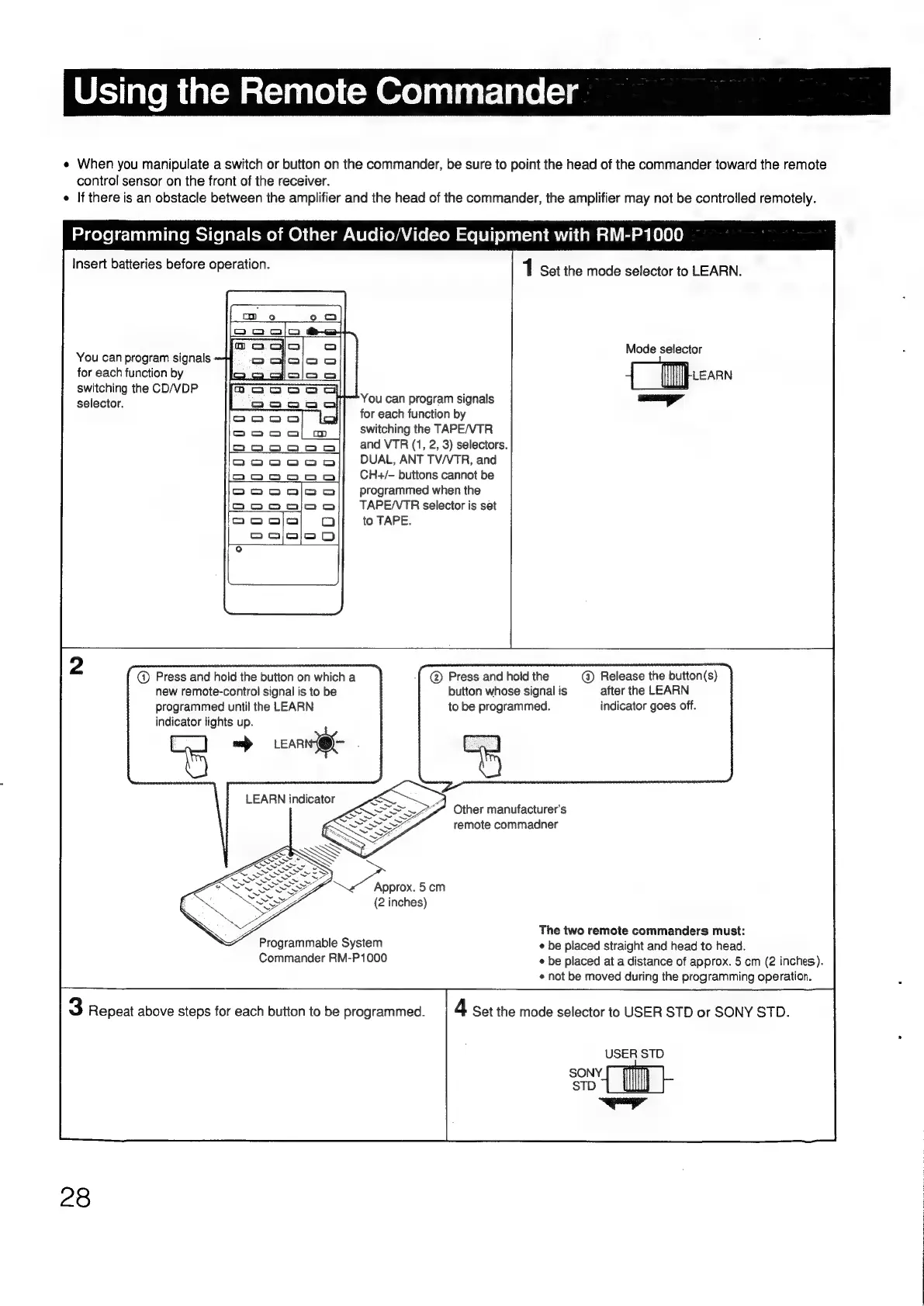
Insert
batteries
before
operation.
1
Set
the
mode
selector
to
LEARN.
Mode
selector
You
can
program
signals
-
for
each
function
by
2a
{
[pes
switching
the
CD/VDP
selector.
You
can
program
signals
ayy
for
each
function
by
switching
the
TAPE/VTR
and
VTR
(1,
2,
3)
selectors.
DUAL,
ANT
TV/VTR,
and
CH+/-
buttons
cannot
be
programmed
when
the
TAPE/VTR
selector
is
set
to
TAPE.
@)
Press
and
hold
the
button
on
which
a
@
Press
and
hold
the
@
Release
the
button(s)
new
remote-control
signal
is
to
be
button
whose
signal
is
after
the
LEARN
programmed
until
the
LEARN
to
be
programmed.
indicator
goes
off.
indicator
lights
up.
es
Other
manufacturer's
remote
commadner
(2
inches)
The
two
remote
commanders
must:
Programmable
System
¢
be
placed
straight
and
head
to
head.
Commander
RM-P1000
¢
be
placed
at
a
distance
of
approx.
5
cm
(2
inches).
¢
not
be
moved
during
the
programming
operation.
3
Repeat
above
steps
for
each
button
to
be
programmed.
4
Set
the
mode
selector
to
USER
STD
or
SONY
STD.
USER
STD
SONY.
STD
sl
28

Other manuals for Sony TA-E1000ESD

Related product manuals