EasyManua.ls Logo

Sony TA-E2000ESD - Combining Video and Audio Sources

Sony TA-E2000ESD
55 pages
Print Icon
To Next Page IconTo Next Page
To Previous Page IconTo Previous Page
Loading...
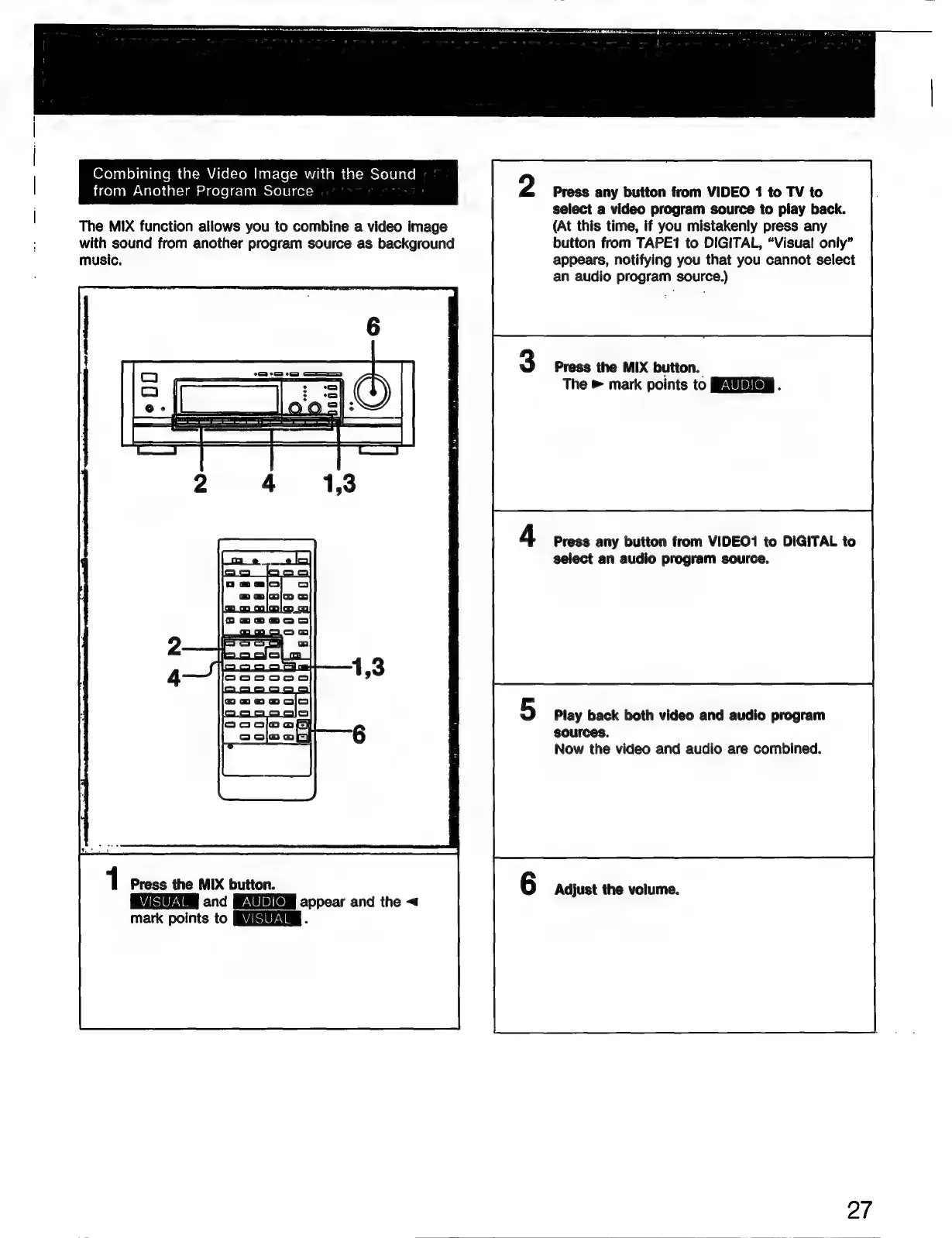
Combining
the
Video
Image
with
the
Sound
from
Another
Program
Source
The
MIX
function
allows
you
to
combine
a
video
image
with
sound
from
another
program
source
as
background
music.
1
Press
the
MIX
button.
and
appear
and
the
<
mark
points
to
FUE
.
Press
any
button
from
VIDEO
1
to
TV
to
select
a
video
program
source
to
play
back.
(At
this
time,
if
you
mistakenly
press
any
button
from
TAPE1
to
DIGITAL,
“Visual
only”
appears,
notifying
you
that
you
cannot
select
an
audio
program
source.)
Press
the
MIX
button.
The
»
mark
points
to
EXER
.
Press
any
button
from
VIDEO1
to
DIGITAL
to
select
an
audio
program
source.
Play
back
both
video
and
audio
program
sources.
Now
the
video
and
audio
are
combined.
Adjust
the
volume.
27

Related product manuals