EasyManua.ls Logo

Sony TA-E2000ESD - Assigning Titles to Controls

Sony TA-E2000ESD
55 pages
Print Icon
To Next Page IconTo Next Page
To Previous Page IconTo Previous Page
Loading...
PANSS\(olaliale
Mm
Mid
(ets
You
can
put
a
title
of
up
to
nine
characters
on an
input
select
button
or
a
stored
sound
field.
For
example,
on
the
input
select
button
VIDEO1
or
VIDEO2,
you
can
put
a
title
such
as
“8mm”
or
“VHS”
which
clearly
describes
the
connected
equipment,
or
else
you
can
put
an
appropriate
title
for
a
concert
hall
or
a
kind
of
music.
These
titles
will
be
indicated
in
the
display
when
selecting
the
input
select
button
or
the
sound
field,
clearly
describing
the
contents
of
an input
select
button
or
a
sound
field.
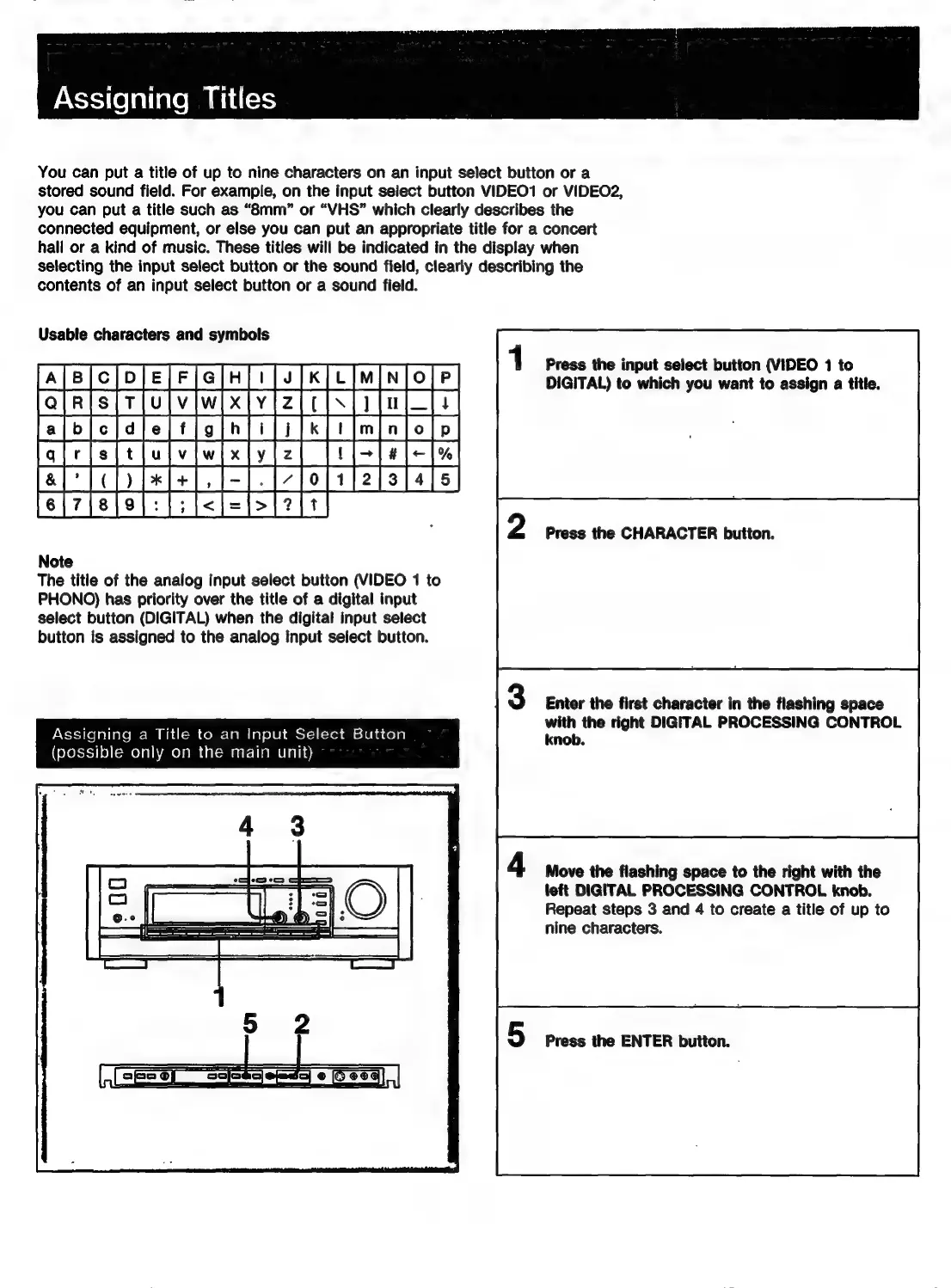
Usable
characters
and
symbols
0
|
fei7
jeje}:
|;
i<j=|>}7]t
Note
The
title
of
the
analog
input
select
button
(VIDEO
1
to
PHONO)
has
priority
over
the
title
of
a
digital
input
select
button
(DIGITAL)
when
the
digital
input
select
button
is
assigned
to
the
analog
input
select
button.
Assigning
a
Title
to
an
Input
Select
Button
(possible
only
on
the
main
unit)
ae
2)
©
Press
the
input
select
button
{VIDEO
1
to
DIGITAL)
to
which
you
want
to
assign
a
title.
Press
the
CHARACTER
button.
Enter
the
first
character
in
the
flashing
space
with
the
right
DIGITAL
PROCESSING
CONTROL
knob.
Move
the
flashing
space
to
the
right
with
the
left
DIGITAL
PROCESSING
CONTROL
knob.
Repeat
steps
3
and
4
to
create
a
title
of
up
to
nine
characters.
Press
the
ENTER
button.

Related product manuals