EasyManua.ls Logo

Sony TA-E2000ESD - Remote Commander Operation; Learning and Storing Signals

Sony TA-E2000ESD
55 pages
Print Icon
To Next Page IconTo Next Page
To Previous Page IconTo Previous Page
Loading...
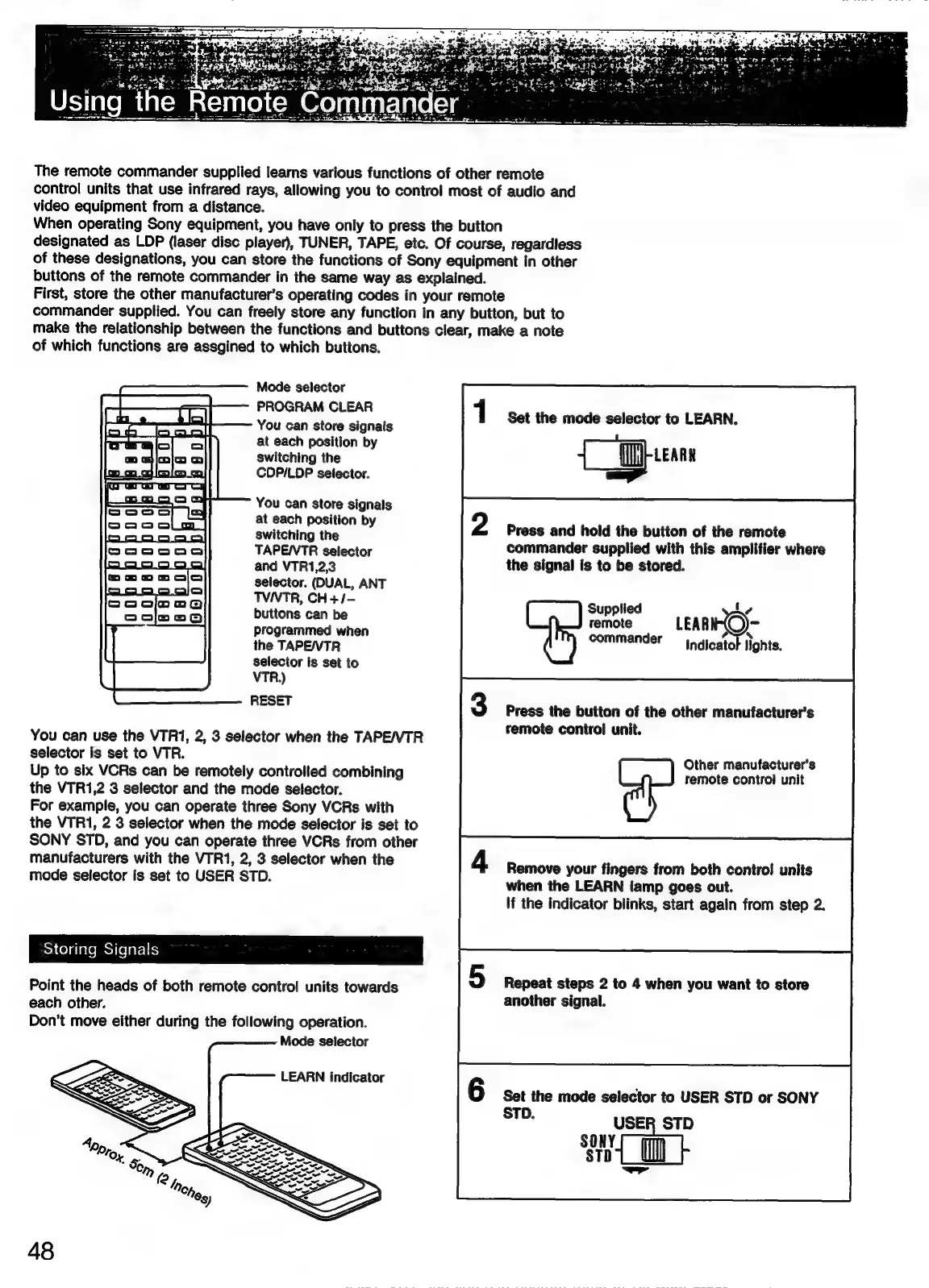
The
remote
commander
supplied
learns
various
functions
of
other
remote
control
units
that
use
infrared
rays,
allowing
you
to
control
most
of
audio
and
video
equipment
from
a
distance.
When
operating
Sony
equipment,
you
have
only
to
press
the
button
designated
as
LDP
(laser
disc
player),
TUNER,
TAPE,
etc.
Of
course,
regardless
of
these
designations,
you
can
store
the
functions
of
Sony
equipment
in
other
buttons
of
the
remote
commander
in
the
same
way
as
explained.
First,
store
the
other
manufacturer’s
operating
codes
in
your
remote
commander
supplied.
You
can
freely
store
any
function
in
any
button,
but
to
make
the
relationship
between
the
functions
and
buttons
clear,
make
a
note
of
which
functions
are
assgined
to
which
buttons.
Mode
selector
eas
PROGRAM
CLEAR
[dao
_b
lca}
You
can
store
signals
at
each
position
by
switching
the
CDPI/LDP
selector.
You
can
store
signals
at
each
position
by
switching
the
TAPE/VTR
selector
and
VTR1,2,3
selector.
(DUAL,
ANT
TVIVTR,
CH+/-
buttons
can
be
programmed
when
the
TAPE/VTR
selector
is
set
to
VTR.)
RESET
You
can
use
the
VTR1,
2,
3
selector
when
the
TAPE/VTR
selector
is
set
to
VTR.
Up
to
six
VCRs
can
be
remotely
controlled
combining
the
VTR1,2
3
selector
and
the
mode
selector.
For
example,
you
can
operate
three
Sony
VCRs
with
the
VTR1,
2 3
selector
when
the
mode
selector
is
set
to
SONY
STD,
and
you
can
operate
three
VCRs
from
other
manufacturers
with
the
VTR1,
2,
3
selector
when
the
mode
selector
is
set
to
USER
STD.
Sh
Celalalemel
(efarctts
Point
the
heads
of
both
remote
control
units
towards
each
other.
Don’t
move
either
during
the
following
operation.
-
Mode
selector
LEARN
indicator
48
Set
the
mode
selector
to
LEARN.
ca
Press
and
hold
the
button
of
the
remote
commander
supplied
with
this
amplifier
where
the
signal
is
to
be
stored.
Supplied
L,
remote
LEAR
-
¢
x
commander
jndicato
lights.
Press
the
button
of
the
other
manufacturer’s
remote
control
unit.
Other
manufacturer's
remote
control
unit
Remove
your
fingers
from
both
contro!
units
when
the
LEARN
lamp
goes
out.
If
the
indicator
blinks,
start
again
from
step
2.
Repeat
steps
2
to
4
when
you
want
to
store
another
signal.
Set
the
mode
selector
to
USER
STD
or
SONY
dh
USER
STD
=

Related product manuals