EasyManua.ls Logo

Sony TC-V3 - Page 7

Sony TC-V3
29 pages
Print Icon
To Next Page IconTo Next Page
To Previous Page IconTo Previous Page
Loading...
TC-V3
SECTION
3
| |
|
:
ADJUSTMENTS
ooh.
MECRANIEAL
AD
USTMENTS
3-2.
ELECTRICAL
ADJUSTMENTS
PRECAUTION
Record/p:
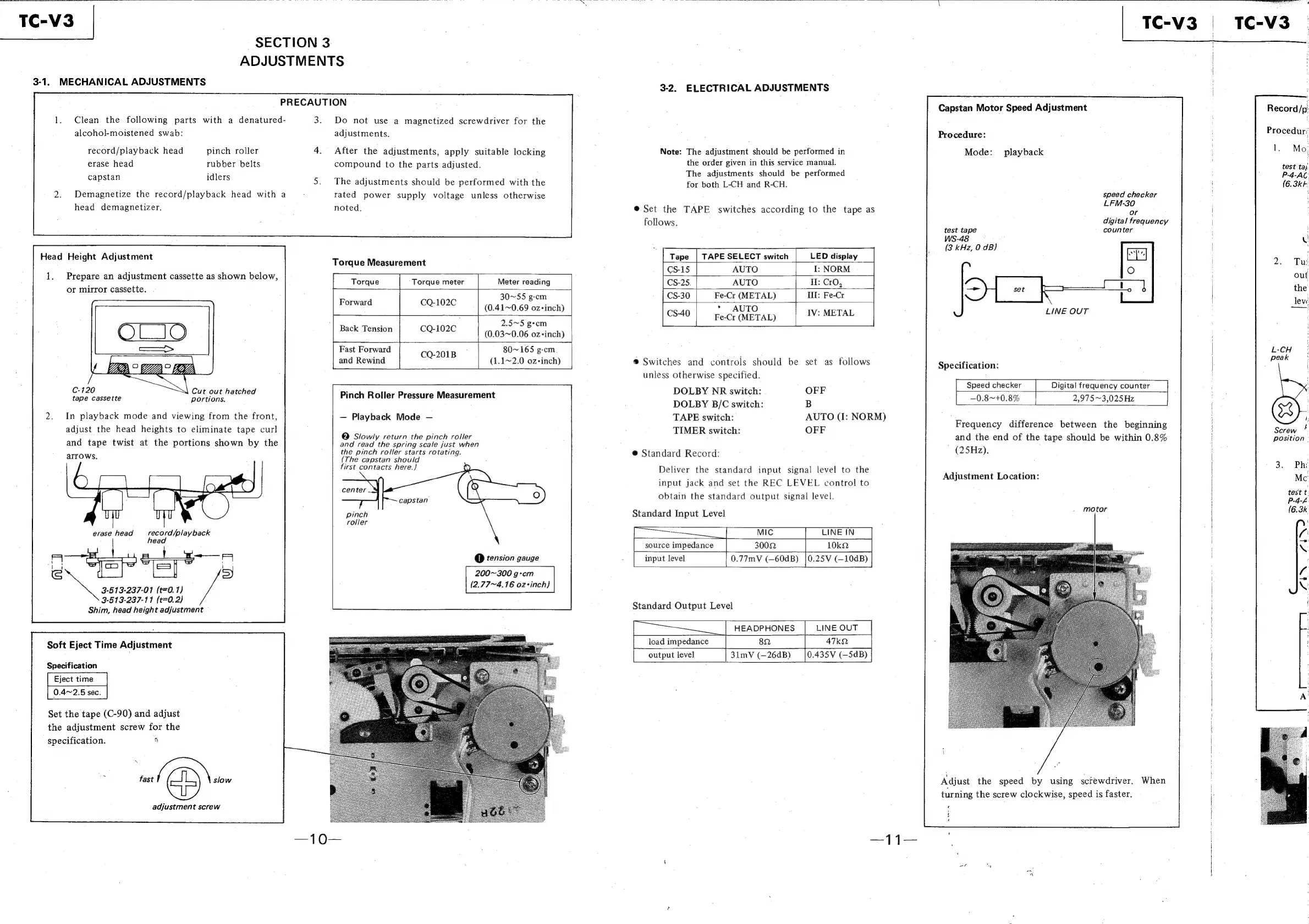
Capstan
Motor
Speed
Adjustment
Clean
the
following
parts
with
a
denatured-
3.
Do
not
use
a
magnetized
screwdriver
for
the
alcohol-moistened
swab:
adjustments.
Procedure:
Procedur:
record/playback
head
pinch
roller
After
the
adjustments,
apply
suitable
locking
Note:
The
adjustment
should
be
performed
in
Mode:
playback
rs
Mo,
erase
head
rubber
belts
compound
to
the
parts
adjusted.
the
order
given
in
this
service
manual.
.
test
tai
capstan
idlers
;
The
adjustments
should
be
performed
P-4-AC
The
adjustments
should
be
performed
with
th
p
1
e€
for
both
L-CH
and
R-CH.
1
(6.3kk
Demagnetize
the
record/playback
head
with
a
rated
power
supply
voltage
unless
otherwise
speed
checker
:
head
demagnetizer.
noted,
®
Set the
TAPE
switches
according
to
the
tape
as
pres
follows.
digital
frequency.
test
tape
counter
:
WS-48
v
Head
Height
Adj
LE
|
Se
eae
ea
eight
stment
i
D
disp!
i
g
jjustmen
Torque
Measurement
Tape
|
TAPE
SELECT
switch
isplay
)
Tu:
:
CS-15
AUTO
I:
NORM
'
1.
Prepare
an
adjustment
cassette
as
shown
below,
r
-
out
:
Torque Torque
meter
Meter
reading
CS-25.
AUTO
If:
CrO,
or
mirror
cassette.
set
[CO
the
30~55
g-cm
CS-30
Fe-Cr
(METAL)
Ili:
Fe-Cr
|
pee
eee
(0.41~0.69
oz+inch)
AUTO
:
as
:
arr
CS40
|
Fe-Cr
(METAL)
MET
a
|
i
dd
Back
Tension
CQ-102C
(0.03~0.06
oz-inch)
|
Fast
Forward
CQ-201B
80~165
g-cm
|
L-CH
d
Rewind
1~2.0
oz+i
®
Switc
controls
s
?
Sent
|
peak
VD
°
7A
BE
pane
ee
(1.1~2.0
oz-inch)
®
Switches
and
controls
should
be
set
as
follows
Specification:
|
unless
otherwise
specified.
;
7
Speed
checker
Digital
ital
frequency
counter
|
counter
C-120
Cut
out
hatched
.
DOLBY
NR
switch:
OFF
tape
cassette
tions.
Pinch
Roller
Pressure
Measurement
ee
_0.8~4
portions.
DOLBY
B/C
switch:
B
0.8~+0.8%
—__2,975~3,025Hz
975~
975
~3,025H
025Hz
In
playback
mode
and
viewing
from
the
front,
Playback
Mode
TAPE
switch:
AUTO
(I:
NORM)
:
Aa
:
adjust
the
head
heights
to
eliminate
tape
curl
G
Sew
henieneba
TIMER
switch:
OFF
Preaueney-ciitgence
Deiween
Hie
beginning
Serew
*
,
;
'o
et
?
ithi
:
ition
°
and
tape
twist
at
the
portions
shown
by
the
bode
oy
ie
oo
Sole
fuse
wher
.
and
the
end
of
the
tape
should
be
within
0.8%
position
-
apna
the
pinch
roller
starts
rotating.
@
Standard
Record:
(25Hz).
i
:
(The
capstan
should
:
|
F
first
contacts
here.)
Deliver
the
standard
input
signal
level
to
the
at
icactent
tes
ation:
|
aE
input
jack
and
set
the
REC
LEVEL
control
to
J
,
|
Mc
obtain
the
standard
output
signal
level.
|
pod
|
ae
pinch
Standard
Input
Level
i
(6.3k
roller
|
a
erase
head
record
/play
back
Mic
LINE
IN
|
fi
head
:
-
source
impedance
3002
|
10kQ
XQ
@
tension
gauge
input
level
0.77mV
(—60dB)
|0.25V
(—10dB)
:
200~300
gem
A
3-513-237-01
(t=0.1)
(2.77~4.16
oz-inch})
|
NG
3-513-237-11
(t=0.2)
Standard
Output
Level
Shim,
head
height
adjustment
HEADPHONES
|
LINE
OUT
82
|
47ka
3lmV
(—26dB)
_[0.435V
(—5dB)
load
impedance
Soft
Eject
Time
Adjustment
|
output
level
Specification
0.4~2.5
sec.
Set
the
tape
(C-90)
and
adjust
the
adjustment
screw
for
the
nS
Son
eee
specification.
5
fast
(DS
slow
adjustment
screw
Adjust
the
speed
by
using
sctewdriver.
When
turning
the
screw
clockwise,
speed
is
faster.

Related product manuals