EasyManua.ls Logo

Sony TC-V3 - Page 9

Sony TC-V3
29 pages
Print Icon
To Next Page IconTo Next Page
To Previous Page IconTo Previous Page
Loading...
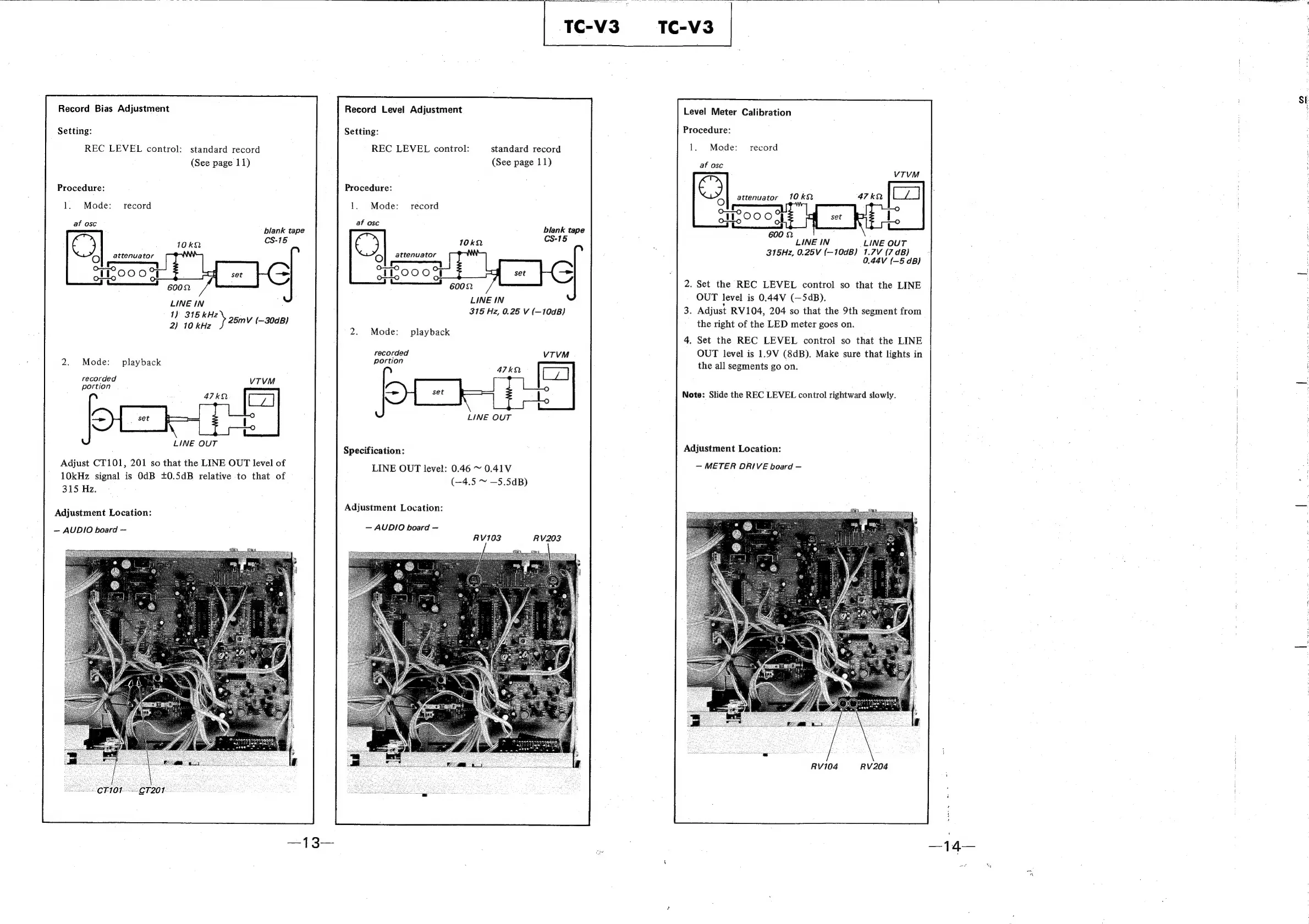
Record
Bias
Adjustment
Setting:
REC
LEVEL
control:
standard
record
(See
page
11)
Procedure:
1.
Mode:
record
af
osc
blank
tape
ee
ad
LINE
IN
1)
315
kHz
2)
10
kHz
»
25mV
(—30dB)
2.
Mode:
playback
recorded
portion
LINE
OUT
Adjust
CT101,
201
so
that
the
LINE
OUT
level
of
10kHz
signal
is
OdB +0.5dB
relative
to
that
of
315
Hz.
Adjustment
Location:
~
AUDIO
board
Record
Level
Adjustment
Setting:
REC
LEVEL
control:
standard
record
(See
page
11)
Procedure:
1.
Mode:
record
af
osc
blank
tape
€)
CS-15
attenuator
_—
oO
LINE
IN
315
Hz,
0.25
V
(—10dB)
2.
Mode:
playback
recorded
portion
LINE
OUT
Specification:
LINE
OUT
level:
0.46
~
0.41V
(—4.5
~
—5.5dB)
Adjustment
Location:
AUDIO
board
RV103
RV203
Level
Meter
Calibration
Procedure:
1.
Mode:
record
af
osc
©)
attenuator
oO
LINE
OUT
315Hz,
0.25V
(—10dB)
1.7V
(7
dB)
0.44V
(—5
dB}
.
Set
the
REC
LEVEL
control
so
that
the
LINE
OUT
level
is
0.44V
(—SdB).
Adjust
RV104,
204
so
that
the
9th
segment
from
the
right
of
the
LED
meter
goes
on.
.
Set
the
REC
LEVEL
control
so
that
the
LINE
OUT
level
is
1.9V
(8dB).
Make
sure
that
lights
in
the
all
segments
go
on.
Note:
Slide
the
REC
LEVEL
control
rightward
slowly.
Adjustment
Location:
METER
DRIVE
board
RV104
RV204
Si

Related product manuals