EasyManua.ls Logo

Sony TPS-L2 - Page 9

Sony TPS-L2
16 pages
Print Icon
To Next Page IconTo Next Page
To Previous Page IconTo Previous Page
Loading...
CASSETTE
INSERTION
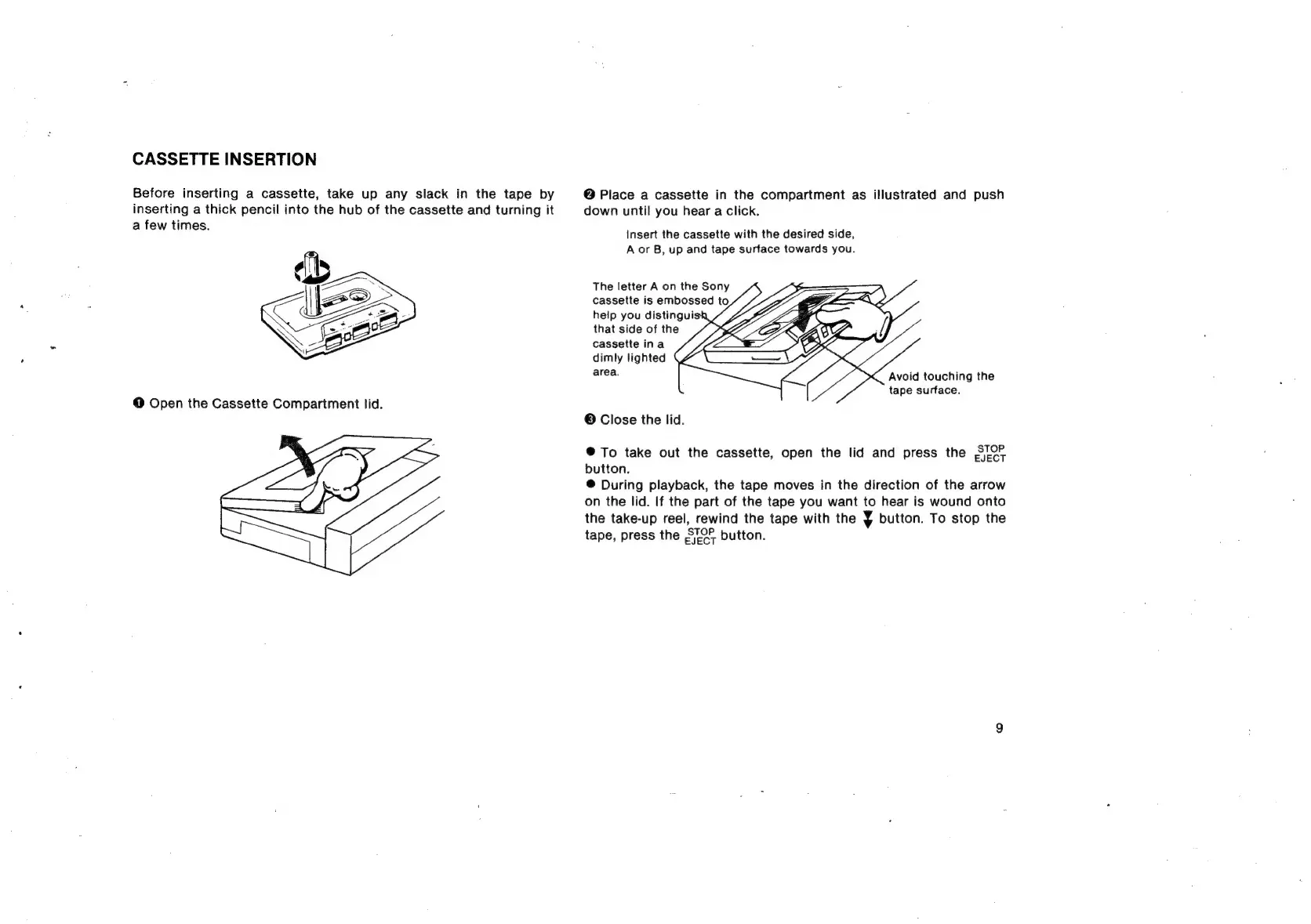
Before
inserting
a
cassette,
take
up
any
slack
in
the
tape
by
inserting
a
thick
pencil
into
the
hub
of
the
cassette
and
turning
it
a
few
times.
@
Place
a
cassette
in
the
compartment
as
illustrated
and
push
down
until
you
hear
a
click.
insert
the
cassette
with
the
desired
side,
A
or
B,
up
and
tape
surface
towards
you.
cassette
ina
dimly
lighted
area.
Avoid
touching
the
tape
surface.
©
Close
the
lid.
®@
To
take
out
the
cassette,
open
the
lid
and
press
the
S/O
button.
@
During
playback,
the
tape
moves
in
the
direction
of
the
arrow
on
the
lid.
If
the
part
of
the
tape
you
want
to
hear
is
wound
onto
the
take-up
reel,
rewind
the
tape
with
the
7
button.
To
stop
the
tape,
press
the
STOF
button.

Related product manuals