EasyManua.ls Logo

Sony TRINITRON KV-1442 - PROGRAMMING; AUTOMATIC PROGRAMMING; MANUAL PROGRAMMING

Sony TRINITRON KV-1442
35 pages
Print Icon
To Next Page IconTo Next Page
To Previous Page IconTo Previous Page
Loading...
KV-1442ECPS
|
RM-651
1-2.
PROGRAMMING
Automatic
and
manual
programming
are
available.
Automatic
programming
presets
up
to
30
receivable
channels
automatically
from
the
lowest
frequency
to
the
highest.
With
manual
programming
the
active
channels
can
be
preset
in
any
desired
sequence.
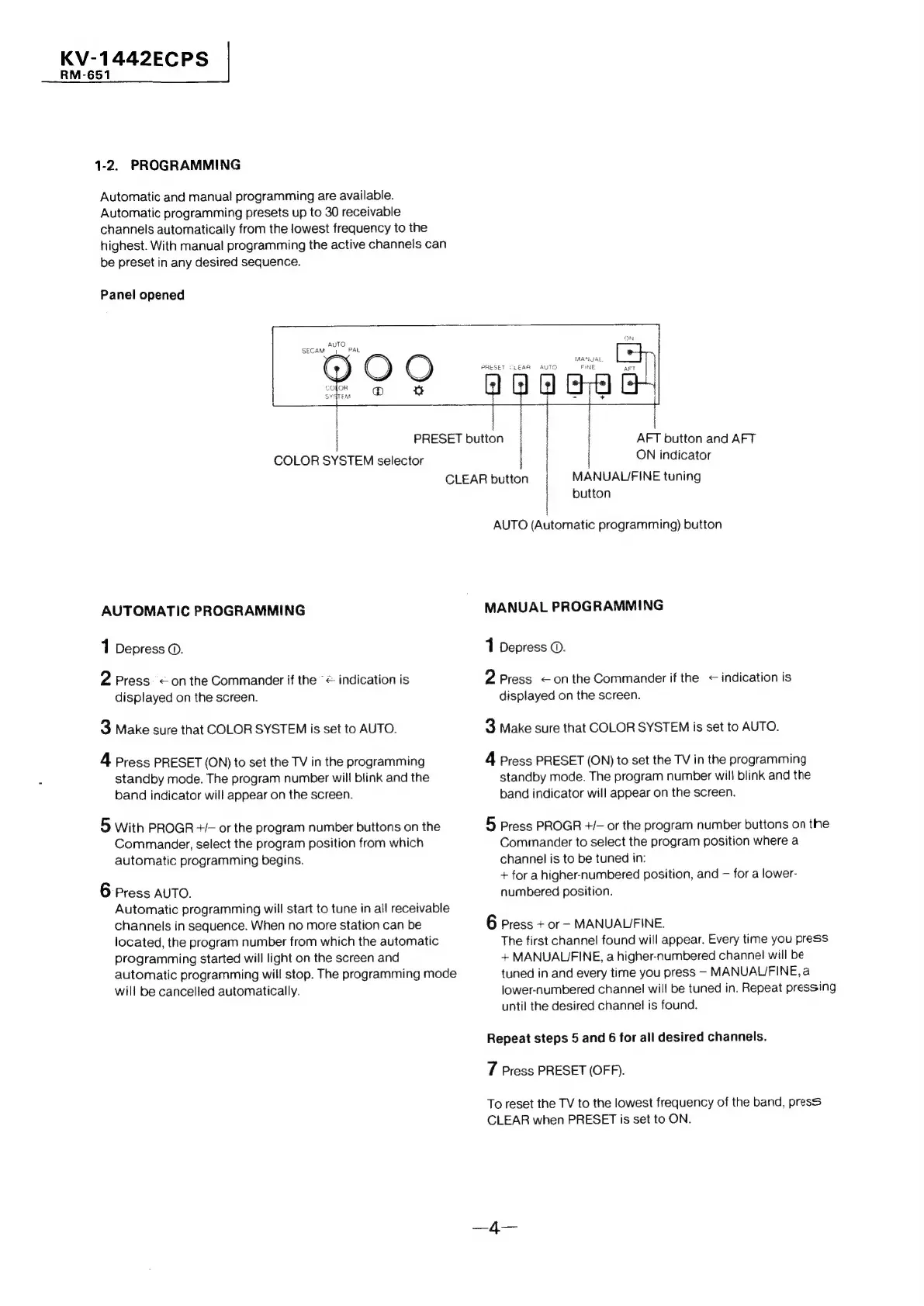
Panel
opened
ON
MANGAL
PRESET
Ci€AR
AUTO
FINE
T
COLOR
SYSTEM
selector
|
PRESET
button
AFT
button
and
AFT
ON
indicator
CLEAR
button
MANUALUFINE
tuning
AUTOMATIC
PROGRAMMING
1
Depress
©.
2
Press
<on
the
Commander
if
the
“<
indication
is
displayed
on
the
screen.
3
Make
sure
that
COLOR
SYSTEM
is
set
to
AUTO.
4
Press
PRESET
(ON)
to
set
the
TV
in
the
programming
standby
mode.
The
program
number
will
blink
and
the
band
indicator
will
appear
on
the
screen.
5
With
PROGR
+/-
or
the
program
number
buttons
on
the
Commander,
select
the
program
position
from
which
automatic
programming
begins.
6
Press
AUTO.
Automatic
programming
will
start
to
tune
in
all
receivable
channels
in
sequence.
When
no
more
station
can
be
located,
the
program
number
from
which
the
automatic
programming
started
will
light
on
the
screen
and
automatic
programming
will
stop.
The
programming
mode
will
be
cancelled
automatically.
button
AUTO
(Automatic
programming)
button
MANUAL
PROGRAMMING
1
Depress
©.
2
Press
<onthe
Commander
if
the
<
indication
is
displayed
on
the
screen.
3
Make
sure
that
COLOR
SYSTEM
is
set
to
AUTO.
4
Press
PRESET
(ON)
to
set
the
TV
in
the
programming
standby
mode.
The
program
number
will
blink
and
the
band
indicator
will
appear
on
the
screen.
5
Press
PROGR
+/—
or
the
program
number
buttons
on
the
Commander
to
select
the
program
position
where
a
channel
is
to
be
tuned
in:
+
for
a
higher-numbered
position,
and
for
a
lower-
numbered
position.
6
Press
+
or
-
MANUALIFINE.
The
first
channel
found
will
appear.
Every
time
you
press
+
MANUALIJFINE,
a
higher-numbered
channel
will
be
tuned
in
and
every
time
you
press
-
MANUAL/FINE,
a
lower-numbered
channel
will
be
tuned
in.
Repeat
pressing
until
the
desired
channel
is
found.
Repeat
steps
5
and
6
for
all
desired
channels.
7
Press
PRESET
(OFF).
To
reset
the
TV
to
the
lowest
frequency
of
the
band,
press
CLEAR
when
PRESET
is
set
to
ON.

Related product manuals