Using the Menus
This chapter shows the options available for set,big up and adjusting
your TV.
TO access a menu
1 Press ME_
CZD _
Use file 4 or r# buttons to highlight a me_lu.
SELECT
Press c:_ to access the menu.
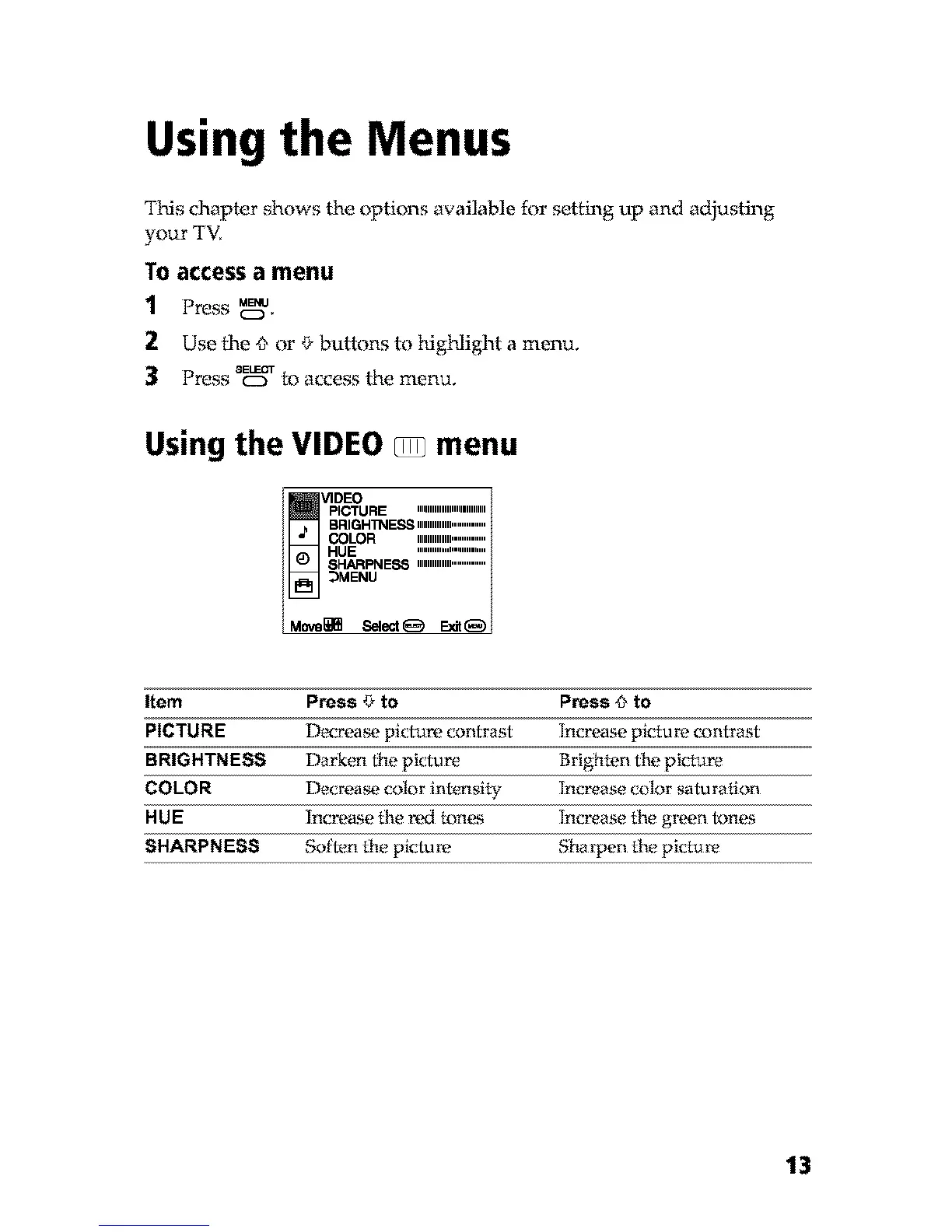
Using the VIDEO _z_menu
V1DEO
pICTURE IIIIIIIIMIIIIIIIMIIM
BFtlGHI_IE,_,ImmM, ...............
COLOR MIIIMIII mmmm
HUE """"''''" ....
SHARPNESS ,imm,lml...............
_)MENU
Move_i_ 8elect_ E_t_
Item Press r# to Press _ to
PICTURE D_crea_. pictz_m contrast Increase picture contrast
BRIGHTNESS Dark_rn the picture Brighten the picture
COLOR Decrea_. c_flor intensity lncrease color _turation
HUE Increase the red tones Increase the green f_nes
SHARPNESS Soften the picture Shalpen the picture
13



 To Next Page