Using the Menus
15
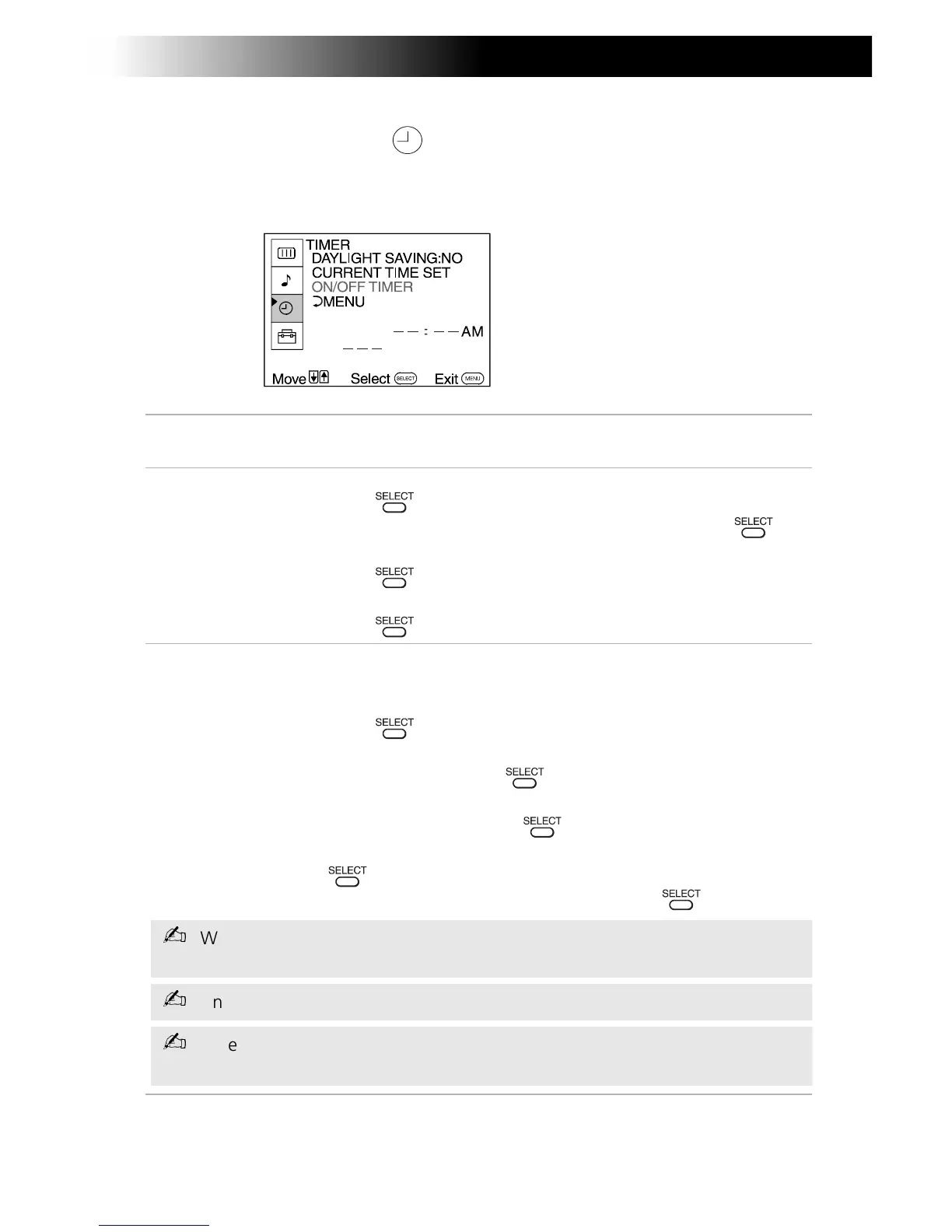
Using the TIMER menu
Except KV-13M42
DAYLIGHT
SAVING
YES: Select in spring to compensate for Daylight Savings.
NO: Select in fall at the end of Daylight Savings.
CURRENT
TIME SET
With the menu open:
1 Press .
2 Press F or f to cycle through the days, then press .
3 Press F or f until the current hour is displayed, then
press .
4 Press F or f until the current minute is displayed, then
press .
ON/OFF TIMER
Scheduled
viewing
CURRENT TIME SET must be programmed before the
ON/OFF TIMER is available.
With the menu open:
1 Press .
2 Press F or f until the desired day or range of days is
displayed, then press .
3 Indicate the time that you want the TV to turn on by
pressing F or f and the , (for hour and minutes).
4 Press F or f to set the duration, up to 6 hours, then press
.
5 Press F or f to set the channel and press .
When you perform AUTO PROGRAM, all ON/OFF TIMER settings will be
cleared.
Any loss of power will cause the ON/OFF TIMER settings to be cleared.
When the ON/OFF TIMER is programmed, the light on the front of your TV will
be turned on.







 To Next Page