7
9
Additional TV Features
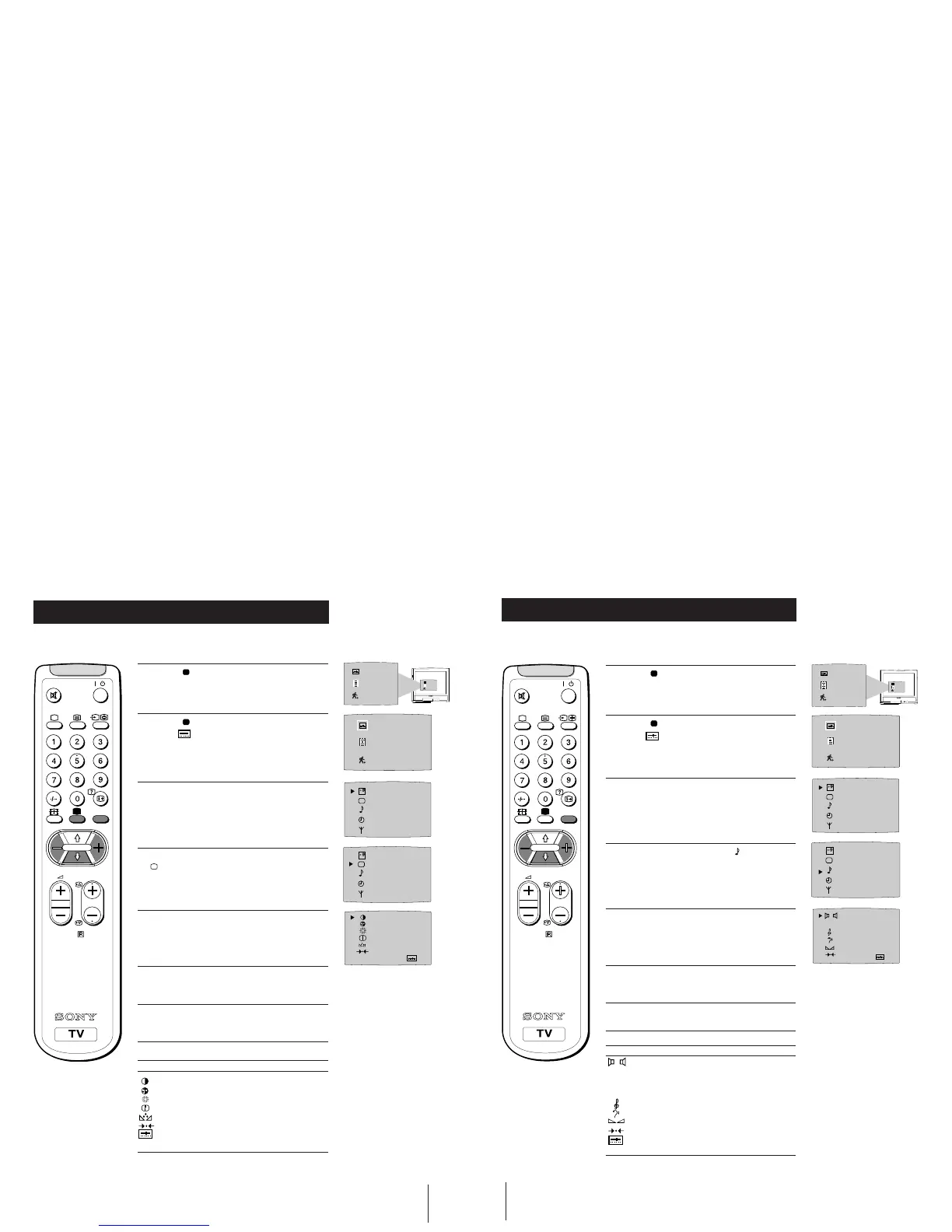
Adjusting the Picture
Although the picture is adjusted at the factory, you can modify it to suit your own
requirement.
1 Press the button on the remote control to
display the three different modes on the TV
screen.
2 Press the button to highlight the personal mode
symbol
as shown.
3 Press the MENU button to display the menu on
the TV screen.
4 Press the blue button on the control to select the
symbol on the TV screen then press the yellow
button.
5 Press the blue button to select the item you wish
to change (see below).
6 Press the red or yellow button to alter the selected
item.
7 Press the MENU
button to remove the menu
display from the TV screen.
Symbol Item
• Contrast
• Colour
• Brightness
• Sharpness
• Hue control (only for NTSC video signals)
• Reset - resets to factory preset picture level
• Represents the mode selected in the “Using
Select Mode” section.
OFF
SELEC
T
RM-883
PROGR
MENU
/
OFF
SELEC
T
IIIIIIIIIIIIIII- - - - - -
IIIIIIIIIIIIIII- - - - - -
IIIIIIIIIIIIIII- - - - - -
IIIIIIIIIIIIIII- - - - - -
IIIIIIIIIIIIIII- - - - - -
10
Adjusting the Sound
Although the sound is adjusted at the factory, you can modify it to suit your own
requirement.
Additional TV Features
Symbol Item
• Mono/Stereo
A:Channel 1 sound or Mono sound/
B:Channel 2 sound (to select your desired
language from a dual sound broadcast)
DSP • On/Off (digital sound processor)
• Treble
• Bass
• Balance
• Reset (resets to factory preset sound level)
• Represents the mode selected in the “Using
Select Mode” section of the manual.
1 Press the button on the remote control to
display the three different modes on the TV
screen.
2 Press the button to highlight the personal mode
symbol
as shown.
3 Press the MENU button to display the menu on
the TV screen.
4 Press the blue button to select the symbol on the
TV screen then press the yellow button.
5 Press the blue button to select the item you wish to
change (see below).
6 Press the red or yellow button to alter the selected
item.
7 Press the MENU
button to remove the menu
display from the TV screen.
OFF
SELEC
T
IIIIIIIIIIIIIIIIIIIIIII - - - - - -
IIIIIIIIIIIIIII
IIIIIIIIIIIIIII- -
IIIIIIIIIIIIIIIII - - - - - - - - -
DSP
ON OFF
MONO STEREO
RM-883
PROGR
MENU
/
OFF
SELEC
T




 To Next Page