9
13
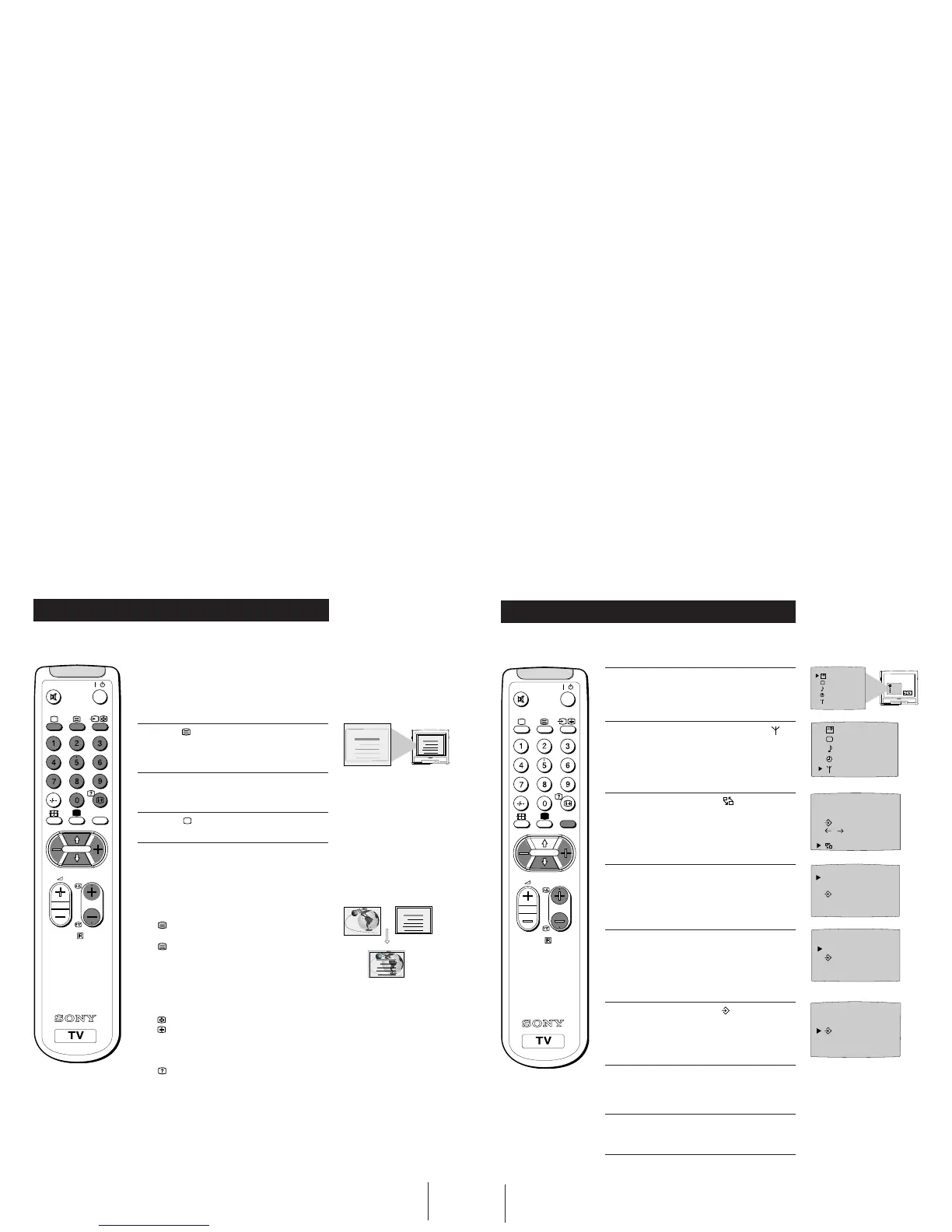
Viewing Teletext
Additional TV Features
RM-883
PROGR
MENU
/
Selecting Teletext
1
Press a number button on the remote control to
select the channel which carries the teletext service
you wish to receive.
2 Press the button on the remote control to switch
on teletext.
3 Input three digits for the page number using the
numbered buttons on the control.
4 Press the button to switch off teletext.
Note: Teletext errors may occur if the broadcasting
signals are weak.
Using Other Teletext Functions
To Superimpose Teletext on to the TV
Press
once in teletext mode or twice in TV mode to
superimpose teletext on to the TV screen.
Press
again to cancel teletext mode.
To Move to Next or Preceding Page
Press PROGR +/-
on the remote control to select the
previous or next page.
To Freeze a Teletext Page
Press
on the control to freeze the page.
Press
again to cancel the freeze.
Revealing concealed information (eg: answers
to a quiz).
Press
to reveal information.
Press again to conceal the information.
Using colour buttons to access pages
(Fastext/TOPtext)
When the colour coded menu appears at the bottom of
a page, press the colour button (green, red, yellow or
blue)
to access the corresponding page.
Index
TELETEXT
Programme
News
Sport
Weather
25
153
101
98
Index
TELETEXT
Programme
News
Sport
Weather
25
153
101
98
Teletext is an information service transmitted by most TV stations.
Index
Programme
News
Sport
Weather
25
153
101
98
TELETEXT
Index
Programme
News
Sport
Weather
25
153
101
98
TELETEXT
14
1 Press the MENU button on the remote control.
2 Press the blue button on the control to select on
the TV screen, then press the yellow button.
3 Press the blue
button to select then press the
yellow button.
4 With the cursor pointing at PROGR on the TV
screen as shown, press PROGR + or - button until
the channel you wish to rearrange appears on
screen, then press the blue
button once.
5 Press the red or yellow
button to select the new
programme number (e.g. PROGR 04) for your
selected channel.
6 Press the blue
button to select then press the
yellow button to exchange the channels.
7 Repeat steps 4 to 6 if you wish to change the order
of the other channels on your TV, then press
MENU to return to normal TV screen.
8 Press the PROGR+/- button to view your selected
channels on their new programme numbers.
Exchanging Programme Positions
After tuning you may wish to change the order in which the channels appear on the
TV. You may wish for example to exchange the channel on programme number 8
with the channel on programme number 4.
Additional TV Features
RM-883
PROGR
MENU
/
OFF
SELEC
T
PROGR - +
04
PROGR - +
01
PROGR - +
04
PROGR 01
CH 05 IIIIIIIIIIIIIII- - - - -
C
OO
C
S
F
on
OK
SELEC
T
OFF
SELEC
T
OFF



 To Next Page