AdjustingPictureand SoundQuality
F
SLEEP POWER
_ _:) (_.
Q®®
®®®
®®®
CH VOL
r'--3 _
_, .,)--o--+(__,)
RM-Yt02
RESET
-1 MENU
-- ENTER
--2,3,4
A/V WINDOW
+1-
EXIT
1
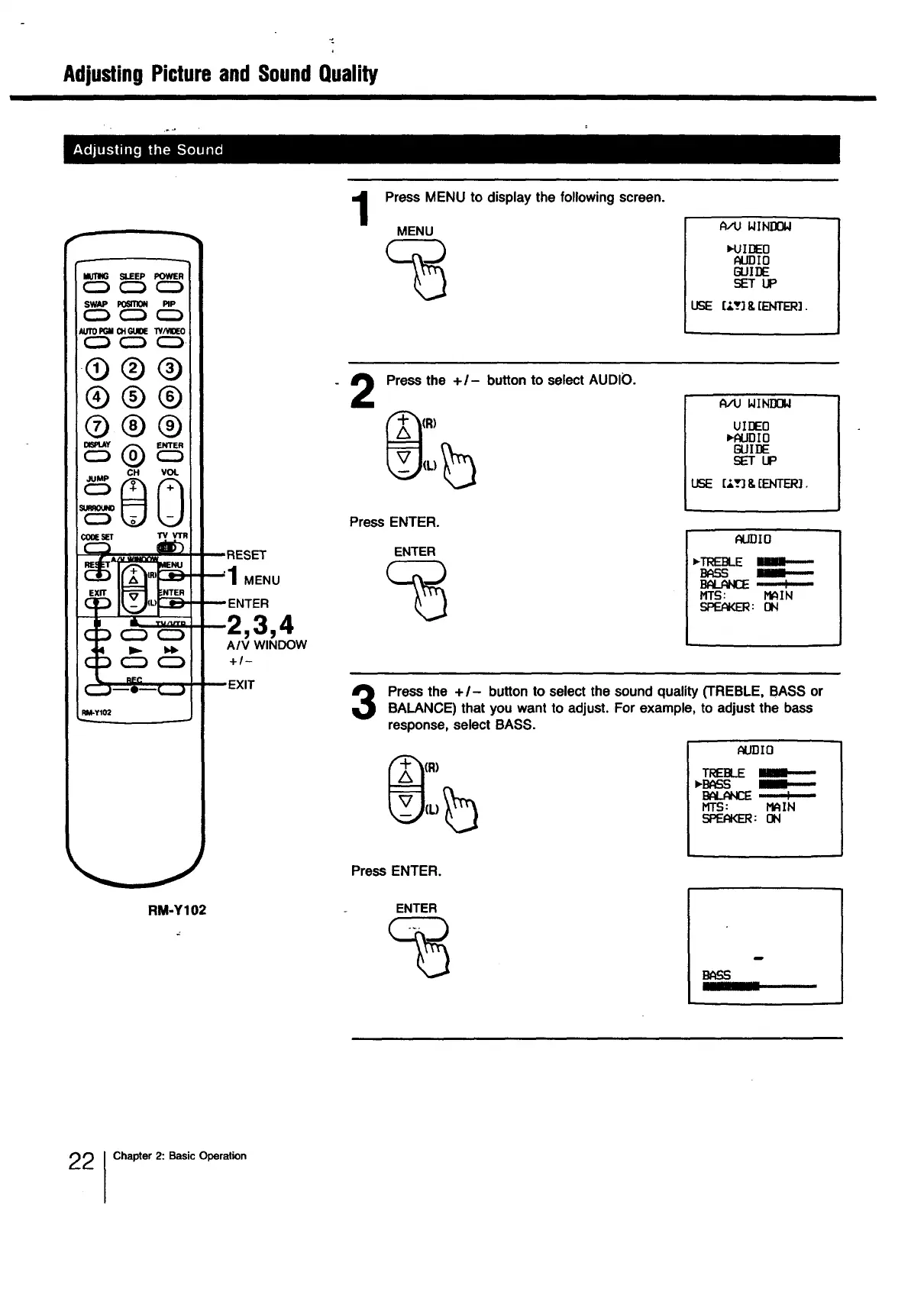
Press MENU to display the following screen.
MENU
WINDOW
_-Ul[]EO
AUDIO
GUII]E
SET UP
USE [_._] 8,[ENTER].
2
Press the +/- button to select AUDIO.
_(R)
(L) b
A/U WINDOW
UIDEO
I,AUDIO
GUIDE
SETUP
USE [-'.'3 8,[ENTER].
Press ENTER.
ENTER
_IDIO
*TRE]_E
BASS Ill.----
BPLP_ : ....
firs: MAIN
_: ON
Press the + I- button to select the sound quality (TREBLE, BASS or
BALANCE) that you want to adjust. For example, to adjust the bass
response, select BASS.
AUDIO
TREBLE IIIII-----
_'B_S
BALANCE :
MTS: MAIN
SPEAKER:ON
RM-Y102
Press ENTER.
ENTER
!
2 Chapter 2: Basic Operation







 To Next Page