ConnectingVideoEquipment
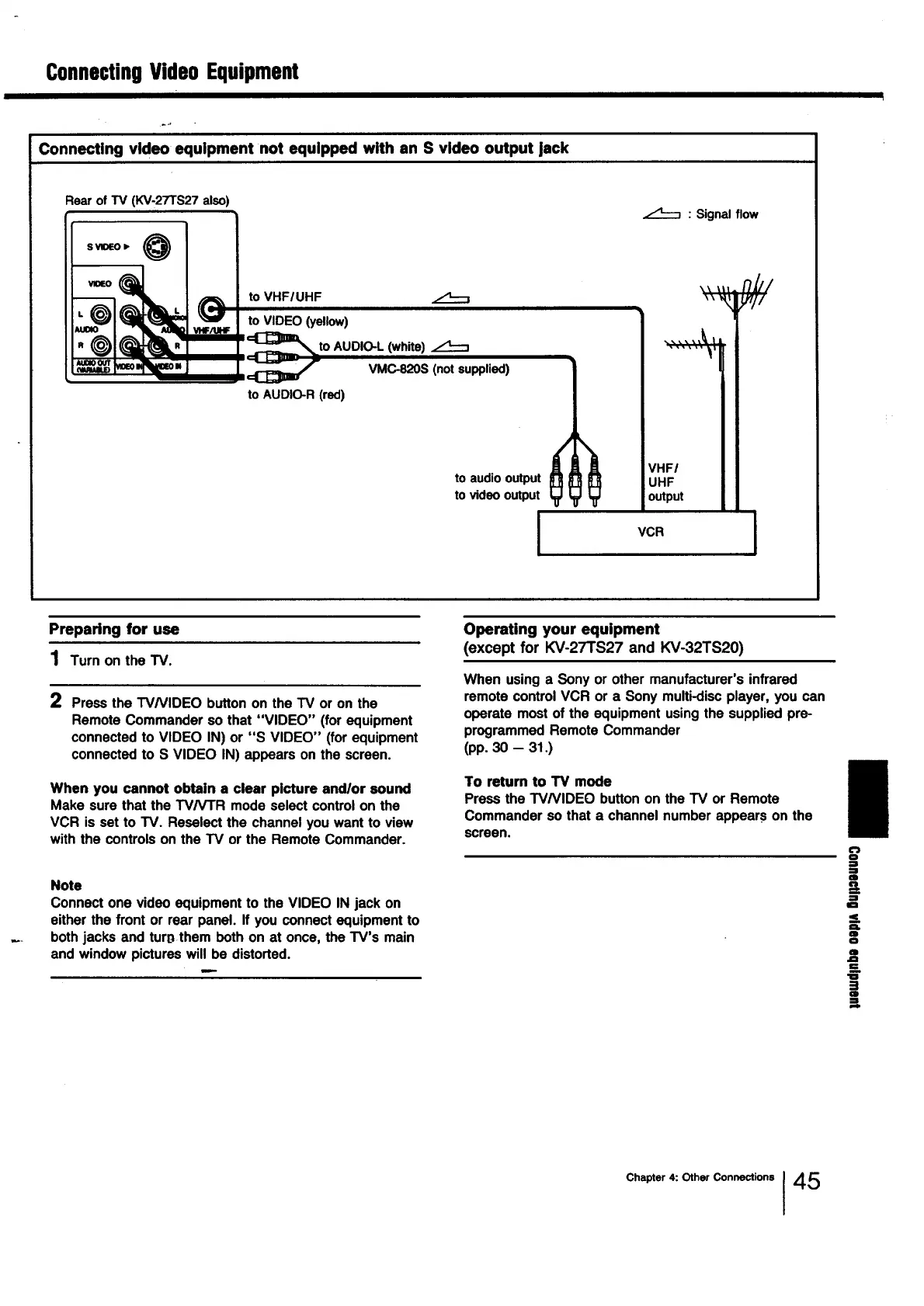
Connecting video equipment not equipped with an S video output jack
Rearof TV (KV-27TS27 also)
S VIOEO )"
VlOEO
to VHFIUHF
to VIDEO (yellow)
to AUDIO-L (white)
VMC-820S (not supplied)
to AUDIO-R (red)
z:_ : Signal flow
to audio output
to video output
VHFI
UHF
output
;
VCR
1
Preparing for use
1 Turn on the TV.
2
Press the W/VIDEO button on the TV or on the
Remote Commander so that "VIDEO" (for equipment
connected to VIDEO IN) or "S VIDEO" (for equipment
connected to S VIDEO IN) appears on the screen.
When you cannot obtain a clear picture andlor sound
Make sure that the TV/VTR mode select control on the
VCR is set to TV. Reseiect the channel you want to view
with the controls on the TV or the Remote Commander.
Note
Connect one video equipment to the VIDEO IN jack on
either the front or rear panel. If you connect equipment to
both jacks and turl_ them both on at once, the TV's main
and window pictures will be distorted.
Operating your equipment
(except for KV-27TS27 and KV-32TS20)
When usinga Sonyor other manufacturer'sinfrared
remotecontrolVCR or a Sony multi-discplayer, you can
operate mostof the equipment usingthe suppliedpre-
programmedRemoteCommander
(pp.30 - 31.)
To return to TV mode
Press the W/VIDEO button on the TV or Remote
Commander so that a channel number appears on the
screen.
0
:l
:1
m
&
:l
Im
<_.
as.
m
o
Q
.Q
"0
E!
ID
Chapter 4: Other Connections I 45




 To Next Page