– 7 –
KV-PG14M40/PG14M72/L/N
KV-PG14P42/G/L/N/PG14P70
RM-952
SECTION 1
GENERAL
The operating instruction mentioned here are partial abstracts
from the Operating Instruction Manual. The page numbers of
the Operating Instruction Manual remain as in the manual.
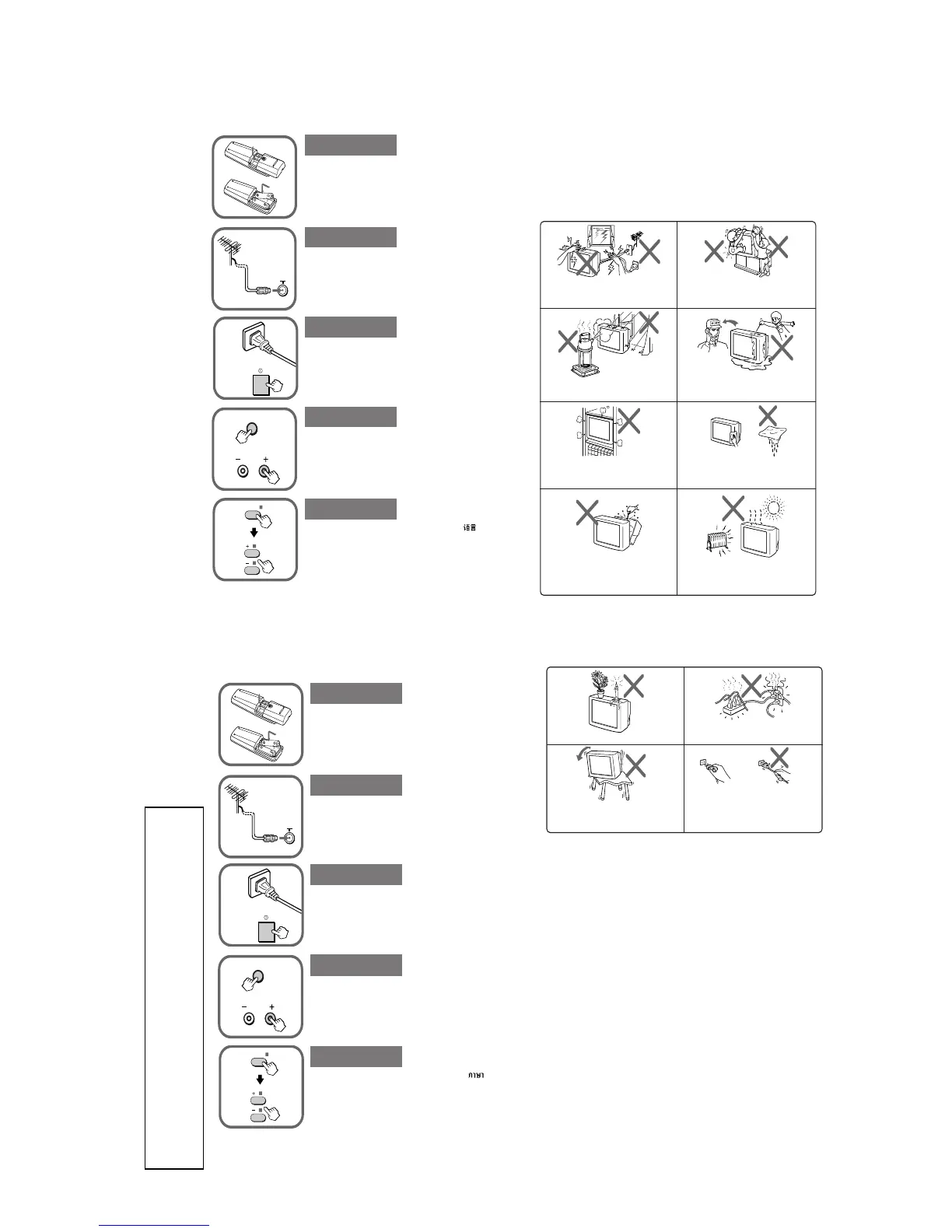
A Getting Started
Connect the antenna cable (not supplied) to 8 at the
rear of the TV.
Tip
• You can also connect your TV to other optional components.
(See E)
Plug in the power cord, then press ! on the TV to
turn it on.
Press SELECT and PROGR + on the TV at the same time
for one to two seconds to preset the channels
automatically. (See J)
Tip
• To stop the automatic channel presetting, press SELECT
twice.
b
PROGR
SELECT
b
SELECT
Press SELECT on the remote until “LANGUAGE/ :
ENGLISH” appears on the screen, then press + or – to
change the on-screen display language.
Insert the batteries (supplied) into the remote.
Note
• Do not use old batteries nor use different types of batteries
together.
Step 1
Step 2
Step 3
Step 4
Step 5
(KV-PG14M40/PG14P70/PG14M72/
PG14M72/N/L)
A Getting Started
Plug in the power cord, then press ! on the TV to
turn it on.
Press SELECT and PROGR + on the TV at the same time
for one to two seconds to preset the channels
automatically. (See J)
Tip
• To stop the automatic channel presetting, press SELECT twice.
Press SELECT on the remote until “LANGUAGE/ :
ENGLISH” appears on the screen, then press + or – to
change the on-sceen display language.
Connect the antenna cable (not supplied) to 8 at the
rear of the TV.
Tip
• You can also connect your TV to other optional components.
(See E)
Step 1
Insert the batteries (supplied) into the remote.
Note
• Do not use old batteries nor use different types of batteries
together.
Step 2
Step 3
Step 4
Step 5
b
b
PROGR
SELECT
SELECT
(KV-PG14P42/PG14P42/G/L/N)
Install the TV on a stable TV stand and floor
which can support the TV set weight. Ensure that
the TV stand surface is flat and its area is larger
than the bottom area of the TV.
Do not place any objects on the TV.
Do not plug in too many appliances to the same
power socket. Do not damage the power cord.
Pull the power cord out by the plug. Do not pull
the power cord itself. Even if your TV is turned
off, it is still connected to the AC power source
(mains) as long as the power cord is plugged in.
Unplug the TV before moving it or if you are not
going to use it for several days.
WARNING (continued)
B WARNING
• Dangerously high voltages are present inside the TV.
• TV operating voltage: 220 – 240 V AC. (KV-PG14M72/PG14P42)
110 – 240 V AC. (KV-PG14M40/PG14P70)
• Do not plug in the power cord until you have completed making all other connections;
otherwise a minimum leakage current might flow through the antenna and other terminals to
ground.
• To avoid battery leakage and damage to the remote, remove the batteries from the remote if
you are not going to use it for several days. If any liquid that leaks from the batteries touches
you, immediately wash it away with water.
To prevent fire or shock hazard, do not expose the
TV to rain or moisture.
Do not operate the TV if any liquid or solid object
falls into it. Have it checked immediately by
qualified personnel only.
Do not open the cabinet and the rear cover of the
TV as high voltages and other hazards are present
inside the TV. Refer servicing and disposal of the
TV to qualified personnel.
Your TV is recommended for home use only.
Do not use the TV in any vehicle or where it may
be subject to excessive dust, heat, moisture or
vibrations.
Do not block the ventilation openings of the TV.
Do not install the TV in a confined space, such as
a bookcase or built-in cabinet.
For children’s safety, do not leave children alone
with the TV. Do not allow children to climb onto
it.
Clean the TV with a dry and soft cloth. Do not
use benzine, thinner, or any other chemicals to
clean the TV. Do not scratch the picture tube.
For your own safety, do not touch any part of the
TV, the power cord and the antenna cable during
lightning storms.





 To Next Page