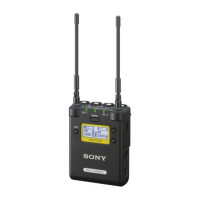
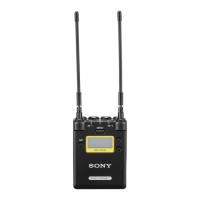
The Sony URX-P03D is a UHF Synthesized Diversity Tuner, a two-channel portable wireless tuner designed for professional audio applications. It is ideal for use with compact camcorders or interchangeable-lens digital cameras in various scenarios such as Electronic News Gathering (ENG), Electronic Field Production (EFP), sports events, and weddings.
Function Description
The URX-P03D employs a Digital Signal Processor (DSP) for high-quality sound transmission through digital compander processing. This allows for clear and reliable audio capture. The unit is versatile, offering compatibility with current Sony analog wireless microphone systems (UWP series, WRT series, WRR series, WRU series) by simply switching the compander mode. This flexibility ensures seamless integration into existing setups.
A key feature is its built-in infrared communication function. When paired with UWP-D series transmitters, the frequency and compander mode settings configured on the tuner can be quickly transmitted to the transmitter. This, combined with the Clear Channel Scan function, significantly reduces the time required for channel setup, streamlining the workflow.
The tuner is equipped with an external microphone input port that supports plug-in power external microphones and Sony BMP-type lavalier microphones, offering flexibility in microphone choice. An internal mixing function allows for individual assignment of audio signals from tuner 1, tuner 2, and the external microphone to OUTPUT 1 (L channel), OUTPUT 2 (R channel), or both, via menu settings. This enables free mixing of audio signals for stereo or monaural output, facilitating fast production.
The URX-P03D utilizes a space diversity reception system to minimize dropouts, providing a true diversity system for enhanced stability during one-channel operation. It also includes two built-in frequency scanning functions: "Clear Channel Scan" to find unused channels and "Active Channel Scan" to identify channels already in use. These functions help users quickly configure stable channels.
Usage Features
The URX-P03D can be powered by two AA batteries (alkaline, nickel metal hydride, or lithium), or via a USB connector from a commercially available USB-output type AC adapter or portable power supply. Power can also be supplied through an auxiliary connector. The unit offers a "PWR SOURCE" function to specify the preferred power supply when multiple sources are available. By default, AA batteries take precedence.
For mounting on cameras, the optional SMAD-P3D shoe mount adapter (not supplied) allows the unit to be attached to cameras equipped with a Multi Interface Shoe (e.g., Sony video camera recorders and interchangeable-lens digital cameras). This adapter also facilitates sending audio signals to the camera without requiring additional cable connections.
The unit's display section provides crucial information, including RF (radio frequency) input levels for tuner 1 and tuner 2, indicating signal strength. A battery level indicator shows the remaining battery charge, with "EXT" displayed when powered by USB and "MI" when powered via an SMAD-P3D adapter.
Setting the receive channel involves navigating the RX1 or RX2 menu, selecting the GP/CH screen, and using the + or – buttons to choose the desired group and channel. The Clear Channel Scan function helps find available channels within a specified group, while the Active Channel Scan identifies channels already in use, particularly useful when operating multiple receivers with a single transmitter.
The compander mode can be adjusted to match the transmitter being used (UWP-D, UWP, or WL800 series). Incorrect compander mode settings can result in no audio output. The infrared communication function (AUTO SET or SYNC) allows for automatic or manual configuration of channel settings and compander mode to the transmitter, simplifying setup.
The monitor audio level for headphones can be adjusted from 1 to 16. The audio output level (OUT LEVEL) can be set in 3 dB increments from -12 dB to +12 dB. The accumulated running time (TIME) of the unit is displayed as a guide to total usage, and can be reset.
The battery type (BATTERY) can be set to TYPE1 (alkaline), TYPE2 (nickel metal hydride), or TYPE3 (lithium) for accurate battery level indication. The display contrast (CONTRAST) is adjustable from 1 to 10. Factory default settings can be restored using the RESET function. The software version (VERSION) can also be displayed.
For the external microphone input, the MIC SELECT function allows selection of the microphone type (OFF, PLUG-IN PWR, MONO BMP +5V). The input level (INPUT LEVEL) is adjustable from -12 dB to +12 dB. A low-cut filter (LCF) can be set to OFF, LOW (100 Hz), MID (150 Hz), or HIGH (200 Hz) to reduce wind noise. The phase of the connected microphone can be switched between NORMAL and INVERT. The ASSIGN function allows selection of the output connector for audio inputs (OUT1, OUT1/2 (L/R), OUT2).
Maintenance Features
For battery care, it is crucial to use sets of the same battery type and charge level. Replacing batteries during operation may cause noise, so it is recommended to turn off the unit before replacement. Manganese batteries are not recommended due to poor performance. Batteries should be inserted with correct polarity. Dry cells are not rechargeable. If the unit will not be used for an extended period, remove the batteries to prevent leakage.
When charging nickel metal hydride batteries, the unit must be turned off and connected to a USB-output type AC adapter or portable power supply. The POWER indicator lights orange during charging and turns off when charging is complete. Alkaline and lithium batteries cannot be recharged via USB.
For cleaning, the surface and connectors of the device should be wiped with a dry, soft cloth. Avoid using thinners, benzene, alcohol, or other chemicals, as they may damage the finish.
To prevent electromagnetic interference, keep the unit away from electrical equipment (motors, transformers, dimmers) and air conditioning equipment. Position the receiver antenna and transmitter to minimize interference from lighting equipment. Avoid using the unit in noisy or vibrating environments. If noise or radio interference occurs, consider stopping transmission or changing the frequency. To prevent interference from portable communication devices, it is recommended to turn them off when near the unit.


 To Next Page
 General