EasyManua.ls Logo

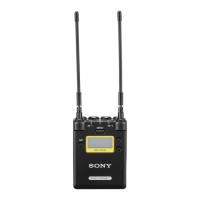
Sony URX-P03D - User Manual

Sony URX-P03D
19 pages
Print Icon
To Next Page IconTo Next Page
Loading...
UHF Synthesized
Diversity Tuner
Operating Instructions
URX-P03D
4-593-095-11 (1)
© 2016 Sony Corporation

Questions and Answers

  • D
    David YoungAug 18, 2025
    How to fix a Sony URX-P03D that does not turn on?
    • T
      Tara GarciaAug 18, 2025
      If your Sony Radio unit does not turn on, there are several possible causes: * The polarity of the batteries might be incorrect. Ensure you insert the batteries with the correct polarity. * The batteries may be low. Try replacing them with new ones. * The battery terminals could be dirty. Clean the terminals with a cotton swab. * Batteries might not be inserted, and the PWR SOURCE is set to BATT ONLY. Insert batteries, or change the PWR SOURCE setting.
  • J
    Juan CamposAug 23, 2025
    What to do if there is no sound coming from my Sony URX-P03D?
    • T
      Tracy GilesAug 23, 2025
      If you are not getting any sound from your Sony Radio, it could be due to mismatched channel or compander mode settings. Ensure that the channel setting on the transmitter matches the channel setting on the receiver. Similarly, make sure the compander mode setting on the transmitter is the same as the compander mode setting on the receiver.
  • J
    Joseph GarciaAug 26, 2025
    What to do if the sound is weak on my Sony URX-P03D Radio?
    • E
      Elizabeth ScottAug 26, 2025
      If the sound from your Sony Radio is weak, the cables and connected device might not be connected correctly. Refer to the operating instructions of the connected device, and ensure that all connections are properly made.
  • B
    bbellAug 30, 2025
    How to fix a Sony Tuner that does not turn on?
    • M
      Mike RobinsonAug 30, 2025
      If your Sony Tuner does not turn on, it might be due to several reasons: * The batteries might be inserted with incorrect polarity. Ensure you insert the batteries with the correct polarity. * The batteries might be low. Replace them with new ones. * The battery terminals might be dirty. Clean the terminals with a cotton swab. * Batteries are not inserted despite PWR SOURCE being set to BATT ONLY. Insert batteries, or change the PWR SOURCE setting.
  • M
    Marie VegaSep 1, 2025
    What to do if my Sony Tuner has no sound?
    • S
      Stephen DillonSep 1, 2025
      If there is no sound from your Sony Tuner, ensure that the channel setting on the transmitter matches the channel setting on the receiver. Also, verify that the compander mode setting on the transmitter is the same as that on the receiver. Using the same settings on both devices should resolve the issue.
  • J
    James PachecoSep 3, 2025
    Why does the RF indicator light up on my Sony URX-P03D Radio receiver when the transmitter is off?
    • J
      Jennifer SteeleSep 3, 2025
      If the RF indicator on your Sony Radio receiver lights up even when the transmitter is off, it is likely due to jamming radio waves being received. To resolve this, set the channel on the receiver to a channel for which the RF indicator does not light, or use the Clear Channel Scan function to switch to a channel without interference. Then, set the transmitter to the same channel as the receiver. If using two or more transmitters, change to a channel group that is not affected.
  • E
    Emily SanfordSep 6, 2025
    Why is the sound distorted on my Sony URX-P03D?
    • K
      kimberlytownsendSep 6, 2025
      If the sound from your Sony Radio is distorted, it may be because the channel setting on the transmitter is different from the channel setting on the receiver. To fix this, use the same channel setting on both the transmitter and the receiver.
  • Y
    youngphillipSep 8, 2025
    How to fix the Sony URX-P03D transmitter channel if it cannot be set with infrared transmission?
    • D
      Destiny WilsonSep 8, 2025
      If the transmitter channel on your Sony Radio cannot be set with infrared transmission, it could be due to a couple of reasons. First, the infrared receptor on the transmitter might be too far from the infrared transmission port on the receiver. Reduce the distance to within about 20 cm (8 in.). Second, there might be interference from other devices or direct sunlight. Place the transmitter and receiver as close as possible to each other.
  • J
    Jennifer HodgeSep 12, 2025
    Why does the RF indicator light up on my Sony Tuner receiver when the transmitter is off?
    • J
      Johnathan LeeSep 12, 2025
      If the RF indicator on your Sony Tuner receiver lights up even when the transmitter is off, it could be due to jamming radio waves being received. To resolve this, set the channel on the receiver to a channel for which the RF indicator does not light, or use the Clear Channel Scan function to switch to a channel without interference. Then, set the transmitter to the same channel as the receiver. If using two or more transmitters, change to a channel group that is not affected.
  • S
    Sandra OchoaSep 12, 2025
    Why is the sound distorted on my Sony Tuner?
    • D
      Denise RomeroSep 13, 2025
      If the sound from your Sony Tuner is distorted, the channel setting on the transmitter might be different from that on the receiver. To fix this, make sure to use the same channel setting on both the transmitter and the receiver.

Summary

Unit Controls and Indicators

Additional Unit Controls and Connectors

Channel Configuration Procedures

Setting the Receive Channel

Procedure for selecting the desired group and channel for reception.

Clear Channel Scan

Scans for unused channels within a selected group to find available frequencies.

Advanced Channel and Compander Settings

Active Channel Scan

Scans for active channels within a group, useful for multi-receiver setups.

Setting the Compander Mode

Configures the compander mode for compatibility with different transmitters.

Infrared Communication for Setup

Infrared Communication Function

Allows sending frequency and compander settings to a transmitter.

Auto Set via Infrared Communication

Automatically sets channels and configures transmitters using infrared.

Sync Setup via Infrared Communication

Manually configures group/channel and settings via infrared sync.

Menu System Overview

Adjusting Monitor Audio Level

Procedure for setting the headphone monitor audio level.

Basic Menu Operations

Adjusting Monitor Audio Level (PHONES)

Adjusts the monitor audio level for headphones within a specified range.

Setting Power Supply Preference

Specifies precedence between batteries and external power sources.

Tuner Menu Functions

Group;Channel, Battery, and Contrast Settings

Covers GP/CH, BATTERY, CONTRAST, and VERSION settings.

Scan, Sync, Compander, and Assign Options

Details CLR SCAN, SYNC, COMPANDER, ACT SCAN, and ASSIGN functions.

Automatic Channel Setting and Reset

Covers AUTO SET for automatic channel configuration and RESET for factory defaults.

External Input Menu and Error Handling

External Microphone Configuration

Settings for MIC SELECT, INPUT LEVEL, LCF, PHASE, and ASSIGN for external mics.

Understanding Error Messages

Explains common error messages like EEP, PLL, and NO TONE, and their solutions.

Troubleshooting Common Issues

Usage, Safety, and Specifications Summary

Sony URX-P03D Specifications

General IconGeneral
Quantity1
Antenna typeRemovable
Display typeLCD
Ethernet LANNo
Mounting typeCamera mount
Product colorBlack
Built-in displayYes
Antennas quantity2
Channels quantity33 channels
Operating frequency typeUltra High Frequency (UHF)
Radio Frequency (RF) range566.025 - 630 MHz
Operating temperature (T-T)0 - 50 °C
Signal-to-Noise Ratio (SNR)96 dB
Microphone frequency response23 - 18000 Hz
Total Harmonic Distortion (THD)0.9 %
Battery typeAA
Input voltage5 V
Power supply typeBattery
Battery life (max)5 h
Weight and Dimensions IconWeight and Dimensions
Depth28.4 mm
Width63 mm
Height82 mm
Weight210 g

Related product manuals