4
Dubbing From a Handycam
®
(Memory
Stick) –Using the Dubbing Mode–
You can dub video recorded in a “Memory Stick Duo” by inserting a “Memory
Stick Duo” into the Memory Stick Duo slot. You can simply dub video without
connecting the Handycam
®
(Memory Stick) to DVDirect.
You may dub video by connecting a Handycam
®
(Memory Stick) to DVDirect
(page 35 of the operating instructions).
When using the Navigation Display function, follow the procedure below.
When the Menu appears in the DVDirect’s display window, follow the
procedure of “To dub video with the “Menu” function” (page 5).
1 Press the 1 (power) button to turn on the DVDirect, and insert a
disc (page 19 of the operating instructions).
The DVDirect starts reading the inserted disc.
Note
Insert a new disc when creating the AVCHD disc.
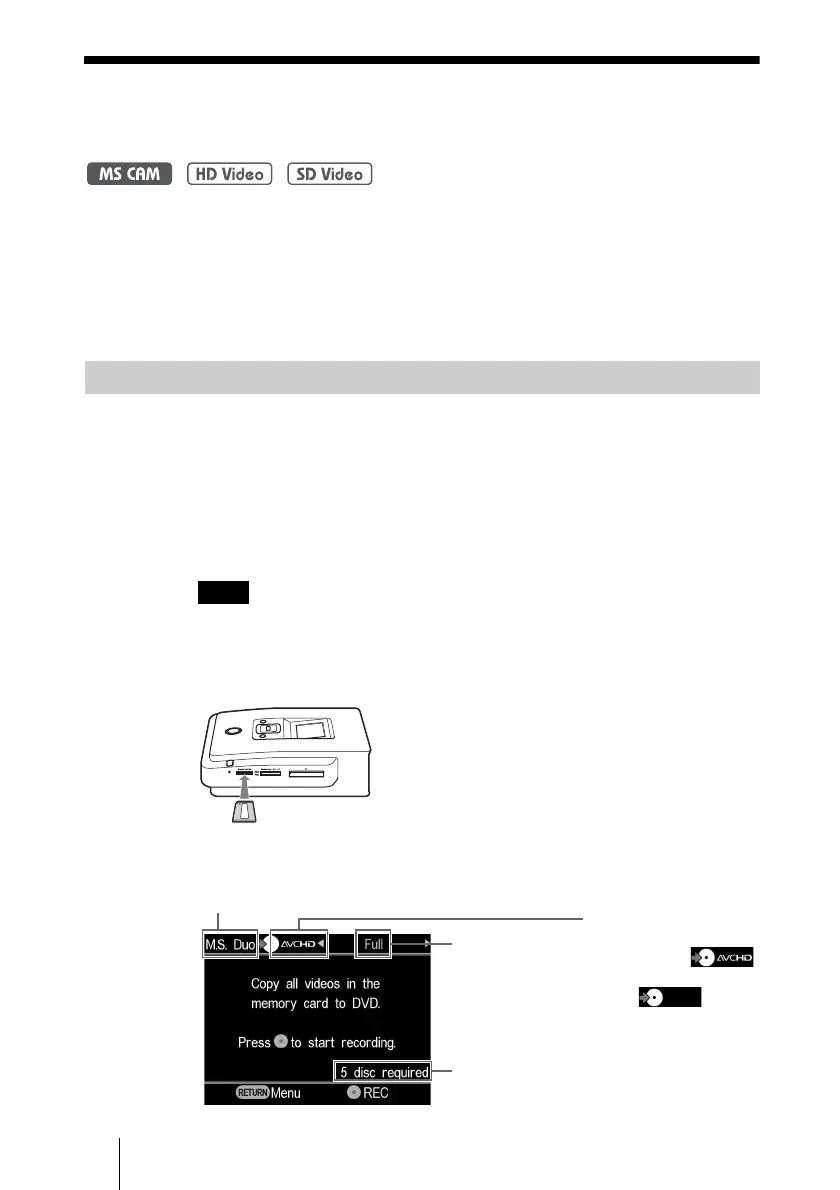
2 Insert a “Memory Stick Duo” into the Memory Stick Duo slot of
the DVDirect.
3 The following appears in the DVDirect’s display window.
Before selecting a dubbing mode…
Type of input
Type of disc created
•
When creating an
AVCHD disc:
• When creating a video
DVD:
Number of required
discs
Dubbing mode



 To Next Page